

There are a couple of guides on how to write Content Enrichment services for SharePoint 2013. One of them is official MSDN article “How to: Use the Content Enrichment web service callout for SharePoint Server“.
This article advice you two configuration steps to adjust max size of document that will be processed by CPES (Content Processing Enrichment Service).
- Modify web.config to accept messages up to 8 MB, and configure readerQuotas to be a sufficiently large value.
<bindings> <basicHttpBinding> <!-- The service will accept a maximum blob of 8 MB. --> <binding maxReceivedMessageSize = "8388608"> <readerQuotas maxDepth="32" maxStringContentLength="2147483647" maxArrayLength="2147483647" maxBytesPerRead="2147483647" maxNameTableCharCount="2147483647" /> <security mode="None" /> </binding> </basicHttpBinding> </bindings> - Modify SPEnterpriseSearchContentEnrichmentConfiguration.
$ssa = Get-SPEnterpriseSearchServiceApplication
$config = New-SPEnterpriseSearchContentEnrichmentConfiguration
$config.Endpoint = http://Site_URL/ContentEnrichmentService.svc
$config.InputProperties = "Author", "Filename"
$config.OutputProperties = "Author"
$config.SendRawData = $True
$config.MaxRawDataSize = 8192
Set-SPEnterpriseSearchContentEnrichmentConfiguration –SearchApplication
$ssa –ContentEnrichmentConfiguration $config
The concept is generally good, but what if you need to process files larger than 8MB? Let’s try to increase this number up to 300Mb for example (I think that ideally this limit should be not less than max file size allowed for your web apps).
Let’s change both values and run full crawl of SharePoint site. After that, if you are lucky, you will see something like that in your “Error Breakdown”:
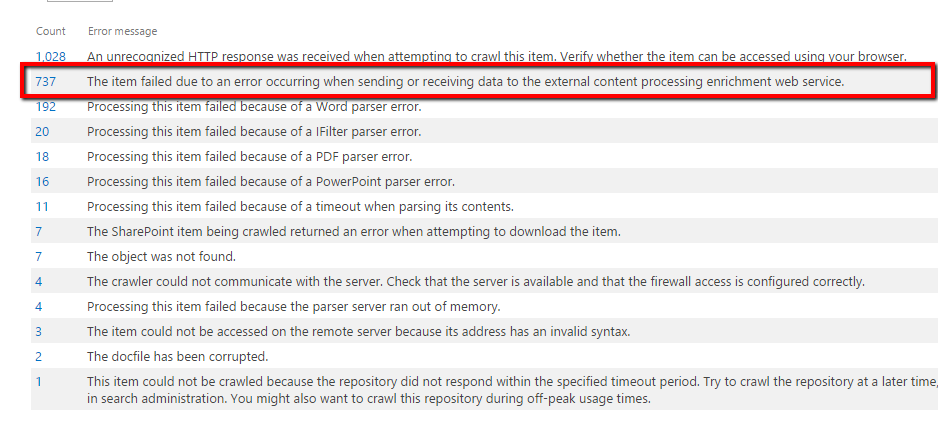
WAT? Something went wrong, but what it was … Let’s investigate ULS logs on the machine with Search Service. After a couple of unforgettable minutes of reading ULS logs, I’ve found the following error message:
[Microsoft.CrawlerFlow-cb9134ec-91c6-4bac-89f9-a0cc9fe1e481] Microsoft.Ceres.Evaluation.Engine.ErrorHandling.HandleExceptionHelper : Evaluation failure detected: Operator : ContentEnrichment Operator type : ContentEnrichmentClient Error id : 3206 Correlation id : 60ef1afd-038a-4f64-8230-2b2493923f80 Partition id : 0c37852b-34d0-418e-91c6-2ac25af4be5b Message : Failed to send the item to the content processing enrichment service. 49691C90-7E17-101A-A91C-08002B2ECDA9:#9: https://mysite.com/MyDoc.pptx id : ssic://780174 System.ServiceModel.EndpointNotFoundException: There was no endpoint listening
at http://MyServer:8081/ContentProcessingEnrichmentService.svc that could accept the message. This is often caused by an incorrect address or SOAP action. See InnerException, if present, for more details. —> System.Net.WebException: The remote server returned an error: (404) Not Found.
at System.Net.HttpWebRequest.GetResponse()
at System.ServiceModel.Channels.HttpChannelFactory`1.HttpRequestChannel.HttpChannelRequest.WaitForReply(TimeSpan timeout) –
…
WAT? “The remote server returned an error: (404) Not Found”. Does the service not exist sometimes? How could it be? Let’s go to IIS log (on the machine where your CPES is installed). Path to the IIS logs should look similar to this c:\inetpub\logs\LogFiles\W3SVC3\.
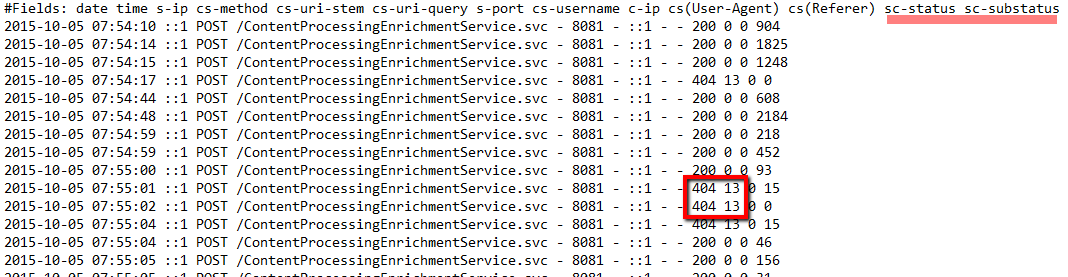
It is true – CPES sometimes returns 404.13 status. Let’s google what this status code means.
404.13 – Content length too large. The request contains a Content-Length header. The value of the Content-Length header is larger than the limit that is allowed for the server.
Seems that IIS is not ready yet to receive our 300Mb files. There is one more parameter in web config that should be tweaked to handle really large files, this parameter is maxAllowedContentLength (default value is 30000000, that is ~30Mb). Let’s change it in web.config:
 <system.webServer>
   <security>
     <requestFiltering>
       <requestLimits maxAllowedContentLength="314572800" />
     </requestFiltering>
   </security>
 </system.webServer>
Recrawl your content once again, and Voila, strange errors gone! Enjoy your content enrichment!)










 Swagger is a simple yet powerful representation of your RESTful API. With the largest ecosystem of API tooling on the planet, thousands of developers are supporting Swagger in almost every modern programming language and deployment environment. With a Swagger-enabled API, you get interactive documentation, client SDK generation and discoverability.