I have found that I have a large set of interesting and maybe sometimes useful applications. I have been programming for 14 years, I started from Pascal and tried Delphi, C++, Java, Perl, Clipper, FoxPro, Lua , JavaScript, C#, Octave, Python, Scala, R, F# (and may be something else that I currently do not remember). Through the years I created set of programs that may be interesting for someone else. These programs may look simple for experts, but I hope that they can be useful for beginners. So, I would like to add a new rubric to my blog, called “Apps”, where I will try to collect and share as much as I can find)
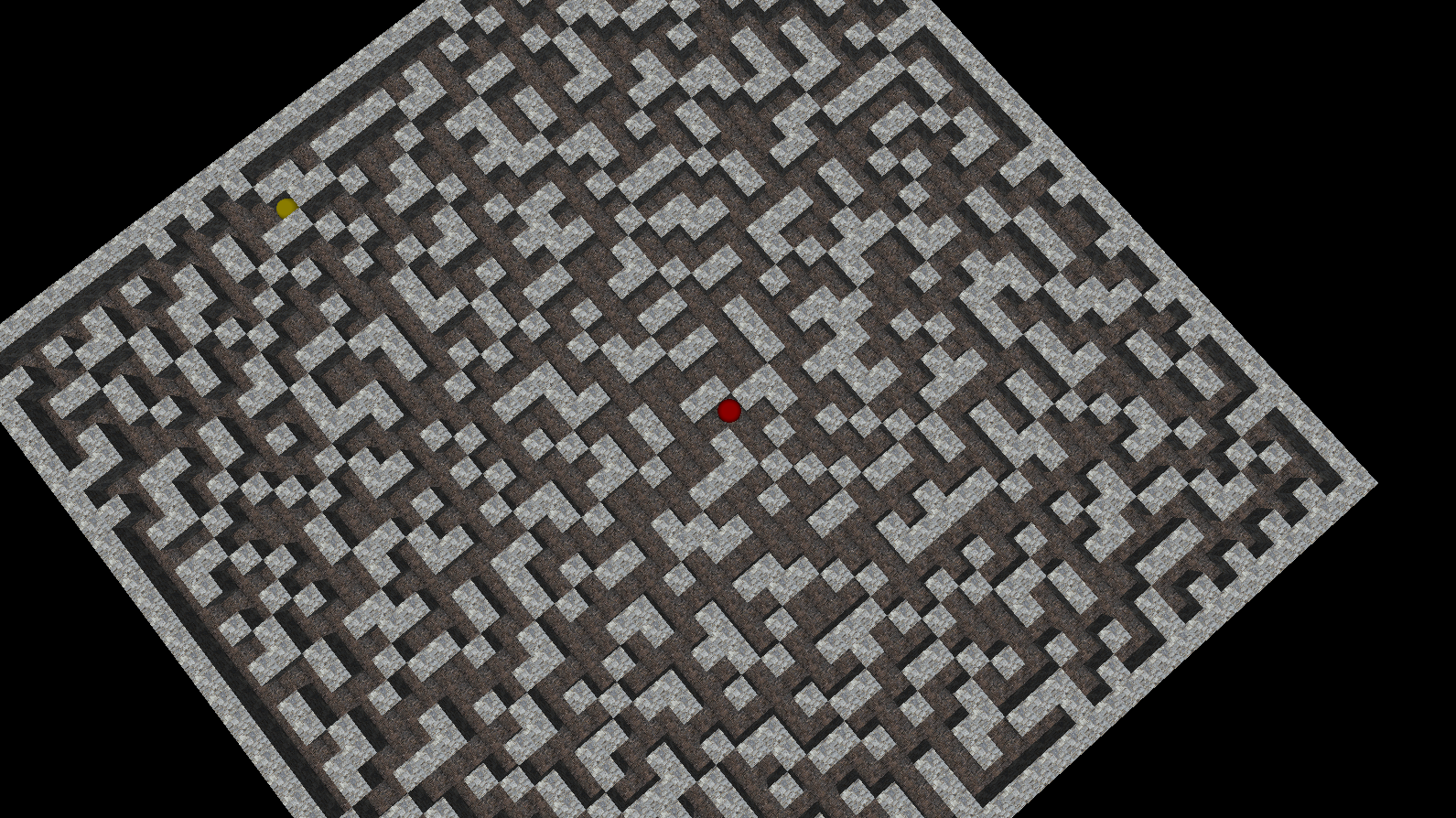
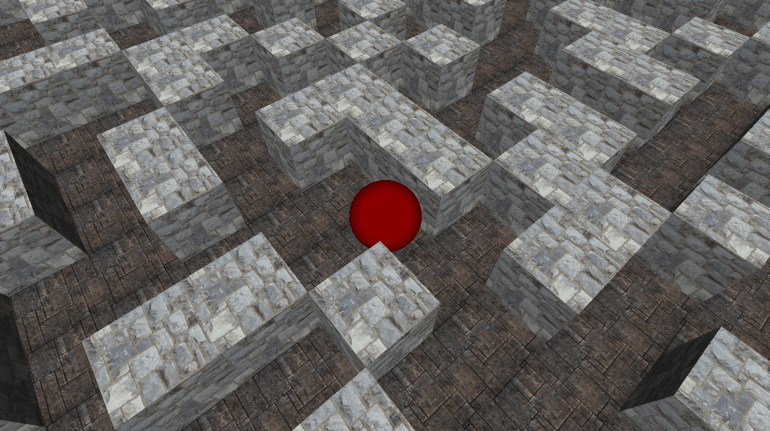
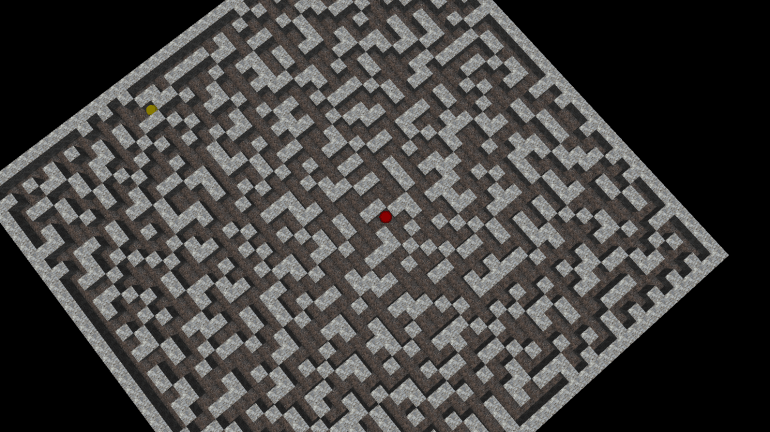
This post is about second version of the small maze game that called SuperSDG2, which was created in 2005 using C++, OpenGL(glut32) and a bit of passion. In the game, you are a lonely red ball in the large terrible maze. Your only wish is to find an exit from the random-generated maze. It is strange, but exit is a yellow ball ;). The source code and binaries of this application are available on GitHub.
Control keys:
- Left/Right/Up/Down – move actions
- A/S – rotate camera
- Z/X – up/down camera
- R – reset camera position
- Esc/Q – exit
Feel free to download binaries, play and modify the source code.
/********************************
* SuperSDG v2.2 release
* Copyright (c) 2002-2008 Ravent
* All rights reserved
*********************************/
#pragma comment (lib,"glut32.lib")
#pragma comment (lib,"glaux.lib")
#include "glaux.h"
#include "glut.h"
#include <stdio.h>
#include <stdlib.h>
#include <conio.h>
#define _USE_MATH_DEFINES
#include <math.h>
#include <time.h>
const int sMax=6, m=40, mm=m+1, direction_parts=36;
int cur_direction=0;
double distance=4.;
unsigned textureId = -1, texFloor = -1;
AUX_RGBImageRec *localTexture = NULL, *localFloor = NULL;
int glWin,pathLen,myLen=0;
struct Tpos
{char x,y;};
struct Player
{
int x,y,z;
int dx,dz;
bool isGo;
}player,ex;
struct Maps
{int x,z;} map;
char data[m+2][m+2], cp[m+2][m+2];
float lightAmb [] = { 0.03, 0.03, 0.03 };
float lightDif [] = { 0.95, 0.95, 0.95 };
float lightPos [] = { (int)m/2, 7, (int)m/2 };
void display(void);
void halt(bool f=false);
void drawFloor(GLfloat x1, GLfloat x2, GLfloat z1, GLfloat z2, unsigned texture=texFloor)
{
glBindTexture ( GL_TEXTURE_2D, texture );
glBegin(GL_POLYGON);
glNormal3f( 0.0, 1.0, 0.0);
glTexCoord2f(0,0);
glVertex3f( x1, 0, z2 );
glTexCoord2f(1,0);
glVertex3f( x2, 0, z2 );
glTexCoord2f(1,1);
glVertex3f( x2, 0, z1 );
glTexCoord2f(0,1);
glVertex3f( x1, 0, z1 );
glEnd();
}
void drawBox (GLint j, GLint i, unsigned texture=textureId)
{
GLfloat x1=i, x2=i+1, y1=0, y2=1, z1=j, z2=j+1;
glBindTexture ( GL_TEXTURE_2D, texture );
if ((j==map.z+1)||(data[j-1][i]!='x'))
{
glBegin(GL_POLYGON); // Back
glNormal3f( 0.0, 0.0, -1.0);
glTexCoord2f(0,0);
glVertex3f( x2, y1, z1 );
glTexCoord2f(1,0);
glVertex3f( x1, y1, z1 );
glTexCoord2f(1,1);
glVertex3f( x1, y2, z1 );
glTexCoord2f(0,1);
glVertex3f( x2, y2, z1 );
glEnd();
}
if ((j==map.z-1)||(data[j+1][i]!='x'))
{
glBegin(GL_POLYGON); // Front
glNormal3f( 0.0, 0.0, 1.0);
glTexCoord2f(0,0);
glVertex3f( x1, y1, z2 );
glTexCoord2f(1,0);
glVertex3f( x2, y1, z2 );
glTexCoord2f(1,1);
glVertex3f( x2, y2, z2 );
glTexCoord2f(0,1);
glVertex3f( x1, y2, z2 );
glEnd();
}
if ((i>0)&&(data[j][i-1]!='x'))
{
glBegin(GL_POLYGON); // Left
glNormal3f( -1.0, 0.0, 0.0);
glTexCoord2f(0,0);
glVertex3f( x1, y1, z1 );
glTexCoord2f(1,0);
glVertex3f( x1, y1, z2 );
glTexCoord2f(1,1);
glVertex3f( x1, y2, z2 );
glTexCoord2f(0,1);
glVertex3f( x1, y2, z1 );
glEnd();
}
if ((i<map.x)&&(data[j][i+1]!='x'))
{
glBegin(GL_POLYGON); // Right
glNormal3f( 1.0, 0.0, 0.0);
glTexCoord2f(0,0);
glVertex3f( x2, y1, z2 );
glTexCoord2f(1,0);
glVertex3f( x2, y1, z1 );
glTexCoord2f(1,1);
glVertex3f( x2, y2, z1 );
glTexCoord2f(0,1);
glVertex3f( x2, y2, z2 );
glEnd();
}
glBegin(GL_POLYGON); // Top
glNormal3f( 0.0, 1.0, 0.0);
glTexCoord2f(0,0);
glVertex3f( x1, y2, z2 );
glTexCoord2f(1,0);
glVertex3f( x2, y2, z2 );
glTexCoord2f(1,1);
glVertex3f( x2, y2, z1 );
glTexCoord2f(0,1);
glVertex3f( x1, y2, z1 );
glEnd();
}
void animate()
{
if ((player.x == ex.x)&&(player.z==ex.z))
{
halt(true);
};
if (player.isGo==true)
{
if (player.dx>0) player.dx+=1; else
if (player.dz>0) player.dz+=1; else
if (player.dx<0) player.dx-=1; else
if (player.dz<0) player.dz-=1;
if ((player.dx>=sMax)||(player.dz>=sMax))
{
player.isGo=false;
if (player.dx>0) player.x+=1;
if (player.dz>0) player.z+=1;
player.dx=0; player.dz=0;
}else
if ((player.dx<=-sMax)||(player.dz<=-sMax))
{
player.isGo=false;
if (player.dx<0) player.x-=1;
if (player.dz<0) player.z-=1;
player.dx=0; player.dz=0;
}
}
glutPostRedisplay();
}
void init()
{
glClearColor( 0.0, 0.0, 0.0, 1.0 );
glEnable( GL_DEPTH_TEST );
glEnable( GL_TEXTURE_2D );
glEnable( GL_CULL_FACE );
glPixelStorei ( GL_PACK_ALIGNMENT, 1 );
glPixelStorei ( GL_UNPACK_ALIGNMENT, 1 );
glShadeModel (GL_SMOOTH);
glLightfv ( GL_LIGHT0, GL_AMBIENT, lightAmb );
glLightfv ( GL_LIGHT0, GL_DIFFUSE, lightDif );
//glLightfv ( GL_LIGHT0, GL_POSITION, lightPos );
glEnable ( GL_LIGHT0 );
glEnable ( GL_LIGHTING );
player.dx=0; player.dz=0; player.isGo=false;
glEnable(GL_COLOR_MATERIAL);
}
void display()
{
glClear( GL_COLOR_BUFFER_BIT | GL_DEPTH_BUFFER_BIT );
glMatrixMode( GL_MODELVIEW );
glLoadIdentity();
gluLookAt(player.x+(1.0*player.dx/sMax)+0.5f+3*cos(M_PI_2+cur_direction/double(direction_parts)*2.*M_PI),player.y+distance,player.z+(1.0*player.dz/sMax)+0.5f+3*sin(M_PI_2+cur_direction/double(direction_parts)*2.*M_PI),
player.x+(1.0*player.dx/sMax)+0.5f,player.y+0.5f,player.z+(1.0*player.dz/sMax)+0.5f,
0,1,0);
for (int i=0;i<map.x;i++)
for (int j=0;j<map.z;j++)
if (data[j][i] == 'x')
{
drawBox(j,i);
} else {
drawFloor(i,i+1,j,j+1);
}
glPushMatrix();
glTranslatef ( player.x+(1.0*player.dx/sMax)+0.5f, player.y+0.5f, player.z+(1.0*player.dz/sMax)+0.5f);
glColor3d(1,0,0);
glutSolidSphere(0.5,100,100);
glColor3d(1,1,1);
glPopMatrix();
glPushMatrix();
glTranslatef ( ex.x +0.5f, ex.y+0.5f, ex.z+0.5f);
glColor4d(1,1,0.,0.4);
glutSolidSphere(0.5,100,100);
glColor3d(1,1,1);
glPopMatrix();
glutSwapBuffers();
}
void reshape ( int w, int h )
{
glViewport( 0, 0, (GLsizei)w, (GLsizei)h);
glMatrixMode( GL_PROJECTION );
glLoadIdentity();
gluPerspective( 60.0, (GLfloat)w/(GLfloat)h, 1.0, 60.0);
glMatrixMode( GL_MODELVIEW );
glLoadIdentity();
gluLookAt(0,0,25,0,0,0,0,1,0);
}
void key( unsigned char key, int x, int y)
{
if ( key=='q' || key=='Q' || key == 27) halt(false);
if ( key=='a' || key=='A' ) { cur_direction--; if (cur_direction<0) cur_direction+=direction_parts;}
if ( key=='s' || key=='S' ) { cur_direction++; if (cur_direction==direction_parts) cur_direction=0;}
if ((key=='z' || key=='Z') && (distance<58.) ) distance+=0.25;
if ((key=='x' || key=='X') && (distance>3.) ) distance-=0.25;
if ( key=='r' || key=='R' ) { cur_direction=0; distance=4.;}
}
const int move[4][2]={{-1,0},{0,-1},{1,0},{0,1}};
const int move_key[4] = {GLUT_KEY_UP, GLUT_KEY_LEFT, GLUT_KEY_DOWN, GLUT_KEY_RIGHT };
bool good_move(int z, int x){
return (0<=z && 0<=x && z<map.z && x<map.x && data[z][x]!='x');
}
void keys( int key, int x, int y)
{
if (player.isGo) return;
int dir=int(((direction_parts-cur_direction-1)/double(direction_parts))*4.+0.5);
for (int i=0; i<4; i++)
if ( key == move_key[i] ) {
int newz=player.z+move[(dir+i)%4][0];
int newx=player.x+move[(dir+i)%4][1];
if (good_move(newz,newx)) {
player.isGo=true;
player.dz+=move[(dir+i)%4][0];
player.dx+=move[(dir+i)%4][1];
myLen++;
}
}
}
void genMap(void);
int main (int argc, char** argv)
{
genMap();
glutInit(&argc,argv);
glutInitDisplayMode( GLUT_DOUBLE | GLUT_RGB | GLUT_DEPTH );
glutInitWindowSize(1024,768);
glWin = glutCreateWindow("SuperSDG 2");
init();
glutDisplayFunc(display);
glutReshapeFunc(reshape);
glutKeyboardFunc(key);
glutSpecialFunc(keys);
glutIdleFunc(animate);
localTexture = auxDIBImageLoad(L"1.bmp");
glGenTextures (1,&textureId);
glBindTexture (GL_TEXTURE_2D,textureId);
glPixelStorei (GL_UNPACK_ALIGNMENT,1);
glTexParameteri (GL_TEXTURE_2D, GL_TEXTURE_WRAP_S,GL_REPEAT);
glTexParameteri (GL_TEXTURE_2D, GL_TEXTURE_WRAP_T,GL_REPEAT);
gluBuild2DMipmaps( GL_TEXTURE_2D, GL_RGB, localTexture->sizeX, localTexture->sizeY, GL_RGB, GL_UNSIGNED_BYTE, localTexture->data);
glTexParameteri (GL_TEXTURE_2D, GL_TEXTURE_MAG_FILTER, GL_LINEAR);
glTexParameteri (GL_TEXTURE_2D, GL_TEXTURE_MIN_FILTER, GL_LINEAR);
localFloor = auxDIBImageLoad(L"2.bmp");
glGenTextures (1,&texFloor);
glBindTexture (GL_TEXTURE_2D,texFloor);
glPixelStorei (GL_UNPACK_ALIGNMENT,1);
glTexParameteri (GL_TEXTURE_2D, GL_TEXTURE_WRAP_S,GL_REPEAT);
glTexParameteri (GL_TEXTURE_2D, GL_TEXTURE_WRAP_T,GL_REPEAT);
gluBuild2DMipmaps( GL_TEXTURE_2D, GL_RGB, localFloor->sizeX, localFloor->sizeY, GL_RGB, GL_UNSIGNED_BYTE, localFloor->data);
glTexParameteri (GL_TEXTURE_2D, GL_TEXTURE_MAG_FILTER, GL_LINEAR);
glTexParameteri (GL_TEXTURE_2D, GL_TEXTURE_MIN_FILTER, GL_LINEAR);
glutFullScreen();
glutMainLoop();
return 0;
}
int step(int y, int x)
{
int res=0;
if ((data[y][x]=='x')) res++;
if ((y<mm)&&(data[y+1][x]=='x')) res++;
if ((y>0 )&&(data[y-1][x]=='x')) res++;
if ((x<mm)&&(data[y][x+1]=='x')) res++;
if ((x>0 )&&(data[y][x-1]=='x')) res++;
return res;
}
int stepC(int y, int x)
{
int res=0;
if ((cp[y][x]=='x')) res++;
if ((y<mm)&&(cp[y+1][x]=='x')) res++;
if ((y>0 )&&(cp[y-1][x]=='x')) res++;
if ((x<mm)&&(cp[y][x+1]=='x')) res++;
if ((x>0 )&&(cp[y][x-1]=='x')) res++;
return res;
}
void DataToCp(void)
{
for(int j=1;j<=mm;j++)
for (int i=1;i<=mm;i++)
cp[j][i]=data[j][i];
}
void fill (int y,int x,Tpos *v, int *l)
{
int st=1,en=0;
int G[mm*mm],Ll[mm*mm];
G[0]=y*mm+x; Ll[0]=0;
cp[y][x]='x';
while (st!=en)
{
if ((G[en]%mm+1<mm)&&(cp[(int)G[en]/mm][G[en]%mm+1]=='.'))
{
G[st]=G[en]+1;
Ll[st]=Ll[en]+1;
cp[(int)G[st]/mm][G[st]%mm]='x';
st++;
}
if ((G[en]%mm-1>0)&&(cp[(int)G[en]/mm][G[en]%mm-1]=='.'))
{
G[st]=G[en]-1;
Ll[st]=Ll[en]+1;
cp[(int)G[st]/mm][G[st]%mm]='x';
st++;
}
if ((((int)G[en]/mm)+1<mm)&&(cp[((int)G[en]/mm)+1][G[en]%mm]=='.'))
{
G[st]=G[en]+mm;
Ll[st]=Ll[en]+1;
cp[(int)G[st]/mm][G[st]%mm]='x';
st++;
}
if ((((int)G[en]/mm)-1>0)&&(cp[((int)G[en]/mm)-1][G[en]%mm]=='.'))
{
G[st]=G[en]-mm;
Ll[st]=Ll[en]+1;
cp[(int)G[st]/mm][G[st]%mm]='x';
st++;
}
en++;
}
int rnd=rand()%5+1;
(*v).x =(int) G[en-rnd] % mm;
(*v).y =(int) G[en-rnd] / mm;
*l=Ll[en-rnd];
}
bool isGood(Tpos a)
{
DataToCp();
int k=0,i,j,lt;
Tpos temp;
cp[a.y][a.x]='x';
if ((step(a.y,a.x)>3)||(step(a.y+1,a.x)>3)||(step(a.y-1,a.x)>3)||(step(a.y,a.x+1)>3)||(step(a.y,a.x-1)>3))
return false;
for(j=1;j<=m;j++)
for(i=1;i<=m;i++)
if (cp[j][i]=='.')
{
if (k>0)
return false;
fill(j,i,&temp,<);
k++;
}
return true;
}
void genMap()
{
int i,j;
map.x=m+2; map.z=m+2;
printf("Loading... Please Wait.\n");
srand( (unsigned)time( NULL ) );
for (j=0;j<map.z;j++)
for (i=0;i<map.x;i++)
{
if ((i==0)||(j==0)||(i==map.x-1)||(j==map.z-1))
data[j][i]='x';
else
data[j][i]='.';
}
int k=0;
Tpos t;
while (k<(int)m*m/2.5)
{
t.x = rand()%mm+1;
t.y = rand()%mm+1;
if ((data[t.y][t.x]=='.')&&(isGood(t)))
{
data[t.y][t.x]='x';
k++;
}
}
for (j=1;j<=m;j++)
for (i=1;i<=m;i++)
if ((data[j][i]=='x')&&(step(j,i)>3))
{
data[j][i]='.';
}
for (j=1;j<=m;j++)
for (i=1;i<=m;i++)
if ((data[j][i]=='.')&&(step(j,i)<2))
{
t.x = i; t.y=j;
if (isGood(t))
data[j][i]='x';
}
Tpos ps[11]; k=0;
while (k<=10)
{
t.x = rand()%mm+1;
t.y = rand()%mm+1;
if (data[t.y][t.x]=='.')
{
ps[k]=t;
k++;
}
}
k=rand()%11;
player.x=ps[k].x;
player.z=ps[k].y;
DataToCp();
fill(ps[k].y,ps[k].x,&t,&pathLen);
ex.x=t.x;
ex.z=t.y;
printf("Loading complete.\n");
}
void halt(bool f)
{
glutDestroyWindow(glWin);
printf("-----------------------------------------------------\n");
printf("# SuperSDG 2.2 #\n");
if (f==true)
{
printf("-----------------------------------------------------\n");
printf("# The shortest path %d. #\n",pathLen);
printf("# Your path %d. #\n",myLen);
printf("# Congratulate you passed the game. #\n");
if ( 1.2*pathLen >= myLen )
{
printf("-----------------------------------------------------\n");
printf("# YOU ONE OF THE BEST PLAYER OF THE WORLD. #\n");
}
}
printf("-----------------------------------------------------\n");
printf("# Developers: #\n");
printf("# Ravent - programmer. #\n");
printf("# Series found: #\n");
printf("# Ravent - Sergey Tihon #\n");
printf("# MasterZerg - Dima Rudol #\n");
printf("-----------------------------------------------------\n");
printf("# Copyright (c) Ravent 2002-2008. #\n");
printf("# All rights reserved #\n");
printf("-----------------------------------------------------\n");
getch();
exit(0);
}







 – “What can C# do that F# cannot?”