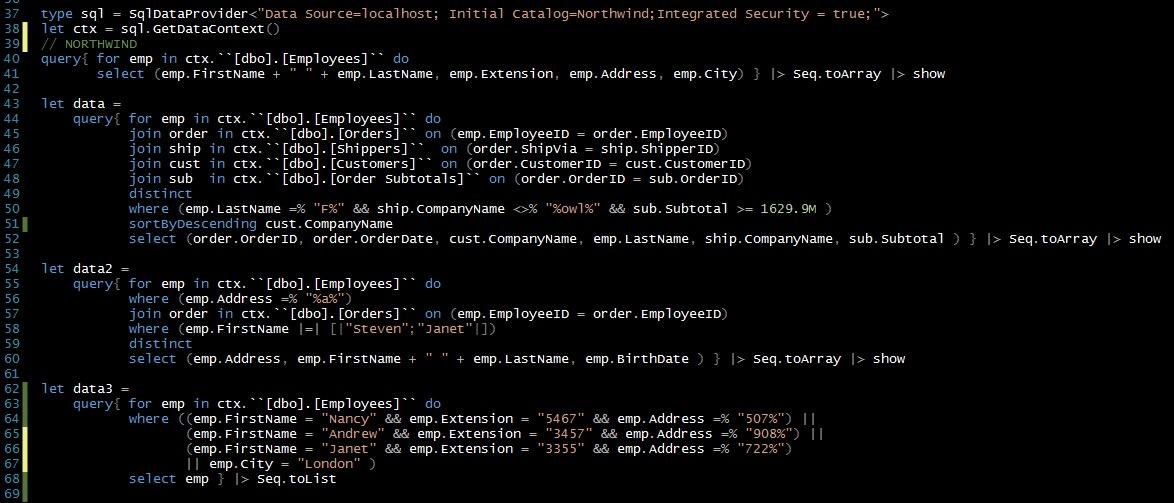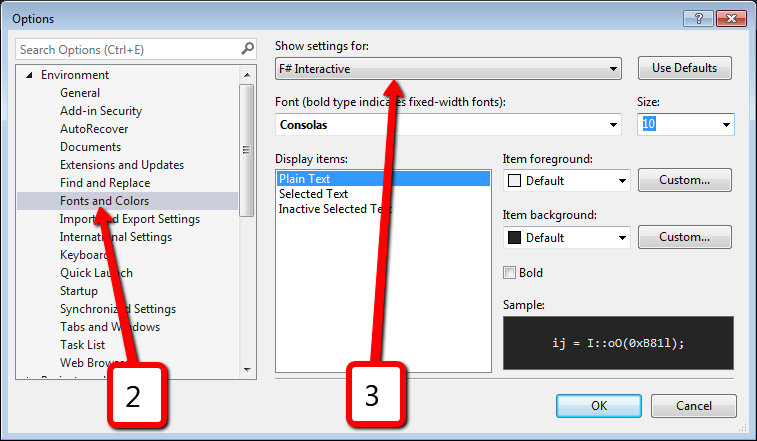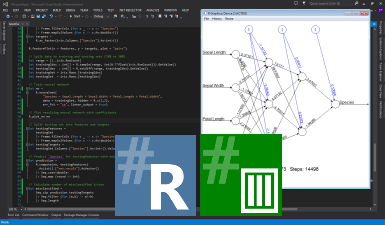
FSI console has a pretty small font size by default. It is really uncomfortable to share screen with projector. Source code in FSI is always small and hard to read. Never thought (until today) that I can configure font, color, font size and etc. In fact, it is very easy to do:
Author: Sergey Tihon 🦔🦀🦋
F# Weekly #44, 2013
![]() |
![]() |
Welcome to F# Weekly,
A roundup of F# content from this past week:
News
- FunScript v1.1b is out: 280+ #TypeScript 0.9 bindings on NuGet, better performance, reflection API and project template.
- Build.Tools project was announced.
- FShake – F# build tool from IntelliFactory.
- Taha Hachana shared “Navigation Within the Browser History“.
- New T-shirt in F# Fashion Collection by Robert Pickering.
- Octokit is now using FAKE for its build script.
Video/Presentations
- “FunScript” by Zach Bray.
- “Pacific Northwest Scala 2013 We’re Doing It All Wrong” by Paul Phillips
- MBrace: Cloud Computing with Monads
- A Study and Toolkit for Asynchronous Programming in C#
Blogs
- Martin Trojer shared “This year in F#“
- Michael Newton posted “To Infinity and Beyond“.
- Tomas Petricek blogged “Building great open-source libraries“.
- Scott Wlaschin wrote about “Working with non-monoids“.
- Mikael Helldén posted “ReSharper and F# project references“.
- Gustavo Guerra wrote “F# for Screen Scraping“.
- Michał Łusiak published “Progressive F# Tutorials in London“.
- ContingenciesOnline posted “A Sharp New Analytical Tool“.
- Natallie Baikevich blogged “Trying out Deedle with Bones and Regression“.
- Neil Danson wrote about “Desktop class performance on a mobile phone?“.
- Anthony Brown posted “Unable to copy file when compiling an F# project“.
- Annmarie Geddes Baribeau wrote “Discovering the Power of F#“.
That’s all for now. Have a great week.
Previous F# Weekly edition – #43
Anniversary edition of F# Weekly #43, 2013 – One year together
Deer all,
A great thing happened this time one year ago – F# Weekly was born. It seems quite recently and at the same time was long ago. Many great things happened during this time, a lot of news were spread. I would like to invite you to feel the breath of nostalgia and look at first published weekly “F# Weekly #43, 2012“.
Thank you to all of you, for being with me all this time. F# Community is an excellent one, I am glad to be a part of it. You are awesome and it’s all thanks to you. Let’s make a small journey to the past and recall some news that occurred during this time.
Small F# time journey
- Visaul Studio 2013 was released with F# 3.1.
- Lots of new Type Providers were born.
- F# Community Affiliated Technical Groups come in sight.
- F# Community Projects were identified and some of them actually born during this year.
- F# Community was managed to collect great F# Testimonials.
- New F# User Groups appeared on the map.
- Excellent Expert F# 3.0 was published.
- F# became No. 26 on the latest TIOBE Index.
- Data Science is growing in F# (Fsharp.Data, RProvider, Deedle. Fsharp.Charting, VegaHub, Python Type Provider, Matlab Type Provider)
- F# fashion collection was arranged.
- fsharpforfunandprofit.com enriched with new gorgeous post series.
- Tsunami IDE, {m}-brace and tryfsharp.org v3.0 saw the light.
- Xamarin announced F# support.
- New thoughts and facts were established into “Why F#?“.
Of course, there happened much more than mentioned in the list. It is impossible to get all things in one small post. F# community is growing as well as a number of ongoing activities. It takes more and more time for me each week to get all news and summarize them; F# Weekly posts become longer. We grow and will change the world for the better soon – be in touch with F# Weekly ;).
Finally, F# Weekly #43, a roundup of F# content from this past week:
News
- Deedle: Exploratory data library for .NET is coming soon.
- Nee F# book was announced –“Understanding Functional Programming” by Scott Wlaschin.
- New site with docs for R Type Provider was published
- “Functional Programming using F#” by M.R.Hansen & H.Rischel (sources and slides)
- FsControl was released some days ago.
- F# static site generation is gains momentum.
- {m}brace version 0.4.4 has been released! Sign up for alpha testing.
- Go deeper in {m}-brace with Technical Overview.
- Using navigation bar and regions for F# works in VS2013.
- F# Visual Studio project template was published to VS gallery.
- New version of SqlCommand Type Provider was shipped.
- New version of PowerShell Type Provider was published.
- Foq 1.3 (mocking library for F#) was released.
- Steffen Forkmann is having an expedition to improve FAKE API docs. We have a unique opportunity – to spy on his daily diary (Day1, Day2, Day3, Day4, Day5, Day6, Day7, Day8, Day9, Day10, Day11, Day12, …)
Video/Presentations
- “F# for the Web with Type providers and FunScript” by Tomas Petricek
- “Community-Driven F#” by Rachel Reese.
Blogs
- Neil Danson posted “A Platform game in F# and SpriteKit – Part 7 – DSLs baby!“.
- Anthony Brown wrote about “F# interactive for level design“.
- Daniel Mohl shared “Progressive F# Tutorials 2013 in London“.
- Mauricio Scheffer blogged “Towards a NuGet dependency monitor with OData and F#“.
- Danny Warren wrote “C# to F#: I’m a Convert“.
- Onorio Catenacci posted “Slick Use Case For Active Patterns“.
- Scott Wlaschin started new “Understanding monoids” series:
- Don Syme blogged “Code Outlining for Visual F# in VS2010, VS2012 and VS2013“.
- Sergey Tihon posted “Stanford CoreNLP is available on NuGet for F#/C# devs“.
- Richard Dalton wrote about “F# and Databases“.
That’s all for now. Have a great week.
Previous F# Weekly edition – #42
Stanford CoreNLP is available on NuGet for F#/C# devs
Update (2014, January 3): Links and/or samples in this post might be outdated. The latest version of samples are available on new Stanford.NLP.NET site.
Stanford CoreNLP provides a set of natural language analysis tools which can take raw English language text input and give the base forms of words, their parts of speech, whether they are names of companies, people, etc., normalize dates, times, and numeric quantities, and mark up the structure of sentences in terms of phrases and word dependencies, and indicate which noun phrases refer to the same entities. Stanford CoreNLP is an integrated framework, which make it very easy to apply a bunch of language analysis tools to a piece of text. Starting from plain text, you can run all the tools on it with just two lines of code. Its analyses provide the foundational building blocks for higher-level and domain-specific text understanding applications.
Stanford CoreNLP integrates all Stanford NLP tools, including the part-of-speech (POS) tagger, the named entity recognizer (NER), the parser, and the coreference resolution system, and provides model files for analysis of English. The goal of this project is to enable people to quickly and painlessly get complete linguistic annotations of natural language texts. It is designed to be highly flexible and extensible. With a single option you can change which tools should be enabled and which should be disabled.
Stanford CoreNLP is here and available on NuGet. It is probably the most powerful package from whole The Stanford NLP Group software packages. Please, read usage overview on Stanford CoreNLP home page to understand what it can do, how you can configure an annotation pipeline, what steps are available for you, what models you need to have and so on.
I want to say thank you to Anonymous 😉 and @OneFrameLink for their contribution and stimulating me to finish this work.
Please follow next steps to get started:
- Install-Package Stanford.NLP.CoreNLP
- Download models from The Stanford NLP Group site.
- Extract models from stanford-corenlp-3.2.0-models.jar and remember new folder location. (Unzip archive)
- You are ready to start.
Before using Stanford CoreNLP, we need to define and specify annotation pipeline. For example, annotators = tokenize, ssplit, pos, lemma, ner, parse, dcoref.
The next thing we need to do is to create StanfordCoreNLP pipeline. But to instantiate a pipeline, we need to specify all required properties or at least paths to all models used by pipeline that are specified in annotators string. Before starting samples, let’s define some helper function that will be used across all source code pieces: jarRoot is a path to folder where we extracted files from stanford-corenlp-3.2.0-models.jar; modelsRoot is a path to folder with all models files; ‘!’ is overloaded operator that converts model name to relative path to the model file.
let (@@) a b = System.IO.Path.Combine(a,b) let jarRoot = __SOURCE_DIRECTORY__ @@ @"..\..\temp\stanford-corenlp-full-2013-06-20\stanford-corenlp-3.2.0-models\" let modelsRoot = jarRoot @@ @"edu\stanford\nlp\models\" let (!) path = modelsRoot @@ path
Now we are ready to instantiate the pipeline, but we need to do a small trick. Pipeline is configured to use default model files (for simplicity) and all paths are specified relatively to the root of stanford-corenlp-3.2.0-models.jar. To make things easier, we can temporary change current directory to the jarRoot, instantiate a pipeline and then change current directory back. This trick helps us dramatically decrease the number of code lines.
let props = Properties()
props.setProperty("annotators","tokenize, ssplit, pos, lemma, ner, parse, dcoref") |> ignore
props.setProperty("sutime.binders","0") |> ignore
let curDir = System.Environment.CurrentDirectory
System.IO.Directory.SetCurrentDirectory(jarRoot)
let pipeline = StanfordCoreNLP(props)
System.IO.Directory.SetCurrentDirectory(curDir)
However, you do not have to do it. You can configure all models manually. The number of properties (especially paths to models) that you need to specify depends on the annotators value. Let’s assume for a moment that we are in Java world and we want to configure our pipeline in a custom way. Especially for this case, stanford-corenlp-3.2.0-models.jar contains StanfordCoreNLP.properties (you can find it in the folder with extracted files), where you can specify new property values out of code. Most of properties that we need to use for configuration are already mentioned in this file and you can easily understand what it what. But it is not enough to get it work, also you need to look into source code of Stanford CoreNLP. By the way, some days ago Stanford was moved CoreNLP source code into GitHub – now it is much easier to browse it. Default paths to the models are specified in DefaultPaths.java file, property keys are listed in Constants.java file and information about which path match to which property name is contained in Dictionaries.java. Thus, you are able to dive deeper into pipeline configuration and do whatever you want. For lazy people I already have a working sample.
let props = Properties()
let (<==) key value = props.setProperty(key, value) |> ignore
"annotators" <== "tokenize, ssplit, pos, lemma, ner, parse, dcoref"
"pos.model" <== ! @"pos-tagger\english-bidirectional\english-bidirectional-distsim.tagger"
"ner.model" <== ! @"ner\english.all.3class.distsim.crf.ser.gz"
"parse.model" <== ! @"lexparser\englishPCFG.ser.gz"
"dcoref.demonym" <== ! @"dcoref\demonyms.txt"
"dcoref.states" <== ! @"dcoref\state-abbreviations.txt"
"dcoref.animate" <== ! @"dcoref\animate.unigrams.txt"
"dcoref.inanimate" <== ! @"dcoref\inanimate.unigrams.txt"
"dcoref.male" <== ! @"dcoref\male.unigrams.txt"
"dcoref.neutral" <== ! @"dcoref\neutral.unigrams.txt"
"dcoref.female" <== ! @"dcoref\female.unigrams.txt"
"dcoref.plural" <== ! @"dcoref\plural.unigrams.txt"
"dcoref.singular" <== ! @"dcoref\singular.unigrams.txt"
"dcoref.countries" <== ! @"dcoref\countries"
"dcoref.extra.gender" <== ! @"dcoref\namegender.combine.txt"
"dcoref.states.provinces" <== ! @"dcoref\statesandprovinces"
"dcoref.singleton.predictor"<== ! @"dcoref\singleton.predictor.ser"
let sutimeRules =
[| ! @"sutime\defs.sutime.txt";
! @"sutime\english.holidays.sutime.txt";
! @"sutime\english.sutime.txt" |]
|> String.concat ","
"sutime.rules" <== sutimeRules
"sutime.binders" <== "0"
let pipeline = StanfordCoreNLP(props)
As you see, this option is much longer and harder to do. I recommend to use the first one, especially if you do not need to change the default configuration.
And now the fun part. Everything else is pretty easy: we create an annotation from your text, path it through the pipeline and interpret the results.
let text = "Kosgi Santosh sent an email to Stanford University. He didn't get a reply."; let annotation = Annotation(text) pipeline.annotate(annotation) use stream = new ByteArrayOutputStream() pipeline.prettyPrint(annotation, new PrintWriter(stream)) printfn "%O" (stream.toString())
Certainly, you can extract all processing results from annotated test.
let customAnnotationPrint (annotation:Annotation) =
printfn "-------------"
printfn "Custom print:"
printfn "-------------"
let sentences = annotation.get(CoreAnnotations.SentencesAnnotation().getClass()) :?> java.util.ArrayList
for sentence in sentences |> Seq.cast<CoreMap> do
printfn "\n\nSentence : '%O'" sentence
let tokens = sentence.get(CoreAnnotations.TokensAnnotation().getClass()) :?> java.util.ArrayList
for token in (tokens |> Seq.cast<CoreLabel>) do
let word = token.get(CoreAnnotations.TextAnnotation().getClass())
let pos = token.get(CoreAnnotations.PartOfSpeechAnnotation().getClass())
let ner = token.get(CoreAnnotations.NamedEntityTagAnnotation().getClass())
printfn "%O \t[pos=%O; ner=%O]" word pos ner
printfn "\nTree:"
let tree = sentence.get(TreeCoreAnnotations.TreeAnnotation().getClass()) :?> Tree
use stream = new ByteArrayOutputStream()
tree.pennPrint(new PrintWriter(stream))
printfn "The first sentence parsed is:\n %O" (stream.toString())
printfn "\nDependencies:"
let deps = sentence.get(SemanticGraphCoreAnnotations.CollapsedDependenciesAnnotation().getClass()) :?> SemanticGraph
for edge in deps.edgeListSorted().toArray() |> Seq.cast<SemanticGraphEdge> do
let gov = edge.getGovernor()
let dep = edge.getDependent()
printfn "%O(%s-%d,%s-%d)"
(edge.getRelation())
(gov.word()) (gov.index())
(dep.word()) (dep.index())
The full code sample is available on GutHub, if you run it, you will see the following result:
Sentence #1 (9 tokens):
Kosgi Santosh sent an email to Stanford University.
[Text=Kosgi CharacterOffsetBegin=0 CharacterOffsetEnd=5 PartOfSpeech=NNP Lemma=Kosgi NamedEntityTag=PERSON] [Text=Santosh CharacterOffsetBegin=6 CharacterOffsetEnd=13 PartOfSpeech=NNP Lemma=Santosh NamedEntityTag=PERSON] [Text=sent CharacterOffsetBegin=14 CharacterOffsetEnd=18 PartOfSpeech=VBD Lemma=send NamedEntityTag=O] [Text=an CharacterOffsetBegin=19 CharacterOffsetEnd=21 PartOfSpeech=DT Lemma=a NamedEntityTag=O] [Text=email CharacterOffsetBegin=22 CharacterOffsetEnd=27 PartOfSpeech=NN Lemma=email NamedEntityTag=O] [Text=to CharacterOffsetBegin=28 CharacterOffsetEnd=30 PartOfSpeech=TO Lemma=to NamedEntityTag=O] [Text=Stanford CharacterOffsetBegin=31 CharacterOffsetEnd=39 PartOfSpeech=NNP Lemma=Stanford NamedEntityTag=ORGANIZATION] [Text=University CharacterOffsetBegin=40 CharacterOffsetEnd=50 PartOfSpeech=NNP Lemma=University NamedEntityTag=ORGANIZATION] [Text=. CharacterOffsetBegin=50 CharacterOffsetEnd=51 PartOfSpeech=. Lemma=. NamedEntityTag=O]
(ROOT
(S
(NP (NNP Kosgi) (NNP Santosh))
(VP (VBD sent)
(NP (DT an) (NN email))
(PP (TO to)
(NP (NNP Stanford) (NNP University))))
(. .)))nn(Santosh-2, Kosgi-1)
nsubj(sent-3, Santosh-2)
root(ROOT-0, sent-3)
det(email-5, an-4)
dobj(sent-3, email-5)
nn(University-8, Stanford-7)
prep_to(sent-3, University-8)Sentence #2 (7 tokens):
He didn’t get a reply.
[Text=He CharacterOffsetBegin=52 CharacterOffsetEnd=54 PartOfSpeech=PRP Lemma=he NamedEntityTag=O] [Text=did CharacterOffsetBegin=55 CharacterOffsetEnd=58 PartOfSpeech=VBD Lemma=do NamedEntityTag=O] [Text=n’t CharacterOffsetBegin=58 CharacterOffsetEnd=61 PartOfSpeech=RB Lemma=not NamedEntityTag=O] [Text=get CharacterOffsetBegin=62 CharacterOffsetEnd=65 PartOfSpeech=VB Lemma=get NamedEntityTag=O] [Text=a CharacterOffsetBegin=66 CharacterOffsetEnd=67 PartOfSpeech=DT Lemma=a NamedEntityTag=O] [Text=reply CharacterOffsetBegin=68 CharacterOffsetEnd=73 PartOfSpeech=NN Lemma=reply NamedEntityTag=O] [Text=. CharacterOffsetBegin=73 CharacterOffsetEnd=74 PartOfSpeech=. Lemma=. NamedEntityTag=O]
(ROOT
(S
(NP (PRP He))
(VP (VBD did) (RB n’t)
(VP (VB get)
(NP (DT a) (NN reply))))
(. .)))nsubj(get-4, He-1)
aux(get-4, did-2)
neg(get-4, n’t-3)
root(ROOT-0, get-4)
det(reply-6, a-5)
dobj(get-4, reply-6)Coreference set:
(2,1,[1,2)) -> (1,2,[1,3)), that is: “He” -> “Kosgi Santosh”
C# Sample
C# samples are also available on GitHub.
Stanford Temporal Tagger(SUTime)

SUTime is a library for recognizing and normalizing time expressions. SUTime is available as part of the Stanford CoreNLP pipeline and can be used to annotate documents with temporal information. It is a deterministic rule-based system designed for extensibility.
There is one more useful thing that we can do with CoreNLP – time extraction. The way that we use CoreNLP is pretty similar to the previous sample. Firstly, we create an annotation pipeline and add there all required annotators. (Notice that this sample also use the operator defined at the beginning of the post)
let pipeline = AnnotationPipeline()
pipeline.addAnnotator(PTBTokenizerAnnotator(false))
pipeline.addAnnotator(WordsToSentencesAnnotator(false))
let tagger = MaxentTagger(! @"pos-tagger\english-bidirectional\english-bidirectional-distsim.tagger")
pipeline.addAnnotator(POSTaggerAnnotator(tagger))
let sutimeRules =
[| ! @"sutime\defs.sutime.txt";
! @"sutime\english.holidays.sutime.txt";
! @"sutime\english.sutime.txt" |]
|> String.concat ","
let props = Properties()
props.setProperty("sutime.rules", sutimeRules ) |> ignore
props.setProperty("sutime.binders", "0") |> ignore
pipeline.addAnnotator(TimeAnnotator("sutime", props))
Now we are ready to annotate something. This part is also equal to the same one from the previous sample.
let text = "Three interesting dates are 18 Feb 1997, the 20th of july and 4 days from today." let annotation = Annotation(text) annotation.set(CoreAnnotations.DocDateAnnotation().getClass(), "2013-07-14") |> ignore pipeline.annotate(annotation)
And finally, we need to interpret annotating results.
printfn "%O\n" (annotation.get(CoreAnnotations.TextAnnotation().getClass()))
let timexAnnsAll = annotation.get(TimeAnnotations.TimexAnnotations().getClass()) :?> java.util.ArrayList
for cm in timexAnnsAll |> Seq.cast<CoreMap> do
let tokens = cm.get(CoreAnnotations.TokensAnnotation().getClass()) :?> java.util.List
let first = tokens.get(0)
let last = tokens.get(tokens.size() - 1)
let time = cm.get(TimeExpression.Annotation().getClass()) :?> TimeExpression
printfn "%A [from char offset '%A' to '%A'] --> %A"
cm first last (time.getTemporal())
The full code sample is available on GutHub, if you run it you will see the following result:
18 Feb 1997 [from char offset ’18’ to ‘1997’] –> 1997-2-18
the 20th of july [from char offset ‘the’ to ‘July’] –> XXXX-7-20
4 days from today [from char offset ‘4’ to ‘today’] –> THIS P1D OFFSET P4D
C# Sample
C# samples are also available on GitHub.
Conclusion
There is a pretty awesome library. I hope you enjoy it. Try it out right now!
There are some other more specific Stanford packages that are already available on NuGet:
FAST Search Server 2010 for SharePoint Versions
Talbott Crowell's Software Development Blog
Here is a table that contains a comprehensive list of FAST Search Server 2010 for SharePoint versions including RTM, cumulative updates (CU’s), and hotfixes. Please let me know if you find any errors or have a version not listed here by using the comments.
| Build | Release | Component | Information | Source (Link to Download) |
| 14.0.4763.1000 | RTM | FAST Search Server | Mark van Dijk | |
| 14.0.5128.5001 | October 2010 CU | FAST Search Server | KB2449730 | Mark van Dijk |
| 14.0.5136.5000 | February 2011 CU | FAST Search Server | KB2504136 | Mark van Dijk |
| 14.0.6029.1000 | Service Pack 1 | FAST Search Server | KB2460039 | Todd Klindt |
| 14.0.6109.5000 | August 2011 CU | FAST Search Server | KB2553040 | Todd Klindt |
| 14.0.6117.5002 | February 2012 CU | FAST Search Server | KB2597131 | Todd Klindt |
| 14.0.6120.5000 | April 2012 CU | FAST Search Server | KB2598329 | Todd Klindt |
| 14.0.6126.5000 | August 2012 CU | FAST Search Server | KB2687489 | Mark van Dijk |
| 14.0.6129.5000 | October 2012 CU | FAST Search Server | KB2760395 | Todd… |
View original post 245 more words
F# Weekly #42, 2013
![]() |
![]() |
Welcome to F# Weekly,
A roundup of F# content from this past week:
News
- Visual Studio 2013 was released.
- If you are interested in getting involved in the F# community please visit FSSF page and add your name to the members list.
- Dmitry Morozov presented SqlCommand Type Provider with samples!
- Dave Thomas presented navigation feature for F# within Xamarin Studio.
- New F# sample project was added to xBehave.net.
- Open challenge: rewriting the FAKE globbing stuff in idiomatic F#.
- New opportunities:
- New bunch of improvements were added to Matlab Type Provider.
- Check out the new F# book from No Starch Press.
- Check out F# event on lanyrd.com.
- Try Math Symbol extension for VS.
Video/Presentations
- “Software for Programming Cells” by Andrew Phillips.
- “Announcing a totally open game development process!” by Captain B-Rye. (using pure functional programming with F#)
Blogs
- Michael Newton shared “Introducing F# to Experienced Developers”.
- Nicolas Rolland posted “Heaps“.
- Neil Danson shared:
- Gustavo Guerra blogged “F# for Screen Scraping“.
- Isaac Abraham wrote about “An Azure Type Provider for F# – first steps“.
- Anton Tayanovskyy posted “Last word in .NET build systems“.
- Lev Gorodinski blogged “Object-oriented Design Patterns From a Functional Perspective“.
- Natallie Baikevich wrote about “[F#] Dev Life’s Little Pleasures“.
- Sergey Tihon shared “‘F# Minsk : Getting started’ was held“.
- Tsunami wrote about “App Store for the rest of us“.
- Cameron Taggart posted “TFS with F# Make“.
- Matt Ball blogged “Test-first F# With Acceptance Testing and the REPL“.
- Jack Fox presented “FSharpTest: F# VS Test Project Template” (template).
- Onorio Catenacci shared “Prerequisites For F# and Android Development“.
- Anthony Brown posted “Adding animation to the platformer“.
- Mathias Brandewinder blogged “Safe refactoring with Units of Measure“.
- Mark Seemann wrote “Easy ASP.NET Web API DTOs with F# CLIMutable records“.
- Phil Trelford posted:
That’s all for now. Have a great week.
Previous F# Weekly edition – #41
“F# Minsk : Getting started” was held
Wow, about 20 attendees!!! I really did not expect such a rush.
Thank you everyone, who joined us today! Welcome all of you at the next F# Minsk meetup.
These are the slides from our talks:
F# Weekly #41, 2013
![]() |
![]() |
Welcome to F# Weekly,
A roundup of F# content from this past week:
News
- Type Provider for Azure is coming, any help is appreciated.
- F# EventSource (An F# library of Server-Sent Events) was announced.
- UK Trains 2.0 was submitted to Windows Phone store.
- OWIN support is coming to fracture.
- New F# is coming from Dave Fancher.
- Canopy was presented in Kiev (photo1, photo2).
- New F# binding features include: Type provider completion parameters, completion list aggregation, Integrated compiler.
- F# Implementation of Quake III on the Mono Runtime.
- New Math.NET documentation using FSharp.Formatting.
Video/Presentations
- “F# Eye for the C# Guy” by Phil Trelford
- “F# for C# devs” by Mathias Brandewinder
Blogs
- Anthony Brown shared “Making a platformer in F# with MonoGame“.
- Phil Trelford wrote about
- Luke Sandell posted “XML Transformations with F#“.
- Danny Warren wrote “C# to F#: My Initial Experience and Reflections“.
- Neil Danson shared
- Jon Harrop posted
- Kit Eason blogged
- Matt Ball published “Adopting F#, Part III“.
- Richard Dalton posted “Learning to think Functionally -> Why I still don’t understand Single Case Active Patterns“.
- Tsunami blogged “Classifying Digits with Deep Belief Nets – Tsunami Sample“.
-
Isaac Abraham wrote “Trying F# – are you a developer or a mouse?“.
- Onorio Catenacci shared “F# Tip Of The Week (14 October 2013)“.
That’s all for now. Have a great week. Previous F# Weekly edition – #40
F# Weekly #40, 2013
![]() |
![]() |
Welcome to F# Weekly,
A roundup of F# content from this past week:
News
- FlexSearch (new F# based open source search engine) was announced.
- FAKE has updated documentations.
- Do not miss F# Community Projects list.
- A new version of F# charting on NuGet, now with better handling of dates.
- Foq 1.2 was released on NuGet.
- F# interactive in Sublime works on Mac.
- “The results speak for themselves.” – a new F# testimonial.
- FAKE is looking for testimonials.
- WebSharper IRC channel was announced.
- Interesting Excel type provider with external schema definition written in F#.
- FsCoreSerializer is renamed to FsPickler.
- {m}brace presented their team.
- Detroit FSharp group was created on LinkedIn.
- WebSharper 2.5 includes WebGL bindings.
- Chris Holt have ported code from functional composition presentation to F#.
Blogs
- Phillip Trelford posted “Functional Game Jam: Platform recommendations“.
- Onorio Catenacci shared “F# Tip Of The Week (30 September 2013)“.
- {m}brace published “PLOS ’13 follow-up“.
- Onorio Catenacci blogged “Functional Programming Makes Simple Easy“.
- Tsunami wrote about “Who is Tsunami for?“.
- Mark Seemann wrote “How to create a pure F# ASP.NET Web API project“.
- Anton Tayanovskyy blogged “WebSharper vs FunScript“.
- Mark Seemann posted “Running a pure F# Web API on Azure Web Site“.
- Isaac Abraham posted “A refresher on Async“.
- Boris blogged “Computing Self-Organizing Maps in a Massively Parallel Way with CUDA. Part 2: Algorithms“.
- César López-Natarén wrote “Introduction to F#“.
- The .NET Team blogged “RyuJIT: The next-generation JIT compiler for .NET“.
- Joseph Rickert wrote about “R and Data Week 2013“.
That’s all for now. Have a great week. Previous F# Weekly edition – #39