Wow, about 20 attendees!!! I really did not expect such a rush.
Thank you everyone, who joined us today! Welcome all of you at the next F# Minsk meetup.
These are the slides from our talks:
Father. Husband. Developer. Microsoft MVP.
Wow, about 20 attendees!!! I really did not expect such a rush.
Thank you everyone, who joined us today! Welcome all of you at the next F# Minsk meetup.
These are the slides from our talks:
Some days ago, I was faced with the task of developing Dropbox connector that should be able to enumerate and download files from Dropbox. The ideal case for me is a wrapper library for .NET 3.5 with an ability to authorize in Dropbox without user interaction. This is a list of .NET libraries/components that are currently available:
Sprint.NET and Xamarin component are not my options for now. DropNet also does not fit my needs, because it is .NET 4+ only. But if your application is for .NET 4+, then DropNet should be the best choice for you. I chose SharpBox, it looks like a dead project – no commits since 2011, but nevertheless the latest version is available on NuGet.
At the beginning, you need to go to Dropbox App Console and create a new app. Click on “Create app” button and answer to the questions like in the picture below.
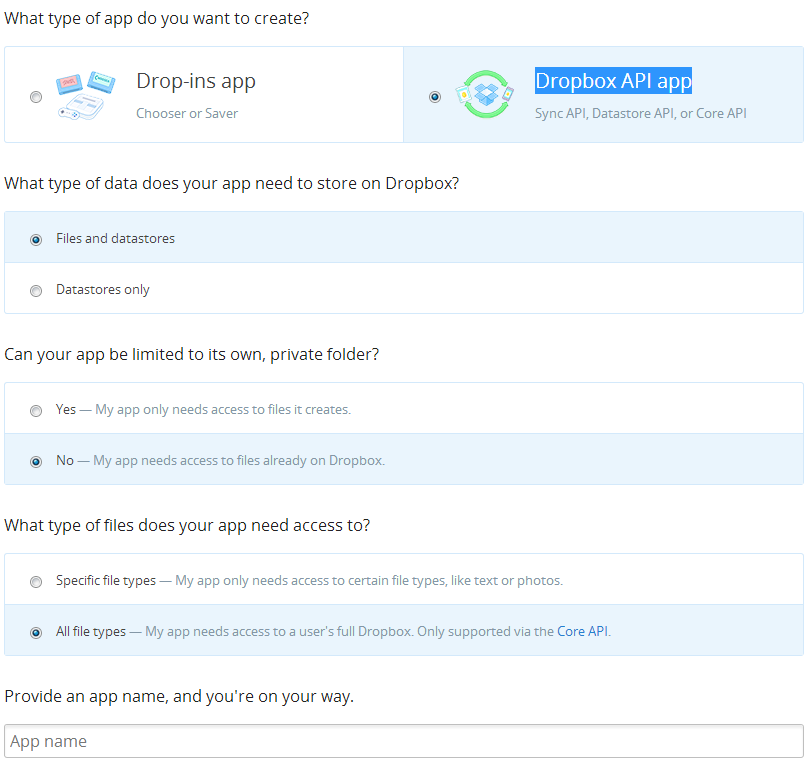
When you finish all these steps, you will get an App key and App secret, please copy them somewhere – you will need them in future. Now we are ready to create our application. Let’s create a new F# project and add AppLimit.CloudComputing.SharpBox package from NuGet.
After package is downloaded, go to packages\AppLimit.CloudComputing.SharpBox.1.2.0.542\lib\net40-full folder, find and start DropBoxTokenIssuer.exe application.
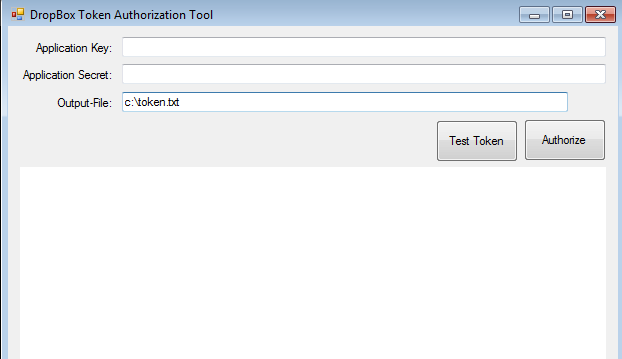
Fill Application Key and Application Secret with values that you received during app creation, fill Output-File path with c:\token.txt and click “Authorize”. Wait some seconds(depends on your Internet connection) and follow the steps that will appear in browser control on the form – you will need to authorize in Dropbox with your Dropbox account and grant access to your files for your app. When file with your token will be created, you can click on “Test Token” button to make sure that it is correct.
Using token file, you are able to work with Dropbox files without direct user interaction, as shown in the sample below:
open System.IO
open AppLimit.CloudComputing.SharpBox

[<EntryPoint>]
let main argv =
    let dropBoxStorage = new CloudStorage()
    let dropBoxConfig = CloudStorage.GetCloudConfigurationEasy(nSupportedCloudConfigurations.DropBox)
    // load a valid security token from file
    use fs = File.Open(@"C:\token.txt", FileMode.Open, FileAccess.Read, FileShare.None)
    let accessToken = dropBoxStorage.DeserializeSecurityToken(fs)
    // open the connection
    let storageToken = dropBoxStorage.Open(dropBoxConfig, accessToken);

    for folder in dropBoxStorage.GetRoot() do
        printfn "%s" (folder.Name)

    dropBoxStorage.Close()
    0
Update (2014, January 3): Links and/or samples in this post might be outdated. The latest version of samples are available on new Stanford.NLP.NET site.
Tokenization of raw text is a standard pre-processing step for many NLP tasks. For English, tokenization usually involves punctuation splitting and separation of some affixes like possessives. Other languages require more extensive token pre-processing, which is usually called segmentation.
The Stanford Word Segmenter currently supports Arabic and Chinese. The provided segmentation schemes have been found to work well for a variety of applications.
One more tool from Stanford NLP Software Package become ready on NuGet today. It is a Stanford Word Segmenter. This is a fourth one Stanford NuGet package published by me, previous ones were a “Stanford Parser“, “Stanford Named Entity Recognizer (NER)” and “Stanford Log-linear Part-Of-Speech Tagger“. Please follow next steps to get started:
For more details see source code on GitHub.
open java.util
open edu.stanford.nlp.ie.crf

[<EntryPoint>]
let main argv =
if (argv.Length <> 1) then
printf "usage: StanfordSegmenter.Csharp.Samples.exe filename"
else
let props = Properties();
props.setProperty("sighanCorporaDict", @"..\..\..\..\temp\stanford-segmenter-2013-06-20\data") |> ignore
props.setProperty("serDictionary", @"..\..\..\..\temp\stanford-segmenter-2013-06-20\data\dict-chris6.ser.gz") |> ignore
props.setProperty("testFile", argv.[0]) |> ignore
props.setProperty("inputEncoding", "UTF-8") |> ignore
props.setProperty("sighanPostProcessing", "true") |> ignore

let segmenter = CRFClassifier(props)
segmenter.loadClassifierNoExceptions(@"..\..\..\..\temp\stanford-segmenter-2013-06-20\data\ctb.gz", props)
segmenter.classifyAndWriteAnswers(argv.[0])
0
For more details see source code on GitHub.
using java.util;
using edu.stanford.nlp.ie.crf;

namespace StanfordSegmenter.Csharp.Samples
{
class Program
{
static void Main(string[] args)
{
if (args.Length != 1)
{
System.Console.WriteLine("usage: StanfordSegmenter.Csharp.Samples.exe filename");
return;
}

var props = new Properties();
props.setProperty("sighanCorporaDict", @"..\..\..\..\temp\stanford-segmenter-2013-06-20\data");
props.setProperty("serDictionary", @"..\..\..\..\temp\stanford-segmenter-2013-06-20\data\dict-chris6.ser.gz");
props.setProperty("testFile", args[0]);
props.setProperty("inputEncoding", "UTF-8");
props.setProperty("sighanPostProcessing", "true");

var segmenter = new CRFClassifier(props);
segmenter.loadClassifierNoExceptions(@"..\..\..\..\temp\stanford-segmenter-2013-06-20\data\ctb.gz", props);
segmenter.classifyAndWriteAnswers(args[0]);
}
}
}
Some weeks ago, Microsoft Research announced NLP toolkit called MSR SPLAT. It is time to play with it and take a look what it can do.
Statistical Parsing and Linguistic Analysis Toolkit is a linguistic analysis toolkit. Its main goal is to allow easy access to the linguistic analysis tools produced by the Natural Language Processing group at Microsoft Research. The tools include both traditional linguistic analysis tools such as part-of-speech taggers and parsers, and more recent developments, such as sentiment analysis (identifying whether a particular of text has positive or negative sentiment towards its focus)
SPLAT has a nice Silverlight DEMO app that lets you try all available functionality.

SPLAT also has WCF and RESTful endpoints, but if you want to use them, you need to request an access key(please email to Pallavi Choudhury). For more details, please read an overview article “MSR SPLAT, a language analysis toolkit“.
Important links:
I have received my GUID with example of using Json service from C# that you can find below.
private static void CallSplatJsonService()
{
    var requestStr = String.Format("http://msrsplat.cloudapp.net/SplatServiceJson.svc/Analyzers?language={0}&json=x", "en");

    string language = "en";
    string input = "I live in Seattle";
    string analyzerList = "POS_tags,Tokens";
    string appId = "XXXXXXXX-XXXX-XXXX-XXXX-XXXXXXXXXXXX";

    string requestAnanlyse = String.Format("http://msrsplat.cloudapp.net/SplatServiceJson.svc/Analyze?language={0}&analyzers={1}&appId={2}&json=x&input={3}",
        language, analyzerList, appId, input);

    var request = WebRequest.Create(requestAnanlyse);
    request.ContentType = "application.json; charset=utf-8";
    request.Method = "GET";
    string postData = String.Format("/{0}?language={1}&json=x","Analyzers", "en");

    using(Stream s = request.GetResponse().GetResponseStream())
    {
        using(StreamReader sr = new StreamReader(s))
        {
            var jsonData = sr.ReadToEnd();
            Console.WriteLine(jsonData);
        }
    }
}
In following samples, I used WCF endpoint since WsdlService Type Provider can dramatically simplify access to the service.
#r "FSharp.Data.TypeProviders.dll"
#r "System.ServiceModel.dll"
#r "System.Runtime.Serialization.dll"
open System
open Microsoft.FSharp.Data.TypeProviders

type MSRSPLAT = WsdlService<"http://msrsplat.cloudapp.net/SplatService.svc?wsdl">
let splat = MSRSPLAT.GetBasicHttpBinding_ISplatService()
In the first call we ask the SPLAT to return list of supported languages splat.Languages() and you will see [|”en”; “bg”|] (English and Bulgarian). The mystical Bulgaria… I do not know why, but NLP guys like Bulgaria. There is something special for NLP :).
The Stanford NLP Group has relocated in Bulgaria … temporarily.
— Stanford NLP Group (@stanfordnlp) August 3, 2013
The next call is splat.Analyzers(“en”) that returns list of all analyzers that are available for English language (All of them are available from DEMO app)
This is a list of full names of analyzers that are available for now. The part of the analyzer’s name that you have to pass to the service to perform corresponding analysis is highlighted in bold. To perform the analysis, you need to have an access guid and pass it as an email to splat.Analyze method. It is probably a typo, but as it is. Let’s call all analyzers on the one of our favorite sentences “All your types are belong to us” and look at the result.
let appId = "XXXXXXXX-XXXX-XXXX-XXXX-XXXXXXXXXXXX"

let analyzers = String.Join(",", splat.Analyzers("en")
                |> Array.map (fun s -> s.Split([|'-'|]).[0]))
let text = "All your types are belong to us"
let bag = splat.Analyze("en", analyzers, text, appId)

bag.Analyses
The result is
[["0-all","1-you","2-types","3-are","4-belong","5-to","6-us"]]";
  "["[NP All your types] [VP are] [VP belong] [PP to] [NP us] \u000a"]";
  "["@@All your types are belong to us\u000d\u000a0\u0009G_DT..."]";
  "["(TOP (S (NP (PDT All) (PRP$ your) (NNS types)) (VP (VBP are) (VP (VB belong) (PP (TO to) (NP (PRP us)))))))"]";
  "[-2.2476917857427452]";
  "[[{"LengthInTokens":3,"Sentence":0,"StartTokenOffset":0}],[{"LengthInTokens":1,"Sentence":0,"StartTokenOffset":1}],[{"LengthInTokens":1,"Sentence":0,"StartTokenOffset":6}]]";
  "[[{"Parent":3,"Tag":"PDT","Word":"All"},{"Parent":3,"Tag":"PRP$","Word":"your"},{"Parent":4,"Tag":"NNS","Word":"types"},{"Parent":0,"Tag":"VBP","Word":"are"},{"Parent":4,"Tag":"VB","Word":"belong"},{"Parent":5,"Tag":"TO","Word":"to"},{"Parent":6,"Tag":"PRP","Word":"us"}]]";
  "["14.50%: アリオータイプサレベロングタス","13.27%: オールユアタイプサレベロングタス","13.26%: アルユアタイプサレベロングタス","13.26%: アリオールタイプサレベロングタス","11.34%: アリオウルタイプサレベロングタス","7.81%: アルルユアタイプサレベロングタス","7.10%: アリアウータイプサレベロングタス","6.60%: アリアウルタイプサレベロングタス","6.46%: アリーオータイプサレベロングタス","6.40%: アリオータイプサリベロングタス"]";
  "[["All","your","type","are","belong","to","us"]]";
  "[{"Len":0,"Offset":0,"Tokens":[]}]";
  "[["DT","PRP$","NNS","VBP","IN","TO","PRP"]]";
  "[["4-4\/belong[A1=0-2\/All_your_types, A1=5-6\/to_us]"]]";
  "[[-0.33393750773577313]]";
  "{"Classification":"pos","Probability":0.59141720028208355}";
  "[["All","your","type","ar","belong","to","us"]]";
  "[{"Len":31,"Offset":0,"Tokens":[{"Len":3,"NormalizedToken":"All","Offset":0,"RawToken":"All"},{"Len":4,"NormalizedToken":"your","Offset":4,"RawToken":"your"},{"Len":5,"NormalizedToken":"types","Offset":9,"RawToken":"types"},{"Len":3,"NormalizedToken":"are","Offset":15,"RawToken":"are"},{"Len":6,"NormalizedToken":"belong","Offset":19,"RawToken":"belong"},{"Len":2,"NormalizedToken":"to","Offset":26,"RawToken":"to"},{"Len":2,"NormalizedToken":"us","Offset":29,"RawToken":"us"}]}]";
  "[["are_belong_to(types, us)"]]"|]
As you see, service returns result as string[]. All result strings are readable for human eyes and formatted according to “NLP standards”, but some of them are really hard to parse programmatically. FSharp.Data and JSON Type Provider can help with strings that contain correct Json objects.
For example, if you need to use “Sentiment-PosNeg-MaxEntClassifier” analyzer in strongly typed way, then you can do it as follows:
#r @"..\packages\FSharp.Data.1.1.9\lib\net40\FSharp.Data.dll"
open FSharp.Data

type SentimentsProvider = JsonProvider<""" {"Classification":"pos","Probability":0.59141720028208355} """>

let bag2 = splat.Analyze("en", "Sentiment", "I love F#.", appId)
let sentiments = SentimentsProvider.Parse(bag2.Analyses.[0])

printfn "Class:'%s' Probability:'%M'"
    (sentiments.Classification) (sentiments.Probability)
For analyzers like “Constituency_Tree-PennTreebank3-SplitMerge” you need to write custom parser that proceses bracket expression (“(TOP (S (NP (PDT All) (PRP$ your) (NNS types)) (VP (VBP are) (VP (VB belong) (PP (TO to) (NP (PRP us)))))))”) and builds a tree for you. If you are lazy to do it yourself (you should be so), you can download SilverlightSplatDemo.xap and decompile source code. All parsers are already implemented there for DEMO app. But this approach is not so easy as it should be.
MSR SPLAT looks like a really powerful and promising toolkit. I hope that it continues growing.
The only wish is an API improvement. I think there should be possible to use services in a strongly typed way. The easiest way is to add an ability to get all results as Json without any cnf forms and so on. Also it can be achieved by changing WCF service and exposing analysis results in a typed way instead of string[].
“All your types are belong to us”
Don Syme
This post is intended for F# developers, first of all, to show the big picture of The World of F# Type Providers. Here you can find the list of articles/posts about building type providers, list of existing type providers, which probably wait your help and list of open opportunities.
List of materials that can be useful if you want to create a new one:
List of available type providers:
Open opportunities:
Please let me know if I missed something.
Update 1: Build-in Tsunami type providers were added.
Update 2: SqlCommand and Azure were added.
 Update (3 February 2014): PowerShell Type Provider merged into FSharp.Management.
I am happy to share with you the first version of PowerShell Type Provider. Last days were really hot, but finally the initial version was published.
Lots of different emotions visited me during the work =). Actually, Type Provider API is much harder than I thought. After reading books, it looked easier than it turned out in reality. Type Providers runtime is crafty.
To start you need to download source code and build it – no NuGet package for now. I want to get a portion of feedback and after that publish to the NuGet more consistent version.
Also you need to know that it is developed using PowerShell 3.0 runtime and .NET 4.0/4.5. This means that you can use only PowerShell 3.0 snap-ins.
#r @"C:\WINDOWS\Microsoft.Net\assembly\GAC_MSIL\System.Management.Automation\v4.0_3.0.0.0__31bf3856ad364e35\System.Management.Automation.dll"
#r @"C:\WINDOWS\Microsoft.NET\assembly\GAC_MSIL\Microsoft.PowerShell.Commands.Utility\v4.0_3.0.0.0__31bf3856ad364e35\Microsoft.Powershell.Commands.Utility.dll"
#r @"d:\GitHub\PowerShellTypeProvider\PowerShellTypeProvider\bin\Debug\PowerShellTypeProvider.dll"

type PS = FSharp.PowerShell.PowerShellTypeProvider<PSSnapIns="WDeploySnapin3.0">
As you see in the sample, PowerShellTypeProvider has a single mandatory static parameter PSSnapIns that contains semicolon-separated list of snap-ins that you want to import into PowerShell. If you want to use only default ones, leave the string empty.
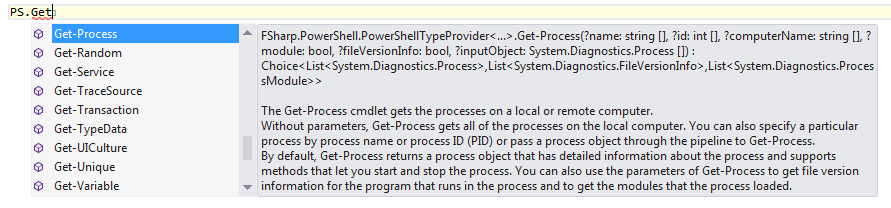 You can find list of snap-ins registered on your machine using Get-PSSnapin method.

Enjoy it. I will be happy to hear feadback (as well as comments about type provider source code from TP gurus).
Some weeks ago, I announced FSharp.NLP.Stanford.Parser and now I want to clarify the goals of this project and show an example of usage.
First of all, this is not an attempt to re-implement some functionality of Stanford Parser. It is just a tiny dust layer that aimed to simplify interaction with Java collections (especially Iterable interface) and bring the power of F# constructs (like pattern matching and discrimination unions) to the code that deals with tagging results.
Let’s start with some sample NLP task: We want to show related questions before user asks a new one (as it works on StackOverflow). There are many possible solutions for this task. Let’s look at one that at the first step tries to understand key phrases that identify this question and runs the search using them.
First of all, let’s choose some real questions from StackOverflow to analyze them:
Now we can use Stanford Parser GUI to visualize the structure of these questions:


We can notice that all phrases that we have selected are parts of noun phrases(NP). As a first solution we can try to analyze tags in the tree and select NP that contains word level tags like (NN,NNS,NNP,NNPS).
#r @"..\packages\IKVM.7.3.4830.0\lib\IKVM.Runtime.dll"
#r @"..\packages\IKVM.7.3.4830.0\lib\IKVM.OpenJDK.Core.dll"
#r @"..\packages\Stanford.NLP.Parser.3.2.0.0\lib\ejml-0.19-nogui.dll"
#r @"..\packages\Stanford.NLP.Parser.3.2.0.0\lib\stanford-parser.dll"

open edu.stanford.nlp.parser.lexparser
open edu.stanford.nlp.trees
open System

let model = @"d:\englishPCFG.ser.gz";

let options = [|"-maxLength"; "500";"-retainTmpSubcategories"; "-MAX_ITEMS"; "500000";"-outputFormat"; "penn,typedDependenciesCollapsed"|]
let lp = LexicalizedParser.loadModel(model, options)

let tlp = PennTreebankLanguagePack();
let gsf = tlp.grammaticalStructureFactory();

open java.util
let toSeq (iter:Iterator) =
    let rec loop (x:Iterator) =
        seq {
            yield x.next()
            if x.hasNext() then
                yield! (loop x)
            }
    loop iter

let getTree question =
    let toke = tlp.getTokenizerFactory().getTokenizer(new java.io.StringReader(question));
    let sentence = toke.tokenize();
    lp.apply(sentence)

let getKeyPhrases (tree:Tree) =
    let isNPwithNNx (node:Tree)=
        if (node.label().value() <> "NP") then false
        else node.getChildrenAsList().iterator()
             |> toSeq
             |> Seq.cast<Tree>
             |> Seq.exists (fun x->
                let y = x.label().value()
                y= "NN" || y = "NNS" || y = "NNP" || y = "NNPS")
    let rec foldTree acc (node:Tree) =
        let acc =
            if (node.isLeaf()) then acc
            else node.getChildrenAsList().iterator()
                 |> toSeq
                 |> Seq.cast<Tree>
                 |> Seq.fold
                    (fun state x -> foldTree state x)
                    acc
        if isNPwithNNx node
          then node :: acc
          else acc
    foldTree [] tree

let questions =
    [|"How to make an F# project work with the object browser";
      "How can I build WebSharper on Mono 3.0 on Mac?";
      "Adding extra methods as type extensions in F#";
      "How to get MonoDevelop to compile F# projects?"|]

questions
|> Seq.iter (fun question ->
    printfn "Question : %s" question
    question
    |> getTree
    |> getKeyPhrases
    |> List.rev
    |> List.iter (fun p ->
        p.getLeaves().iterator()
        |> toSeq
        |> Seq.cast<Tree>
        |> Seq.map(fun x-> x.label().value())
        |> Seq.toArray
        |> printfn "\t%A")
)
If you run this script, you will see the following:
Question : How to make an F# project work with the object browser
[|”an”; “F”; “#”; “project”; “work”|]
[|”the”; “object”; “browser”|]
Question : How can I build WebSharper on Mono 3.0 on Mac?
[|”WebSharper”|]
[|”Mono”; “3.0”|]
[|”Mac”|]
Question : Adding extra methods as type extensions in F#
[|”extra”; “methods”|]
[|”type”; “extensions”|]
[|”F”; “#”|]
Question : How to get MonoDevelop to compile F# projects?
[|”MonoDevelop”|]
[|”F”; “#”; “projects”|]
It is almost what we have expected. Results are good enough, but we can simplify the code and make it more readable using FSharp.NLP.Stanford.Parser.
#r @"..\packages\IKVM.7.3.4830.0\lib\IKVM.Runtime.dll"
#r @"..\packages\IKVM.7.3.4830.0\lib\IKVM.OpenJDK.Core.dll"
#r @"..\packages\Stanford.NLP.Parser.3.2.0.0\lib\ejml-0.19-nogui.dll"
#r @"..\packages\Stanford.NLP.Parser.3.2.0.0\lib\stanford-parser.dll"
#r @"..\packages\FSharp.NLP.Stanford.Parser.0.0.3\lib\FSharp.NLP.Stanford.Parser.dll"

open edu.stanford.nlp.parser.lexparser
open edu.stanford.nlp.trees
open System
open FSharp.IKVM.Util
open FSharp.NLP.Stanford.Parser

let model = @"d:\englishPCFG.ser.gz";

let options = [|"-maxLength"; "500";"-retainTmpSubcategories"; "-MAX_ITEMS"; "500000";"-outputFormat"; "penn,typedDependenciesCollapsed"|]
let lp = LexicalizedParser.loadModel(model, options)

let tlp = PennTreebankLanguagePack();
let gsf = tlp.grammaticalStructureFactory();

let getTree question =
    let toke = tlp.getTokenizerFactory().getTokenizer(new java.io.StringReader(question));
    let sentence = toke.tokenize();
    lp.apply(sentence)

let getKeyPhrases (tree:Tree) =
    let isNNx = function
        | Label NN | Label NNS | Label NNP | Label NNPS -> true
        | _ -> false
    let isNPwithNNx = function
        | Label NP as node
            when node.getChildrenAsList() |> Iterable.castToSeq<Tree> |> Seq.exists isNNx
            -> true
        | _ -> false
    let rec foldTree acc (node:Tree) =
        let acc =
            if (node.isLeaf()) then acc
            else node.getChildrenAsList()
                 |> Iterable.castToSeq<Tree>
                 |> Seq.fold
                    (fun state x -> foldTree state x)
                    acc
        if isNPwithNNx node
          then node :: acc
          else acc
    foldTree [] tree

let questions =
    [|"How to make an F# project work with the object browser";
      "How can I build WebSharper on Mono 3.0 on Mac?";
      "Adding extra methods as type extensions in F#";
      "How to get MonoDevelop to compile F# projects?"|]

questions
|> Seq.iter (fun question ->
    printfn "Question : %s" question
    question
    |> getTree
    |> getKeyPhrases
    |> List.rev
    |> List.iter (fun p ->
        p.getLeaves()
        |> Iterable.castToArray<Tree>
        |> Array.map(fun x-> x.label().value())
        |> printfn "\t%A")
)
Look more carefully at getKeyPhrases function. All tags are strongly typed now. You can be sure that you will never make a typo, code is more readable and self explained:

This post is about one more FAKE use case. It will be not usual, but I hope useful script.
The problem I have faced to is recompilation of Stanford NLP products to .NET using IKVM.NET. I am sick of doing it manually. I posted instructions on how to do it, but I think that not many people have tried to do it. I believe that I can automate it end to end from downloading *.jar files to building NuGet packages. Of course, I have chosen FAKE for this task (Thanks to Steffen Forkmann for help with building NuGet packages).
The build scenario is the following:
Steps 1-5 are not covered by FAKE OOTB tasks and I needed to implement them by myself. Since I wanted to use F# 3.0 features and .NET 4.5 capabilities (like System.IO.Compression.FileSystem.ZipFile for unzipping) I have chosen pre-release version of FAKE 2 that uses .NET 4 runtime. Pre-release version of FAKE can be restored from NuGet as follows:
"nuget.exe" "install" "FAKE" "-Pre" "-OutputDirectory" "..\build" "-ExcludeVersion"
Requirements: For sure, I do not want to download files from the Internet during each build. Before downloading files, I want to check their presence on the file system, if they are missed then start downloading. During downloading, I want to see the progress status to be sure that everything works. The code that does it:
#r "System.IO.Compression.FileSystem.dll"
let downloadDir = @".\Download\"

let restoreFile url =
    let downloadFile file url =
        printfn "Downloading file '%s' to '%s'..." url file
        let BUFFER_SIZE = 16*1024
        use outputFileStream = File.Create(file, BUFFER_SIZE)
        let req = System.Net.WebRequest.Create(url)
        use response = req.GetResponse()
        use responseStream = response.GetResponseStream()
        let printStep = 100L*1024L
        let buffer = Array.create<byte> BUFFER_SIZE 0uy
        let rec download downloadedBytes =
            let bytesRead = responseStream.Read(buffer, 0, BUFFER_SIZE)
            outputFileStream.Write(buffer, 0, bytesRead)
            if (downloadedBytes/printStep <> (downloadedBytes-int64(bytesRead))/printStep)
                then printfn "\tDownloaded '%d' bytes" downloadedBytes
            if (bytesRead > 0) then download (downloadedBytes + int64(bytesRead))
        download 0L
    let file = downloadDir @@ System.IO.Path.GetFileName(url)
    if (not <| File.Exists(file))
        then url |> downloadFile file
    file
let unZipTo toDir file =
    printfn "Unzipping file '%s' to '%s'" file toDir
    Compression.ZipFile.ExtractToDirectory(file, toDir)
let restoreFolderFromUrl folder url =
    if not <| Directory.Exists folder
        then url |> restoreFile |> unZipTo (folder @@ @"..\")

let restoreFolderFromFile folder zipFile =
    if not <| Directory.Exists folder
        then zipFile |> unZipTo (folder @@ @"..\")
Compiler should be able to rebuild any number of *.jar files with predefined dependencies and sign result *.dll files if required.
let ikvmc =
    restoreFolderFromUrl @".\temp\ikvm-7.3.4830.0" "http://www.frijters.net/ikvmbin-7.3.4830.0.zip"
    @".\temp\ikvm-7.3.4830.0\bin\ikvmc.exe"
let ildasm = @"c:\Program Files (x86)\Microsoft SDKs\Windows\v7.0A\Bin\x64\ildasm.exe"
let ilasm = @"c:\Windows\Microsoft.NET\Framework64\v2.0.50727\ilasm.exe"
type IKVMcTask(jar:string) =
    member val JarFile = jar
    member val Version = "" with get, set
    member val Dependencies = List.empty<IKVMcTask> with get, set
let timeOut = TimeSpan.FromSeconds(120.0)
let IKVMCompile workingDirectory keyFile tasks =
    let getNewFileName newExtension (fileName:string) =
        Path.GetFileName(fileName).Replace(Path.GetExtension(fileName), newExtension)
    let startProcess fileName args =
        let result =
            ExecProcess
                (fun info ->
                    info.FileName <- fileName
                    info.WorkingDirectory <- FullName workingDirectory
                    info.Arguments <- args)
                timeOut
        if result<> 0 then
            failwithf "Process '%s' failed with exit code '%d'" fileName result
    let newKeyFile =
        let file = workingDirectory @@ (Path.GetFileName(keyFile))
        File.Copy(keyFile, file, true)
        Path.GetFileName(file)
    let rec compile (task:IKVMcTask) =
        let getIKVMCommandLineArgs() =
            let sb = Text.StringBuilder()
            task.Dependencies |> Seq.iter
               (fun x ->
                   compile x
                   x.JarFile |> getNewFileName ".dll" |> bprintf sb " -r:%s")
            if not <| String.IsNullOrEmpty(task.Version)
                then task.Version |> bprintf sb " -version:%s"
            bprintf sb " %s -out:%s"
                (task.JarFile |> getNewFileName ".jar")
                (task.JarFile |> getNewFileName ".dll")
            sb.ToString()
        File.Copy(task.JarFile, workingDirectory @@ (Path.GetFileName(task.JarFile)) ,true)
        startProcess ikvmc (getIKVMCommandLineArgs())

        if (File.Exists(keyFile)) then
            let dllFile = task.JarFile |> getNewFileName ".dll"
            let ilFile = task.JarFile |> getNewFileName ".il"
            startProcess ildasm (sprintf " /all /out=%s %s" ilFile dllFile)
            File.Delete(dllFile)
            startProcess ilasm (sprintf " /dll /key=%s %s" (newKeyFile) ilFile)
    tasks |> Seq.iter compile
Using this helper function, build scripts come out pretty straightforward and easy. For example, recompilation of Stanford Parser looks as follows:
Target "RunIKVMCompiler" (fun _ ->
    restoreFolderFromUrl
        @".\temp\stanford-parser-full-2013-06-20"
        "http://nlp.stanford.edu/software/stanford-parser-full-2013-06-20.zip"
    restoreFolderFromFile
        @".\temp\stanford-parser-full-2013-06-20\edu"
        @".\temp\stanford-parser-full-2013-06-20\stanford-parser-3.2.0-models.jar"

    [IKVMcTask(@"temp\stanford-parser-full-2013-06-20\stanford-parser.jar",
        Version=version,
        Dependencies =
            [IKVMcTask(@"temp\stanford-parser-full-2013-06-20\ejml-0.19-nogui.jar",
                       Version="0.19.0.0")])]
    |> IKVMCompile ikvmDir @".\Stanford.NLP.snk"
)
 The strange thing happens, Rattle is an awesome tool but it is not so well known for devs as it should be. We definitely need to fix this.
Rattle (the R Analytical Tool To Learn Easily) presents statistical and visual summaries of data, transforms data into forms that can be readily modelled, builds both unsupervised and supervised models from the data, presents the performance of models graphically, and scores new datasets.
At first, we need to install new package from CRAN. To do so, just open R console and type the following:
install.packages("rattle")
Here, you need to check that you have RProvider installed.
Install-Package RProvider
Now we are ready to start.
#I @"..\packages\RProvider.1.0.0\lib"
#r "RDotNet.dll"
#r "RProvider.dll"

open RProvider.rattle
R.rattle() |> ignore
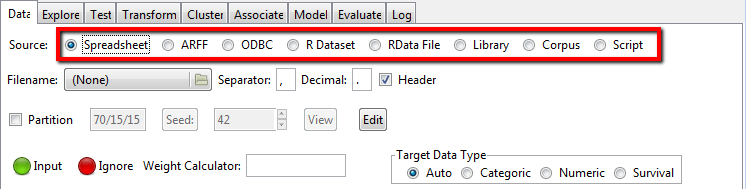
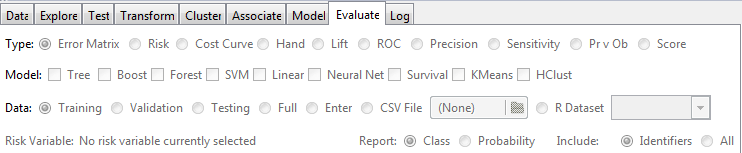
Execute this short snippet and you should see Rattle start screen similar to the following: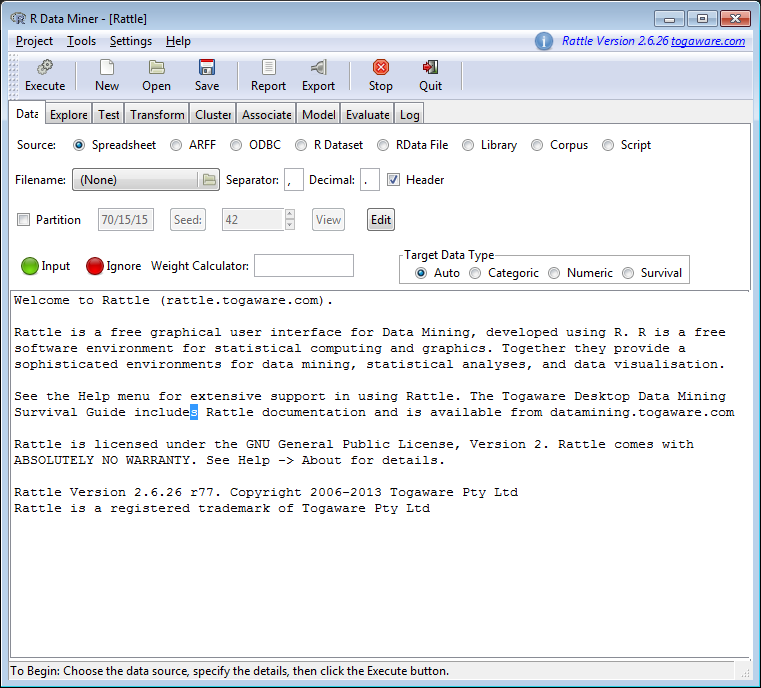 You are ready to study your data without a single line of code.






Upd: If you are interested in it, then I can recommend the following book.


