

If you are a SharePoint developer, an Enterprise Search developer or an employee of a large corporation with Global Search through private internal infrastructure then you may be interested in search automation. Deployment of FAST Search Server 2010 for SharePoint (F4SP) is out of the current post’s scope (you can follow TechNet F4SP Deployment Guide if you need).
F# 3.0 comes with feature called “type providers” that helps you to simplify your life in daily routine. For the case of WCF, the Wsdl type provider allows us to automate the proxy generation. Here we need to note that, F# 3.0 works only on the .NET 4.0 and later, but SharePoint 2010 server side runs exclusively on the .NET 3.0 64bit. Let’s see how this works together.
Connecting to the web service
Firstly, we create an empty F# Script file.
#r "System.ServiceModel.dll"
#r "FSharp.Data.TypeProviders.dll"
#r "System.Runtime.Serialization.dll"

open System
open System.Net
open System.Security
open System.ServiceModel
open Microsoft.FSharp.Data.TypeProviders

[<Literal>]
let SearchServiceWsdl = "https://SharePoint2010WebAppUrl/_vti_bin/search.asmx?WSDL"
type SharePointSearch = Microsoft.FSharp.Data.TypeProviders.WsdlService<SearchServiceWsdl>
At this point, the type provider creates proxy classes in the background. The only thing we need to do is to configure the access security. The following code tested on the two SharePoint 2010 farms with NTLM authentication and HTTP/HTTPS access protocols.
let getSharePointSearchService() =
    let binding = new BasicHttpBinding()
    binding.MaxReceivedMessageSize <- 10000000L
    binding.Security.Transport.ClientCredentialType <- HttpClientCredentialType.Ntlm
    binding.Security.Mode <- if (SearchServiceWsdl.StartsWith("https"))
                                 then BasicHttpSecurityMode.Transport
                                 else BasicHttpSecurityMode.TransportCredentialOnly

    let serviceUrl = SearchServiceWsdl.Remove(SearchServiceWsdl.LastIndexOf('?'))
    let service = new SharePointSearch.ServiceTypes.
                        QueryServiceSoapClient(binding, EndpointAddress(serviceUrl))
    //If server located in another domain then we may authenticate manually
    //service.ClientCredentials.Windows.ClientCredential
    //  <- (Net.NetworkCredential("User_Name", "Password"))
    service.ClientCredentials.Windows.AllowedImpersonationLevel
        <- System.Security.Principal.TokenImpersonationLevel.Delegation;
    service

let searchByQueryXml queryXml =
    use searchService = getSharePointSearchService()
    let results = searchService.QueryEx(queryXml)
    let rows = results.Tables.["RelevantResults"].Rows
    [for i in 0..rows.Count-1 do
        yield (rows.[i].ItemArray) |> Array.map (sprintf "%O")]
Building search query XML
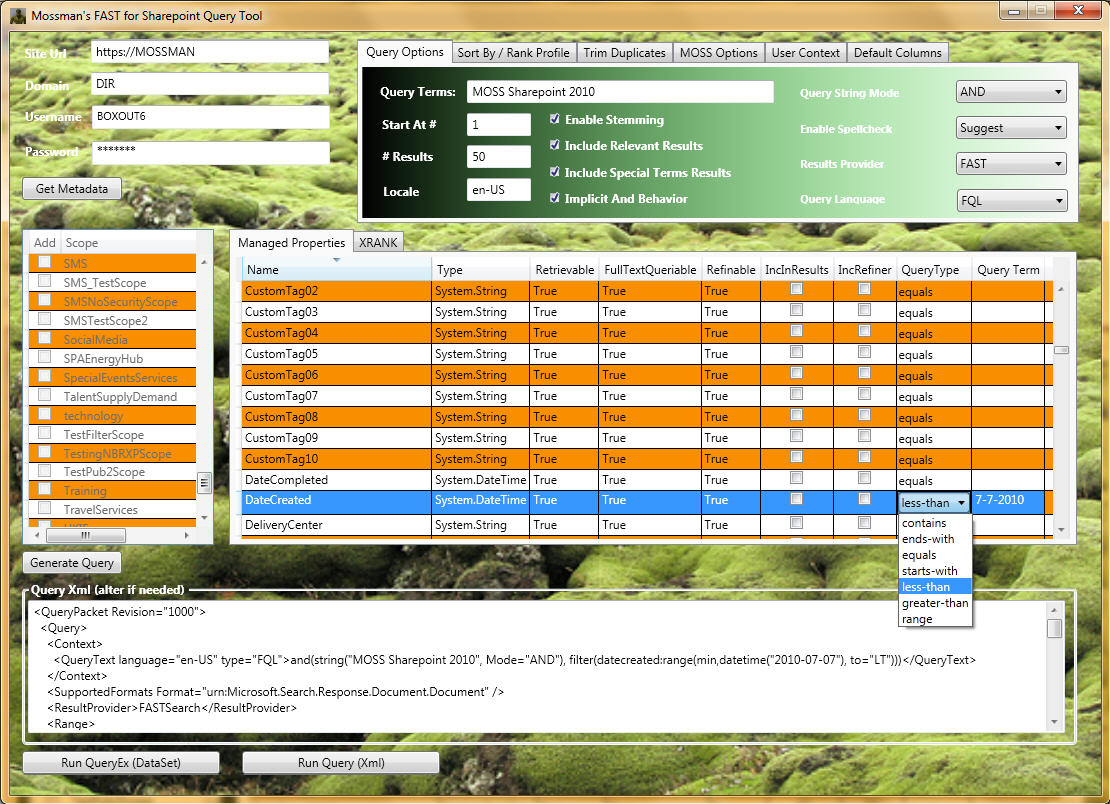
To query F4SP we use the same web service as for build-in SharePoint 2010 search, but with a bit different query XML. The last thing that we need to do is to build query.You can find query XML syntax on Microsoft.Search.Query Schema, but it is hard enough to work with it using official documentation. There is a very useful CodePlex project called FAST Search for Sharepoint MOSS 2010 Query Tool which provides a user-friendly query builder interface.
FAST Query Language (FQL) Syntax
FAST has its own query syntax(FQL Syntax) that can be directly used through SharePoint Search Web Service.
let getFQLQueryXml (fqlString:string) =
  """<QueryPacket Revision="1000">
       <Query>
         <Context>
           <QueryText language="en-US" type="FQL">{0}</QueryText>
         </Context>
         <SupportedFormats Format="urn:Microsoft.Search.Response.Document.Document" />
         <ResultProvider>FASTSearch</ResultProvider>
         <Range>
           <StartAt>1</StartAt>
           <Count>5</Count>
         </Range>
         <EnableStemming>false</EnableStemming>
         <EnableSpellCheck>Off</EnableSpellCheck>
         <IncludeSpecialTermsResults>false</IncludeSpecialTermsResults>
         <IncludeRelevantResults>true</IncludeRelevantResults>
         <ImplicitAndBehavior>false</ImplicitAndBehavior>
         <TrimDuplicates>true</TrimDuplicates>
         <Properties>
           <Property name="Url" />
           <Property name="Write" />
           <Property name="Size" />
         </Properties>
       </Query>
     </QueryPacket>"""
  |> (fun queryTemplate -> String.Format(queryTemplate,fqlString))

let fqlQueryResults =
  """and(string("Functional Programming", annotation_class="user", mode="phrase"),
         or("fileextension":string("ppt", mode="phrase"),
            "fileextension":string("pptx", mode="phrase")))
     AND filter(and(isdocument:1))"""
  |> getFQLQueryXml |> searchByQueryXml
Keyword Query Syntax
FAST also supports native SharePoint Keyword Query Syntax.
let getKeywordQueryXml (keywordString:string) =
  """<QueryPacket Revision="1000">
       <Query>
         <Context>
           <QueryText language="en-US" type="STRING">{0}</QueryText>
         </Context>
         <SupportedFormats Format="urn:Microsoft.Search.Response.Document.Document" />
         <ResultProvider>FASTSearch</ResultProvider>
         <Range>
           <StartAt>1</StartAt>
           <Count>5</Count>
         </Range>
         <EnableStemming>false</EnableStemming>
         <EnableSpellCheck>Off</EnableSpellCheck>
         <IncludeSpecialTermsResults>false</IncludeSpecialTermsResults>
         <IncludeRelevantResults>true</IncludeRelevantResults>
         <ImplicitAndBehavior>false</ImplicitAndBehavior>
         <TrimDuplicates>true</TrimDuplicates>
         <Properties>
           <Property name="Url" />
           <Property name="Write" />
           <Property name="Size" />
         </Properties>
       </Query>
     </QueryPacket>"""
  |> (fun queryTemplate -> String.Format(queryTemplate,keywordString))

let simpleKeywordQueryResults =
  """"Functional Programming" scope:"Documents" (fileextension:"PPT" OR fileextension:"PPTX")"""
  |> getKeywordQueryXml |> searchByQueryXml
Query Syntax Summary
One of the principal differences between two syntaxes is that Keyword Query needs to be converted into FQL on the SharePoint side. Keyword syntax also supports scope conditions, which will be converted into FQL filters. For example “scope:”Documents”” will be translated into ” filter(and(isdocument:1))” (In the case when Documents scope exists in the SharePoint Query Service Application). Unfortunately, we can not specify SharePoint scope in FQL query.