Dropbox for .NET developers

Some days ago, I was faced with the task of developing Dropbox connector that should be able to enumerate and download files from Dropbox. The ideal case for me is a wrapper library for .NET 3.5 with an ability to authorize in Dropbox without user interaction. This is a list of .NET libraries/components that are currently available:

Sprint.NET and Xamarin component are not my options for now. DropNet also does not fit my needs, because it is .NET 4+ only. But if your application is for .NET 4+, then DropNet should be the best choice for you. I chose SharpBox, it looks like a dead project – no commits since 2011, but nevertheless the latest version is available on NuGet.

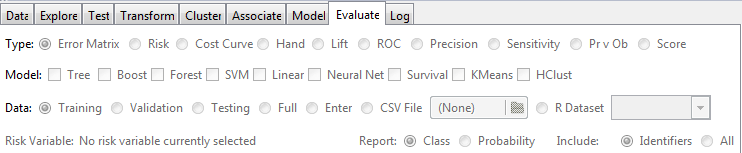
At the beginning, you need to go to Dropbox App Console and create a new app. Click on “Create app” button and answer to the questions like in the picture below.

DropboxCreateApp

When you finish all these steps, you will get an App key and App secret, please copy them somewhere – you will need them in future. Now we are ready to create our application. Let’s create a new F# project and add AppLimit.CloudComputing.SharpBox package from NuGet.

After package is downloaded, go to packages\AppLimit.CloudComputing.SharpBox.1.2.0.542\lib\net40-full folder, find and start DropBoxTokenIssuer.exe application.

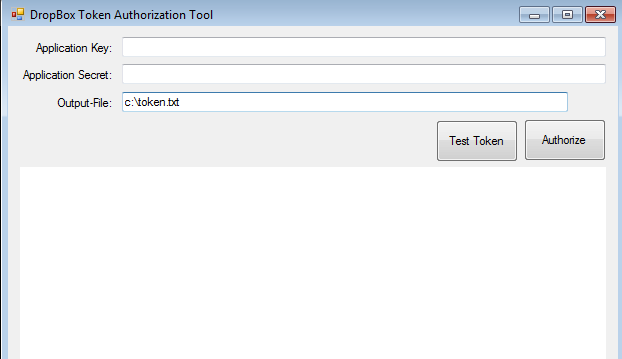
SharpBoxTokenIssuer

Fill Application Key and Application Secret with values that you received during app creation, fill Output-File path with c:\token.txt and click “Authorize”. Wait some seconds(depends on your Internet connection) and follow the steps that will appear in browser control on the form – you will need to authorize in Dropbox with your Dropbox account and grant access to your files for your app. When file with your token will be created, you can click on “Test Token” button to make sure that it is correct.

Using token file, you are able to work with Dropbox files without direct user interaction, as shown in the sample below:

open System.IO
open AppLimit.CloudComputing.SharpBox

[<EntryPoint>]
let main argv =
    let dropBoxStorage = new CloudStorage()
    let dropBoxConfig = CloudStorage.GetCloudConfigurationEasy(nSupportedCloudConfigurations.DropBox)
    // load a valid security token from file
    use fs = File.Open(@"C:\token.txt", FileMode.Open, FileAccess.Read, FileShare.None)
    let accessToken = dropBoxStorage.DeserializeSecurityToken(fs)
    // open the connection
    let storageToken = dropBoxStorage.Open(dropBoxConfig, accessToken);

    for folder in dropBoxStorage.GetRoot() do
        printfn "%s" (folder.Name)

    dropBoxStorage.Close()
    0

Stanford Word Segmenter is available on NuGet

Update (2014, January 3): Links and/or samples in this post might be outdated. The latest version of samples are available on new Stanford.NLP.NET site.

nlp-logo-navbar

Tokenization of raw text is a standard pre-processing step for many NLP tasks. For English, tokenization usually involves punctuation splitting and separation of some affixes like possessives. Other languages require more extensive token pre-processing, which is usually called segmentation.

The Stanford Word Segmenter currently supports Arabic and Chinese. The provided segmentation schemes have been found to work well for a variety of applications.

One more tool from Stanford NLP Software Package become ready on NuGet today. It is a Stanford Word Segmenter. This is a fourth one Stanford NuGet package published by me, previous ones were a “Stanford Parser“, “Stanford Named Entity Recognizer (NER)” and “Stanford Log-linear Part-Of-Speech Tagger“. Please follow next steps to get started:

F# Sample

For more details see source code on GitHub.

open java.util
open edu.stanford.nlp.ie.crf

[<EntryPoint>]
let main argv =
if (argv.Length <> 1) then
printf "usage: StanfordSegmenter.Csharp.Samples.exe filename"
else
let props = Properties();
props.setProperty("sighanCorporaDict", @"..\..\..\..\temp\stanford-segmenter-2013-06-20\data") |> ignore
props.setProperty("serDictionary", @"..\..\..\..\temp\stanford-segmenter-2013-06-20\data\dict-chris6.ser.gz") |> ignore
props.setProperty("testFile", argv.[0]) |> ignore
props.setProperty("inputEncoding", "UTF-8") |> ignore
props.setProperty("sighanPostProcessing", "true") |> ignore

let segmenter = CRFClassifier(props)
segmenter.loadClassifierNoExceptions(@"..\..\..\..\temp\stanford-segmenter-2013-06-20\data\ctb.gz", props)
segmenter.classifyAndWriteAnswers(argv.[0])
0

C# Sample

For more details see source code on GitHub.

using java.util;
using edu.stanford.nlp.ie.crf;

namespace StanfordSegmenter.Csharp.Samples
{
class Program
{
static void Main(string[] args)
{
if (args.Length != 1)
{
System.Console.WriteLine("usage: StanfordSegmenter.Csharp.Samples.exe filename");
return;
}

var props = new Properties();
props.setProperty("sighanCorporaDict", @"..\..\..\..\temp\stanford-segmenter-2013-06-20\data");
props.setProperty("serDictionary", @"..\..\..\..\temp\stanford-segmenter-2013-06-20\data\dict-chris6.ser.gz");
props.setProperty("testFile", args[0]);
props.setProperty("inputEncoding", "UTF-8");
props.setProperty("sighanPostProcessing", "true");

var segmenter = new CRFClassifier(props);
segmenter.loadClassifierNoExceptions(@"..\..\..\..\temp\stanford-segmenter-2013-06-20\data\ctb.gz", props);
segmenter.classifyAndWriteAnswers(args[0]);
}
}
}

F# Type Providers: News from the battlefields

All your types are belong to us

Don Syme

This post is intended for F# developers, first of all, to show the big picture of The World of F# Type Providers. Here you can find the list of articles/posts about building type providers, list of existing type providers, which probably wait your help and list of open opportunities.

List of materials that can be useful if you want to create a new one:

List of available type providers:

Open opportunities:

Please let me know if I missed something.

Update 1: Build-in Tsunami type providers were added.

Update 2: SqlCommand and Azure were added.

PowerShell Type Provider

FSPSUpdate (3 February 2014): PowerShell Type Provider merged into FSharp.Management.

I am happy to share with you the first version of PowerShell Type Provider. Last days were really hot, but finally the initial version was published.

Lots of different emotions visited me during the work =). Actually, Type Provider API is much harder than I thought. After reading books, it looked easier than it turned out in reality. Type Providers runtime is crafty.

To start you need to download source code and build it – no NuGet package for now. I want to get a portion of feedback and after that publish to the NuGet more consistent version.

Also you need to know that it is developed using PowerShell 3.0 runtime and .NET 4.0/4.5. This means that you can use only PowerShell 3.0 snap-ins.

#r @"C:\WINDOWS\Microsoft.Net\assembly\GAC_MSIL\System.Management.Automation\v4.0_3.0.0.0__31bf3856ad364e35\System.Management.Automation.dll"
#r @"C:\WINDOWS\Microsoft.NET\assembly\GAC_MSIL\Microsoft.PowerShell.Commands.Utility\v4.0_3.0.0.0__31bf3856ad364e35\Microsoft.Powershell.Commands.Utility.dll"
#r @"d:\GitHub\PowerShellTypeProvider\PowerShellTypeProvider\bin\Debug\PowerShellTypeProvider.dll"

type PS = FSharp.PowerShell.PowerShellTypeProvider<PSSnapIns="WDeploySnapin3.0">

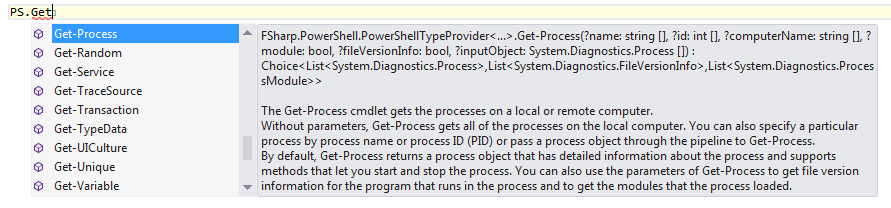
As you see in the sample, PowerShellTypeProvider has a single mandatory static parameter PSSnapIns that contains semicolon-separated list of snap-ins that you want to import into PowerShell. If you want to use only default ones, leave the string empty.
PowerShellIntellisenseYou can find list of snap-ins registered on your machine using Get-PSSnapin method.

PS-Get-PSSnapIns

Enjoy it. I will be happy to hear feadback (as well as comments about type provider source code from TP gurus).

FSharp.NLP.Stanford.Parser justification or StackOverflow questions understanding.

Some weeks ago, I announced FSharp.NLP.Stanford.Parser and now I want to clarify the goals of this project and show an example of usage.

First of all, this is not an attempt to re-implement some functionality of Stanford Parser. It is just a tiny dust layer that aimed to simplify interaction with Java collections (especially Iterable interface) and bring the power of F# constructs (like pattern matching and discrimination unions) to the code that deals with tagging results.

Task

Let’s start with some sample NLP task: We want to show related questions before user asks a new one (as it works on StackOverflow). There are many possible solutions for this task. Let’s look at one that at the first step tries to understand key phrases that identify this question and runs the search using them.

Approach

First of all, let’s choose some real questions from StackOverflow to analyze them:

Now we can use Stanford Parser GUI to visualize the structure of these questions:

q1
As you can see this question is about “F# project” and “object browser”
This question about "WebSharper", "Mono 3.0" and "Mac"
This question is about “WebSharper”, “Mono 3.0” and “Mac”
This one about "extra methods", "type providers" and "F#"
This one is about “extra methods”, “type providers” and “F#”
The last one about "MonoDevelop" and  "F# projects".
The last one is about “MonoDevelop” and “F# projects”.

We can notice that all phrases that we have selected are parts of noun phrases(NP). As a first solution we can try to analyze tags in the tree and select NP that contains word level tags like (NN,NNS,NNP,NNPS).

Solution

#r @"..\packages\IKVM.7.3.4830.0\lib\IKVM.Runtime.dll"
#r @"..\packages\IKVM.7.3.4830.0\lib\IKVM.OpenJDK.Core.dll"
#r @"..\packages\Stanford.NLP.Parser.3.2.0.0\lib\ejml-0.19-nogui.dll"
#r @"..\packages\Stanford.NLP.Parser.3.2.0.0\lib\stanford-parser.dll"

open edu.stanford.nlp.parser.lexparser
open edu.stanford.nlp.trees
open System

let model = @"d:\englishPCFG.ser.gz";

let options = [|"-maxLength"; "500";"-retainTmpSubcategories"; "-MAX_ITEMS"; "500000";"-outputFormat"; "penn,typedDependenciesCollapsed"|]
let lp = LexicalizedParser.loadModel(model, options)

let tlp = PennTreebankLanguagePack();
let gsf = tlp.grammaticalStructureFactory();

open java.util
let toSeq (iter:Iterator) =
    let rec loop (x:Iterator) = 
        seq { 
            yield x.next()
            if x.hasNext() then 
                yield! (loop x)
            }
    loop iter

let getTree question = 
    let toke = tlp.getTokenizerFactory().getTokenizer(new java.io.StringReader(question));
    let sentence = toke.tokenize();
    lp.apply(sentence)

let getKeyPhrases (tree:Tree) = 
    let isNPwithNNx (node:Tree)= 
        if (node.label().value() <> "NP") then false
        else node.getChildrenAsList().iterator()
             |> toSeq 
             |> Seq.cast<Tree>
             |> Seq.exists (fun x-> 
                let y = x.label().value()
                y= "NN" || y = "NNS" || y = "NNP" || y = "NNPS")
    let rec foldTree acc (node:Tree) = 
        let acc = 
            if (node.isLeaf()) then acc
            else node.getChildrenAsList().iterator()
                 |> toSeq 
                 |> Seq.cast<Tree>
                 |> Seq.fold 
                    (fun state x -> foldTree state x)
                    acc
        if isNPwithNNx node 
          then node :: acc
          else acc
    foldTree [] tree

let questions = 
    [|"How to make an F# project work with the object browser";
      "How can I build WebSharper on Mono 3.0 on Mac?";
      "Adding extra methods as type extensions in F#";
      "How to get MonoDevelop to compile F# projects?"|]

questions
|> Seq.iter (fun question ->
    printfn "Question : %s" question
    question 
    |> getTree 
    |> getKeyPhrases
    |> List.rev
    |> List.iter (fun p ->
        p.getLeaves().iterator() 
        |> toSeq 
        |> Seq.cast<Tree> 
        |> Seq.map(fun x-> x.label().value()) 
        |> Seq.toArray
        |> printfn "\t%A")
)

If you run this script, you will see the following:

Question : How to make an F# project work with the object browser
[|”an”; “F”; “#”; “project”; “work”|]
[|”the”; “object”; “browser”|]
Question : How can I build WebSharper on Mono 3.0 on Mac?
[|”WebSharper”|]
[|”Mono”; “3.0”|]
[|”Mac”|]
Question : Adding extra methods as type extensions in F#
[|”extra”; “methods”|]
[|”type”; “extensions”|]
[|”F”; “#”|]
Question : How to get MonoDevelop to compile F# projects?
[|”MonoDevelop”|]
[|”F”; “#”; “projects”|]

It is almost what we have expected. Results are good enough, but we can simplify the code and make it more readable using FSharp.NLP.Stanford.Parser.

#r @"..\packages\IKVM.7.3.4830.0\lib\IKVM.Runtime.dll"
#r @"..\packages\IKVM.7.3.4830.0\lib\IKVM.OpenJDK.Core.dll"
#r @"..\packages\Stanford.NLP.Parser.3.2.0.0\lib\ejml-0.19-nogui.dll"
#r @"..\packages\Stanford.NLP.Parser.3.2.0.0\lib\stanford-parser.dll"
#r @"..\packages\FSharp.NLP.Stanford.Parser.0.0.3\lib\FSharp.NLP.Stanford.Parser.dll"

open edu.stanford.nlp.parser.lexparser
open edu.stanford.nlp.trees
open System
open FSharp.IKVM.Util
open FSharp.NLP.Stanford.Parser

let model = @"d:\englishPCFG.ser.gz";

let options = [|"-maxLength"; "500";"-retainTmpSubcategories"; "-MAX_ITEMS"; "500000";"-outputFormat"; "penn,typedDependenciesCollapsed"|]
let lp = LexicalizedParser.loadModel(model, options)

let tlp = PennTreebankLanguagePack();
let gsf = tlp.grammaticalStructureFactory();

let getTree question = 
    let toke = tlp.getTokenizerFactory().getTokenizer(new java.io.StringReader(question));
    let sentence = toke.tokenize();
    lp.apply(sentence)

let getKeyPhrases (tree:Tree) = 
    let isNNx = function
        | Label NN | Label NNS | Label NNP | Label NNPS -> true
        | _ -> false
    let isNPwithNNx = function
        | Label NP as node 
            when node.getChildrenAsList() |> Iterable.castToSeq<Tree> |> Seq.exists isNNx
            -> true
        | _ -> false
    let rec foldTree acc (node:Tree) = 
        let acc = 
            if (node.isLeaf()) then acc
            else node.getChildrenAsList()
                 |> Iterable.castToSeq<Tree>
                 |> Seq.fold 
                    (fun state x -> foldTree state x)
                    acc
        if isNPwithNNx node 
          then node :: acc
          else acc
    foldTree [] tree

let questions = 
    [|"How to make an F# project work with the object browser";
      "How can I build WebSharper on Mono 3.0 on Mac?";
      "Adding extra methods as type extensions in F#";
      "How to get MonoDevelop to compile F# projects?"|]

questions
|> Seq.iter (fun question ->
    printfn "Question : %s" question
    question 
    |> getTree 
    |> getKeyPhrases
    |> List.rev
    |> List.iter (fun p ->
        p.getLeaves()
        |> Iterable.castToArray<Tree>
        |> Array.map(fun x-> x.label().value()) 
        |> printfn "\t%A")
)

Look more carefully at getKeyPhrases function. All tags are strongly typed now. You can be sure that you will never make a typo, code is more readable and self explained:

STTags

let runFAKE = Download >> Unzip >> IKVMCompile >> Sign >> NuGet

This post is about one more FAKE use case. It will be not usual, but I hope useful script.

The problem I have faced to is recompilation of Stanford NLP products to .NET using IKVM.NET. I am sick of doing it manually. I posted instructions on how to do it, but I think that not many people have tried to do it. I believe that I can automate it end to end from downloading *.jar files to building NuGet packages. Of course, I have chosen FAKE for this task (Thanks to Steffen Forkmann for help with building NuGet packages).

The build scenario is the following:

  1. Download zip archive with *.jar files and trained models from Stanford NLP site (They can be large, up to 200Mb like for Stanford Parser, and I do not want to store all this stuff in my repository)
  2. Download IKVM.NET compiler as a zip archive. (It is not distributed with NuGet package and is not referenced from IKVM.NET site. It is really tricky to find it for the first time)
  3. Unzip all downloaded archives.
  4. Carefully recompile all required *.jar files considering all references.
  5. Sign all compiled assemblies to be able to deploy them to the GAC if needed.
  6. Compile NuGet package.

Steps 1-5 are not covered by FAKE OOTB tasks and I needed to implement them by myself. Since I wanted to use F# 3.0 features and .NET 4.5 capabilities (like System.IO.Compression.FileSystem.ZipFile for unzipping) I have chosen pre-release version of FAKE 2 that uses .NET 4 runtime. Pre-release version of FAKE can be restored from NuGet as follows:

"nuget.exe" "install" "FAKE" "-Pre" "-OutputDirectory" "..\build" "-ExcludeVersion"

Download manager

Requirements: For sure, I do not want to download files from the Internet during each build. Before downloading files, I want to check their presence on the file system, if they are missed then start downloading. During downloading, I want to see the progress status to be sure that everything works. The code that does it:

#r "System.IO.Compression.FileSystem.dll"
let downloadDir = @".\Download\"

let restoreFile url =
    let downloadFile file url =
        printfn "Downloading file '%s' to '%s'..." url file
        let BUFFER_SIZE = 16*1024
        use outputFileStream = File.Create(file, BUFFER_SIZE)
        let req = System.Net.WebRequest.Create(url)
        use response = req.GetResponse()
        use responseStream = response.GetResponseStream()
        let printStep = 100L*1024L
        let buffer = Array.create<byte> BUFFER_SIZE 0uy
        let rec download downloadedBytes =
            let bytesRead = responseStream.Read(buffer, 0, BUFFER_SIZE)
            outputFileStream.Write(buffer, 0, bytesRead)
            if (downloadedBytes/printStep <> (downloadedBytes-int64(bytesRead))/printStep)
                then printfn "\tDownloaded '%d' bytes" downloadedBytes
            if (bytesRead > 0) then download (downloadedBytes + int64(bytesRead))
        download 0L
    let file = downloadDir @@ System.IO.Path.GetFileName(url)
    if (not <| File.Exists(file))
        then url |> downloadFile file
    file
let unZipTo toDir file =
    printfn "Unzipping file '%s' to '%s'" file toDir
    Compression.ZipFile.ExtractToDirectory(file, toDir)
let restoreFolderFromUrl folder url =
    if not <| Directory.Exists folder
        then url |> restoreFile |> unZipTo (folder @@ @"..\")

let restoreFolderFromFile folder zipFile =
    if not <| Directory.Exists folder
        then zipFile |> unZipTo (folder @@ @"..\")

IKVM.NET Compiler

Compiler should be able to rebuild any number of *.jar files with predefined dependencies and sign result *.dll files if required.

let ikvmc =
    restoreFolderFromUrl @".\temp\ikvm-7.3.4830.0" "http://www.frijters.net/ikvmbin-7.3.4830.0.zip"
    @".\temp\ikvm-7.3.4830.0\bin\ikvmc.exe"
let ildasm = @"c:\Program Files (x86)\Microsoft SDKs\Windows\v7.0A\Bin\x64\ildasm.exe"
let ilasm = @"c:\Windows\Microsoft.NET\Framework64\v2.0.50727\ilasm.exe"
type IKVMcTask(jar:string) =
    member val JarFile = jar
    member val Version = "" with get, set
    member val Dependencies = List.empty<IKVMcTask> with get, set
let timeOut = TimeSpan.FromSeconds(120.0)
let IKVMCompile workingDirectory keyFile tasks =
    let getNewFileName newExtension (fileName:string) =
        Path.GetFileName(fileName).Replace(Path.GetExtension(fileName), newExtension)
    let startProcess fileName args =
        let result =
            ExecProcess
                (fun info ->
                    info.FileName <- fileName
                    info.WorkingDirectory <- FullName workingDirectory
                    info.Arguments <- args)
                timeOut
        if result<> 0 then
            failwithf "Process '%s' failed with exit code '%d'" fileName result
    let newKeyFile =
        let file = workingDirectory @@ (Path.GetFileName(keyFile))
        File.Copy(keyFile, file, true)
        Path.GetFileName(file)
    let rec compile (task:IKVMcTask) =
        let getIKVMCommandLineArgs() =
            let sb = Text.StringBuilder()
            task.Dependencies |> Seq.iter
               (fun x ->
                   compile x
                   x.JarFile |> getNewFileName ".dll" |> bprintf sb " -r:%s")
            if not <| String.IsNullOrEmpty(task.Version)
                then task.Version |> bprintf sb " -version:%s"
            bprintf sb " %s -out:%s"
                (task.JarFile |> getNewFileName ".jar")
                (task.JarFile |> getNewFileName ".dll")
            sb.ToString()
        File.Copy(task.JarFile, workingDirectory @@ (Path.GetFileName(task.JarFile)) ,true)
        startProcess ikvmc (getIKVMCommandLineArgs())

        if (File.Exists(keyFile)) then
            let dllFile = task.JarFile |> getNewFileName ".dll"
            let ilFile = task.JarFile |> getNewFileName ".il"
            startProcess ildasm (sprintf " /all /out=%s %s" ilFile dllFile)
            File.Delete(dllFile)
            startProcess ilasm (sprintf " /dll /key=%s %s" (newKeyFile) ilFile)
    tasks |> Seq.iter compile

Results

Using this helper function, build scripts come out pretty straightforward and easy. For example, recompilation of Stanford Parser looks as follows:

Target "RunIKVMCompiler" (fun _ ->
    restoreFolderFromUrl
        @".\temp\stanford-parser-full-2013-06-20"
        "http://nlp.stanford.edu/software/stanford-parser-full-2013-06-20.zip"
    restoreFolderFromFile
        @".\temp\stanford-parser-full-2013-06-20\edu"
        @".\temp\stanford-parser-full-2013-06-20\stanford-parser-3.2.0-models.jar"

    [IKVMcTask(@"temp\stanford-parser-full-2013-06-20\stanford-parser.jar",
        Version=version,
        Dependencies =
            [IKVMcTask(@"temp\stanford-parser-full-2013-06-20\ejml-0.19-nogui.jar",
                       Version="0.19.0.0")])]
    |> IKVMCompile ikvmDir @".\Stanford.NLP.snk"
)

All source code is available on GitHub.
Rattle for F# devs

The strange thing happens, Rattle is an awesome tool but it is not so well known for devs as it should be. We definitely need to fix this.

Rattle (the R Analytical Tool To Learn Easily) presents statistical and visual summaries of data, transforms data into forms that can be readily modelled, builds both unsupervised and supervised models from the data, presents the performance of models graphically, and scores new datasets.

At first, we need to install new package from CRAN. To do so, just open R console and type the following:

install.packages("rattle")

Here, you need to check that you have RProvider installed.

Install-Package RProvider

Now we are ready to start.

#I @"..\packages\RProvider.1.0.0\lib"
#r "RDotNet.dll"
#r "RProvider.dll"

open RProvider.rattle
R.rattle() |> ignore

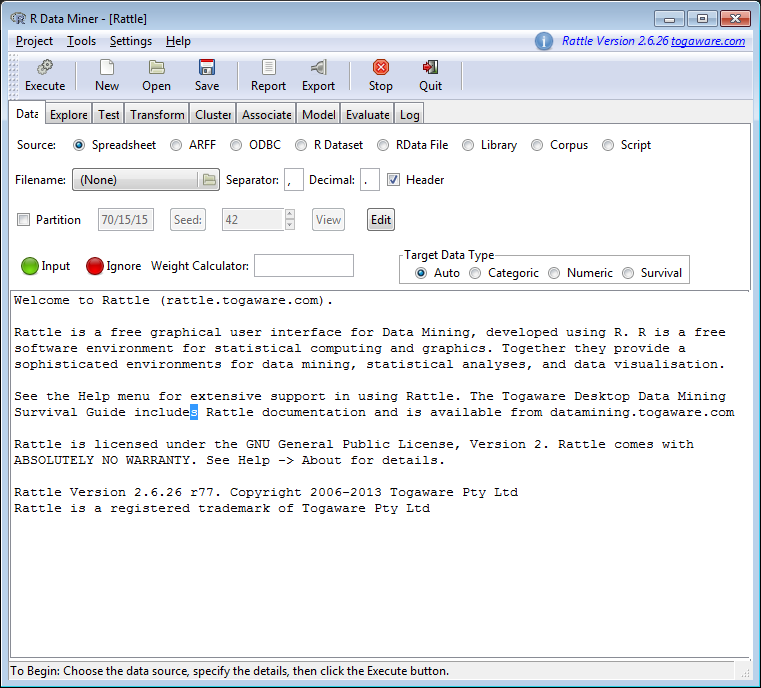
Execute this short snippet and you should see Rattle start screen similar to the following:rattle_start You are ready to study your data without a single line of code.

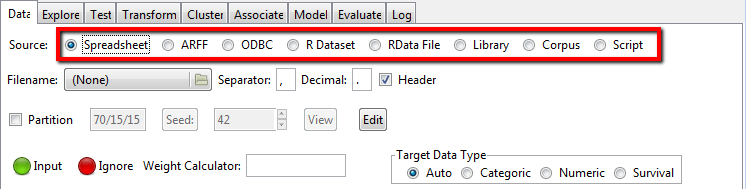
Load you data from wide range of sources:

rattle_load

Explore your data using strongest statistic technics:

rattle_explore

Test the nature of your data:

rattle_test

Transform your data:

rattle_transform

Cluster your data:

rattle_cluster

Identify relationships or affinities:

rattle_associate

Experiment with different models on your data, before implementing any of them in your favorite language:

rattle_model

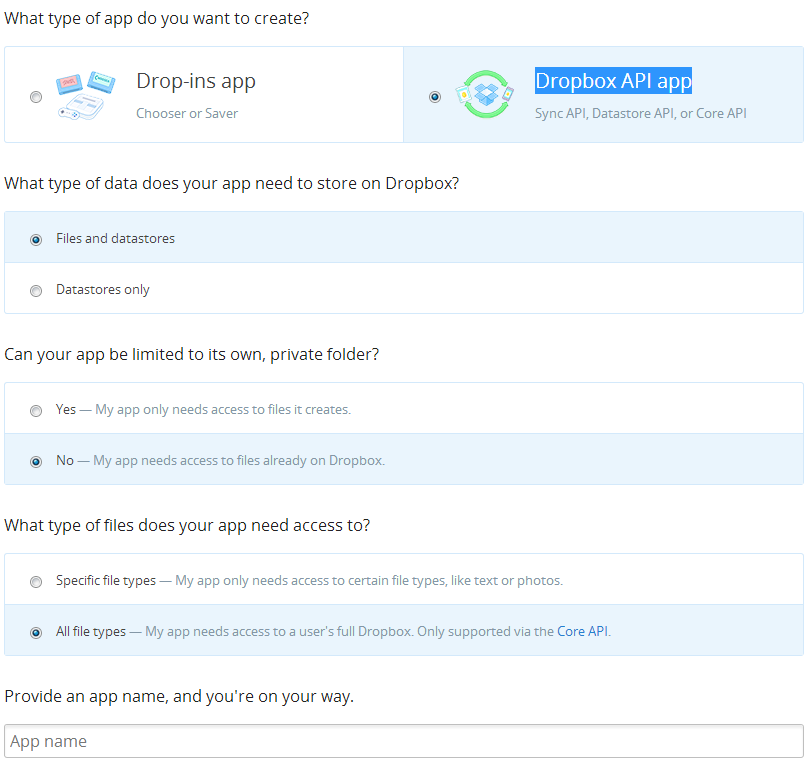
Evaluate quality of your model:

rattle_evaluate

Learn your data!

Upd: If you are interested in it, then I can recommend the following book.

Stanford Log-linear Part-Of-Speech Tagger is available on NuGet

Update (2014, January 3): Links and/or samples in this post might be outdated. The latest version of samples are available on new Stanford.NLP.NET site.

nlp-logo-navbarThere is one more tool that has become ready on NuGet today. It is a Stanford Log-linear Part-Of-Speech Tagger. This is a third one Stanford NuGet package published by me, previous ones were a “Stanford Parser“ and “Stanford Named Entity Recognizer (NER)“. I have already posted about this tool with guidance on how to recompile it and use from F# (see “NLP: Stanford POS Tagger with F# (.NET)“). Please follow next steps to get started:

F# Sample

For more details see source code on GitHub.

let model = @"..\..\..\..\temp\stanford-postagger-2013-06-20\models\wsj-0-18-bidirectional-nodistsim.tagger"

let tagReader (reader:Reader) =
    let tagger = MaxentTagger(model)
    MaxentTagger.tokenizeText(reader)
    |> Iterable.toSeq
    |> Seq.iter (fun sentence ->
        let tSentence = tagger.tagSentence(sentence :?> List)
        printfn "%O" (Sentence.listToString(tSentence, false))
    )

let tagFile (fileName:string) =
    tagReader (new BufferedReader(new FileReader(fileName)))

let tagText (text:string) =
    tagReader (new StringReader(text))

C# Sample

For more details see source code on GitHub.

public static class TaggerDemo
{
    public const string Model =
        @"..\..\..\..\temp\stanford-postagger-2013-06-20\models\wsj-0-18-bidirectional-nodistsim.tagger";

    private static void TagReader(Reader reader)
    {
        var tagger = new MaxentTagger(Model);
        foreach (List sentence in MaxentTagger.tokenizeText(reader).toArray())
        {
             var tSentence = tagger.tagSentence(sentence);
             System.Console.WriteLine(Sentence.listToString(tSentence, false));
        }
    }

    public static void TagFile (string fileName)
    {
        TagReader(new BufferedReader(new FileReader(fileName)));
    }

    public static void TagText(string text)
    {
        TagReader(new StringReader(text));
    }
}

As a result of both samples you will see the same output. For example, if you start program with these parameters:

1 text "A Part-Of-Speech Tagger (POS Tagger) is a piece of software that reads 
text in some language and assigns parts of speech to each word (and other token), 
such as noun, verb, adjective, etc., although generally computational 
applications use more fine-grained POS tags like 'noun-plural'."

Then you will see following on your screen:

A/DT Part-Of-Speech/NNP Tagger/NNP -LRB-/-LRB- POS/NNP Tagger/NNP -RRB-/-RRB- 
is/VBZ a/DT piece/NN of/IN software/NN that/WDT reads/VBZ text/NN in/IN some/DT 
language/NN and/CC assigns/VBZ parts/NNS of/IN speech/NN to/TO each/DT word/NN 
-LRB-/-LRB- and/CC other/JJ token/JJ -RRB-/-RRB- ,/, such/JJ as/IN noun/JJ ,/, 
verb/JJ ,/, adjective/JJ ,/, etc./FW ,/, although/IN generally/RB computational/JJ 
applications/NNS use/VBP more/RBR fine-grained/JJ POS/NNP tags/NNS like/IN `/`` 
noun-plural/JJ '/'' ./.

Stanford Named Entity Recognizer (NER) is available on NuGet

Update (2017, July 24): Links and/or samples in this post might be outdated. The latest version of samples is available on new Stanford.NLP.NET site.

nlp-logo-navbarOne more tool from Stanford NLP product line became available on NuGet today. It is the second library that was recompiled and published to the NuGet. The first one was the “Stanford Parser“. The second one is Stanford Named Entity Recognizer (NER). I have already posted about this tool with guidance on how to recompile it and use from F# (see “NLP: Stanford Named Entity Recognizer with F# (.NET)“). There are some other interesting things happen, NER is kind of hot topic. I recently saw a question about C# NER on CodeProject, Flo asked me about NER in the comment of another post. So, I am happy to make it wider available. The flow of use is as follows:

F# Sample

F# sample is pretty much the same as in ”NLP: Stanford Named Entity Recognizer with F# (.NET)” post. For more details see source code on GitHub.

let main file =
    let classifier =
        CRFClassifier.getClassifierNoExceptions(
             @"..\..\..\..\temp\stanford-ner-2013-06-20\classifiers\english.all.3class.distsim.crf.ser.gz")
    // For either a file to annotate or for the hardcoded text example,
    // this demo file shows two ways to process the output, for teaching
    // purposes.  For the file, it shows both how to run NER on a String
    // and how to run it on a whole file.  For the hard-coded String,
    // it shows how to run it on a single sentence, and how to do this
    // and produce an inline XML output format.
    match file with
    | Some(fileName) ->
        let fileContents = File.ReadAllText(fileName)
        classifier.classify(fileContents)
        |> Iterable.toSeq
        |> Seq.cast<java.util.List>
        |> Seq.iter (fun sentence ->
            sentence
            |> Iterable.toSeq
            |> Seq.cast<CoreLabel>
            |> Seq.iter (fun word ->
                 printf "%s/%O " (word.word()) (word.get(CoreAnnotations.AnswerAnnotation().getClass()))
            )
            printfn ""
        )
    | None ->
        let s1 = "Good afternoon Rajat Raina, how are you today?"
        let s2 = "I go to school at Stanford University, which is located in California."
        printfn "%s\n" (classifier.classifyToString(s1))
        printfn "%s\n" (classifier.classifyWithInlineXML(s2))
        printfn "%s\n" (classifier.classifyToString(s2, "xml", true));
        classifier.classify(s2)
        |> Iterable.toSeq
        |> Seq.iteri (fun i coreLabel ->
            printfn "%d\n:%O\n" i coreLabel
        )

C# Sample

C# version is quite similar. For more details see source code on GitHub.

class Program
{
    public static CRFClassifier Classifier =
        CRFClassifier.getClassifierNoExceptions(
             @"..\..\..\..\temp\stanford-ner-2013-06-20\classifiers\english.all.3class.distsim.crf.ser.gz");

    // For either a file to annotate or for the hardcoded text example,
    // this demo file shows two ways to process the output, for teaching
    // purposes.  For the file, it shows both how to run NER on a String
    // and how to run it on a whole file.  For the hard-coded String,
    // it shows how to run it on a single sentence, and how to do this
    // and produce an inline XML output format.

    static void Main(string[] args)
    {
        if (args.Length > 0)
        {
            var fileContent = File.ReadAllText(args[0]);
            foreach (List sentence in Classifier.classify(fileContent).toArray())
            {
                foreach (CoreLabel word in sentence.toArray())
                {
                    Console.Write( "{0}/{1} ", word.word(), word.get(new CoreAnnotations.AnswerAnnotation().getClass()));
                }
                Console.WriteLine();
            }
        } else
        {
            const string S1 = "Good afternoon Rajat Raina, how are you today?";
            const string S2 = "I go to school at Stanford University, which is located in California.";
            Console.WriteLine("{0}\n", Classifier.classifyToString(S1));
            Console.WriteLine("{0}\n", Classifier.classifyWithInlineXML(S2));
            Console.WriteLine("{0}\n", Classifier.classifyToString(S2, "xml", true));

            var classification = Classifier.classify(S2).toArray();
            for (var i = 0; i < classification.Length; i++)
            {
                Console.WriteLine("{0}\n:{1}\n", i, classification[i]);
            }
        }
    }
}

As a result of both samples you will see the following output:

Don/PERSON Syme/PERSON is/O an/O Australian/O computer/O scientist/O and/O a/O 
Principal/O Researcher/O at/O Microsoft/ORGANIZATION Research/ORGANIZATION ,/O 
Cambridge/LOCATION ,/O U.K./LOCATION ./O He/O is/O the/O designer/O and/O 
architect/O of/O the/O F/O #/O programming/O language/O ,/O described/O by/O 
a/O reporter/O as/O being/O regarded/O as/O ``/O the/O most/O original/O new/O 
face/O in/O computer/O languages/O since/O Bjarne/PERSON Stroustrup/PERSON 
developed/O C/O +/O +/O in/O the/O early/O 1980s/O ./O
Earlier/O ,/O Syme/PERSON created/O generics/O in/O the/O ./O NET/O Common/O 
Language/O Runtime/O ,/O including/O the/O initial/O design/O of/O generics/O 
for/O the/O C/O #/O programming/O language/O ,/O along/O with/O others/O 
including/O Andrew/PERSON Kennedy/PERSON and/O later/O Anders/PERSON 
Hejlsberg/PERSON ./O Kennedy/PERSON ,/O Syme/PERSON and/O Yu/PERSON also/O 
formalized/O this/O widely/O used/O system/O ./O
He/O holds/O a/O Ph.D./O from/O the/O University/ORGANIZATION of/ORGANIZATION 
Cambridge/ORGANIZATION ,/O and/O is/O a/O member/O of/O the/O WG2/O .8/O 
working/O group/O on/O functional/O programming/O ./O He/O is/O a/O co-author/O 
of/O the/O book/O Expert/O F/O #/O 2.0/O ./O
In/O the/O past/O he/O also/O worked/O on/O formal/O specification/O ,/O 
interactive/O proof/O ,/O automated/O verification/O and/O proof/O description/O 
languages/O ./O