 I had the opportunity to play with NDepend and could not keep from trying it on F# code. It is interesting to see how analysis rules that designed for languages like C# apply to functional-first F#.
When I downloaded NDepend from the official site, I expected to get regular msi installer with wizard that passes me through all steps and does everything it needs. But it was not true, I got a zip archive with binaries that I needed to unzip manually and execute some binaries that integrate NDepend with my Visual Studio 2013 and Reflector. Installation guide is simple enough and detailed, I have no problems to follow it step by step and configure everything. Nevertheless, installation process seems rather unusual for today.
When I executed a standalone version of NDepend(VisualNDepend) and opened first project that I found – I got stuck! So much information on my screen, I could not understand where to look. My screen looked like a spaceship control panel and I was afraid to touch it ;). I decided to go back to Getting Started page and watch the introduction video. Luckily, NDepend looks pretty well documented.
Now I needed to choose some F# project to do “a code review”. I wanted to find something cool, large and complicated for clarity. And here was my first problem… The first condition is ‘cool’, but most of open source F# projects are cool. This constrain did not help me to reduce number of choices. The next condition is ‘large’, but we do not have really huge F# projects. Pithiness is one of the main F# advantages (F# helps to dramatically decrease code size and code complexity by design). Even F# Compiler is not so big; it is much smaller than my usual C# project. The last condition is ‘complexity’; here situation is similar to ‘size’. F# really helps to keep complexity at manageable level. Anyway, I needed to choose one…
Finally, I have chosen FSharp.Compiler.Service project for analysis (It is a relatively new project). I have no idea what is inside, so it will be more interesting to explore source code in such unusual(for me) way. It is an extremely cool project, which is probably one step further for F# and a fundamental improvement that will open a lot of new doors. (You can read more about what it for and what it can do on the official F# Compiler Services site). This project must be large enough and complicated because it is a brand new extended version of the powerful compiler.

Joking aside! Let’s go deeper to the code.
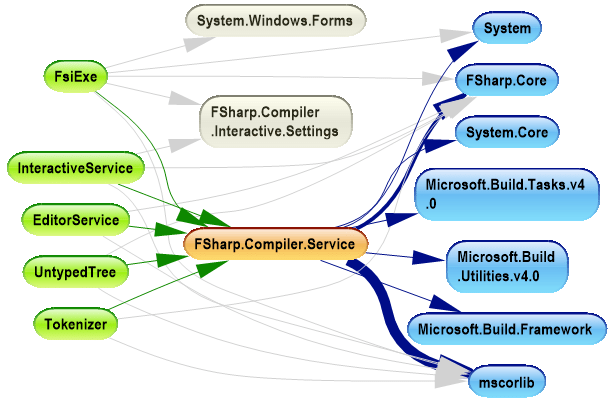
In the dependency graph picture, we see the primary assembly FSharp.Compiler.Service (orange in the picture). This assembly depends on minimal set of assemblies from .NET framework (they are marked blue). Also we see that this GitHub project contains sample projects that are built on top of the compiler service (marked green). So project structure is simple enough and quite clear. The same dependencies we can visualize as a dependency matrix:
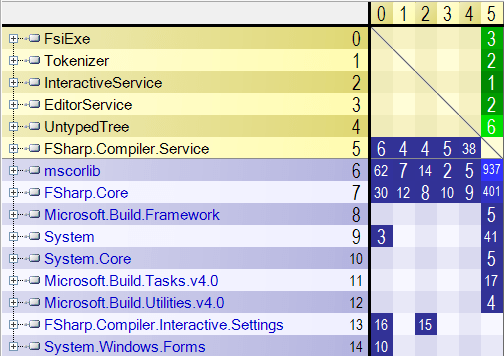
In this matrix, we see more quantitative data about dependencies. Numbers in the cells show the number of assembly members used by one assembly from another. Using these numbers, we can make some conclusions like “UntypedTree sample uses more functionality from FSharp.Compiler.Service than others” or “FsiExe is only one sample that has Windows Forms user interface”.
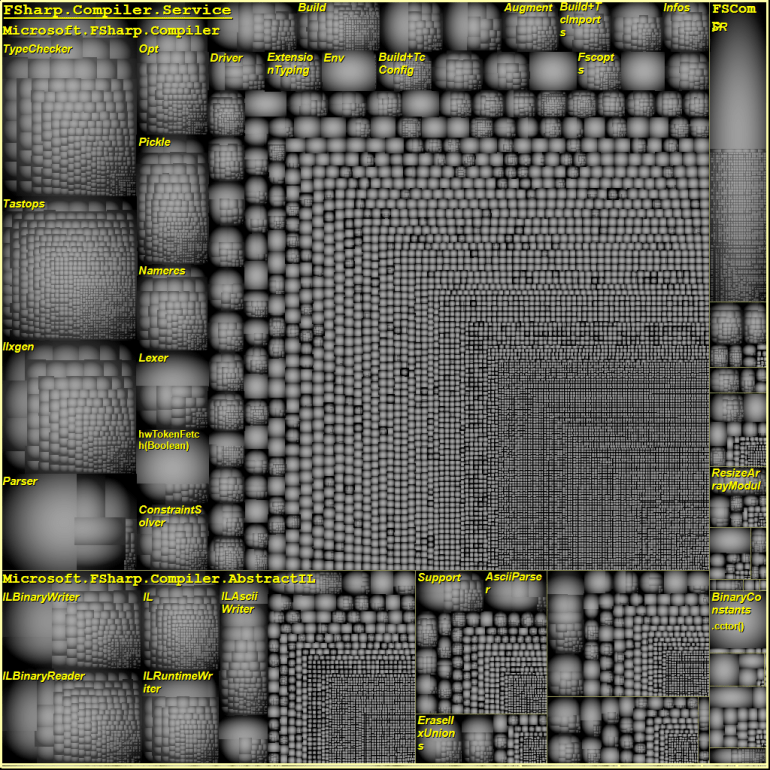
NDepend also provides one crazy interesting report – Treemap Metric View. This report is able to build a tree of namespaces where size of each node will depend on number of LOC in this namespace. Such plots can show where all complexity is concentrated. To extract more useful information from this plot, you need to have an understanding of the code.
Finally, the most intriguing part, the analysis dashboard:
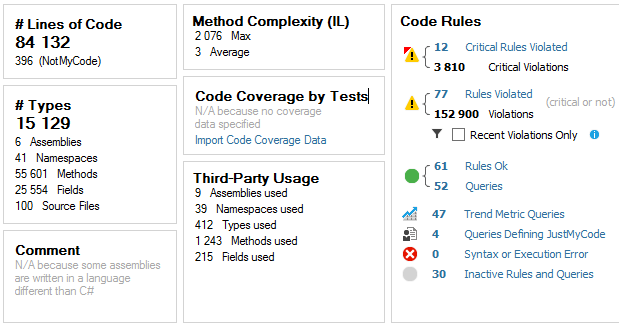
Based on these stats, we see that FSharp.Compiler.Service contains more than 84.000 lines of code, which is really a lot for F# project; the average method complexity is 3 that is pretty nice. Also NDepend found violations of 12 critical rules, let’s see deeper what they are.
Unfortunately, NDepend does not support navigation to method declaration for non-C# compiled source code and this fact complicates observion of F# code.
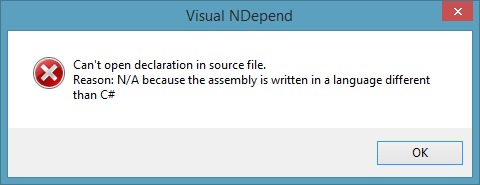 To avoid this error (for methods) you need to open instance of VS with your solution and NDepend navigate you directly where you wish.
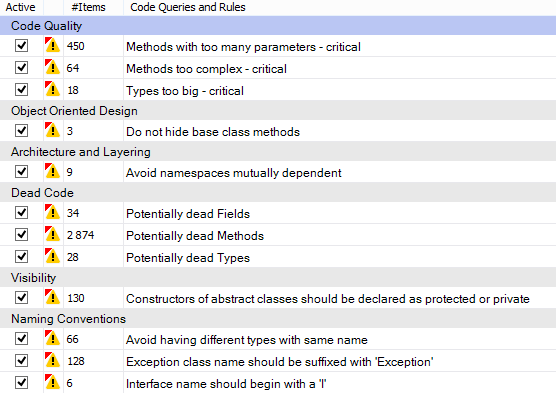
Let’s dwell on critical violated rules:
Code Quality:
Methods with too many parameters – critical
This rule is violated when methods contain more than 8 parameters. I am going to agree here with NDepend – F# compiler source code has such sin. I do not know exact reason of it, but it should be reasonably for compiler/parser source code.
Methods too complex – critical
This rule is violated when methods have ILCyclomaticComplexity > 40 and ILNestingDepth > 4. As I see this happens mostly because NDepend does not understand definition of functions inside other functions (That does not supported by C#). Most of the code that violate this rule is pretty readable. Yes, functionality is wrapped into one large method, but inside it is split into small handy readable functions.
Types too big – critical
This rule is violated when types contain more than 500 lines of code. This story mostly not about F# too. F# compiles modules to the .NET classes. You are allowed to have as large modules as you need. Modules are more like namespaces than classes and constrain with 500 LOC is not applicable for them.
Object Oriented Design
Do not hide base class methods
The rule is self-explanatory. But in current case we should not pay attention because these 3 violations happened in source code of ProvidedType where this is a part of magic of type providers.
Architecture and Layering
Avoid namespaces mutually dependent
I am not sure here, but it also looks like issue related to the F# modules. NDepend reasoning about namespace dependencies without regards to that namespaces are divided into modules.
Dead Code
Potentially dead Types, Methods and Fields
Hmm… It really looks like that there are some methods inside the compiler that were implemented but not used inside and not exposed to external world. It is probably a secret weapon of F#, sketches of new coming features.
Visibility
Constructors of abstract classes should be declared as protected or private
This issue is related to uses of F# discriminated unions. F# compiles discriminated unions into class hierarchy, where root abstract class has a default parameter-less constructor with default visibility (that is internal for F#)
Naming Conventions
Note that C# and F# have a different development guides with a bit different naming conventions.
Avoid having different types with same name
Mostly this rule is also violated by F# modules. It is side effect of F# modules compilation.
Exception class name should be suffixed with ‘Exception’
Exception suffix is rarely used in F# because language has a special exception keyword to define F# exceptions.
Interface name should begin with a ‘I’
F# compiles types to interfaces when all members are abstract. Actually, sometimes we forget to mention I.
Conclusion
Finally, NDepend is a really nice tool. It has some barrier of entry that forces you to refer to documentation, but it looks like a very powerful tool in skillful hand. It is absolutely invaluable in C# world when you want to understand what the hell is going on in the code, but also applicable to F# to see the big picture.
NDepend is highly customizable. Default set of code verification rules is targeted to C# source code, but you can modify existing rules and/or create new ones that will be designed to F#. Hopefully, one day such rules will become available in default distribution and F# will be officially supported by NDepend team.
P.S. I have tried only a basic feature set; you can read more about advanced features in the official documentation.