IIS hosted products (Office Online Server) monitoring with Application Insights Status Monitor

There are some cases when you host and/or maintain 3rd-party .NET products in IIS and logs are not enough to understand the importance of some issues and find root causes. You may need the high-level view of what’s actually going on live.

Fortunately, Microsoft has a tool called Application Insights Status Monitor that can help you to instrument your IIS site with required configs to start collecting telemetry data into Application Insights.

There are blog posts like “Configure an IIS Server To Use Application Insight” that already provide step by step guide on how to use the tool.

In this post, I want to go one step further and share some tips on how to use it for Microsoft products. So here you can find extra steps which you may need during setup on Office Online Server, but I guess that you can do the same with on-premise SharePoint farm as well.

Configure Telemetry for Office Online Server

  1. Create a new instance of Application Insights
  2. Install Application Insight Status Monitor on machines with Office Online Server. You can do it using the direct link http://go.microsoft.com/fwlink/?LinkID=506648 that will run installation using Web Platform Installer.
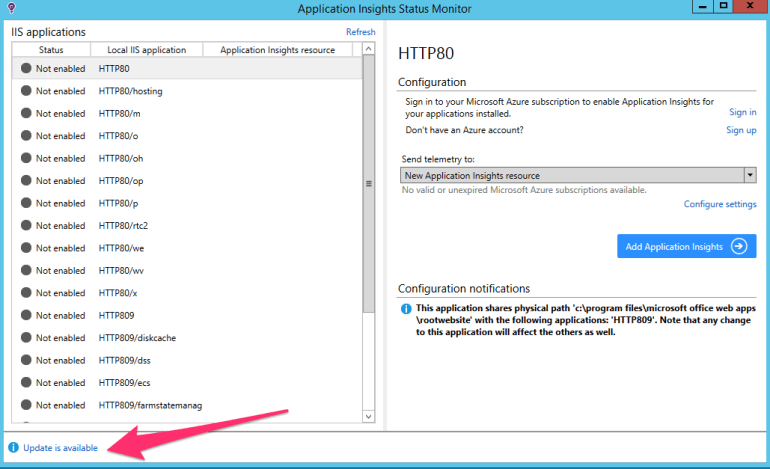
  3. Download update (the latest SDK version from NuGet). Click “Update is available” and then “Install Update”.EPAM_Laptop.png
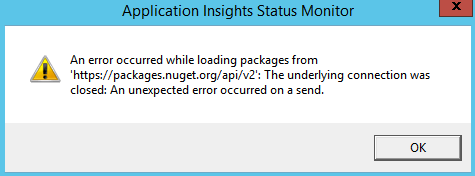
    You may see an error message that app cannot download new SDK from NuGet
    EPAM_Laptop.png
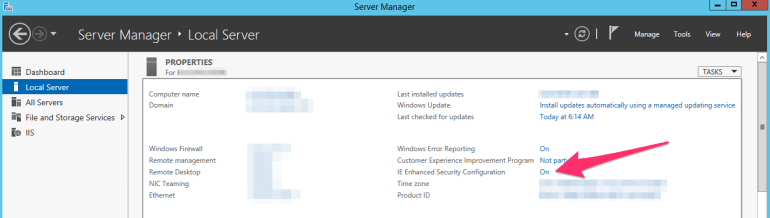
    This can mean that IE Enhanced Security Configuration is enabled on your server, in this case, you need to temporarily turn it off:

    1. Open Server Manager
    2. Go to Local Server, find “IE Enhanced Security Configuration” and turn it off.
      Do not forget to turn it on again when you finish this guide!EPAM_Laptop.png
  4. Sign in using your Azure account
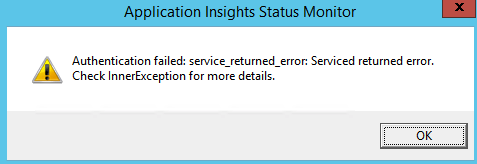
    1. Your sign in flow may end with error “Authentication failed: service_returned_error: Service returned error. Check InnerException for more details
      EPAM_Laptop.png
    2. Go to Event Viewer\Windows Logs\System. If you see Errors from Schannel with a message like “A fatal error occurred while creating an SSL client credential. The internal error state is 10013.” then it is System-wide crypto issue and you need to allow “Use FIPS compliant algorithms for encryption, hashing, and signing” and try to sign in again.
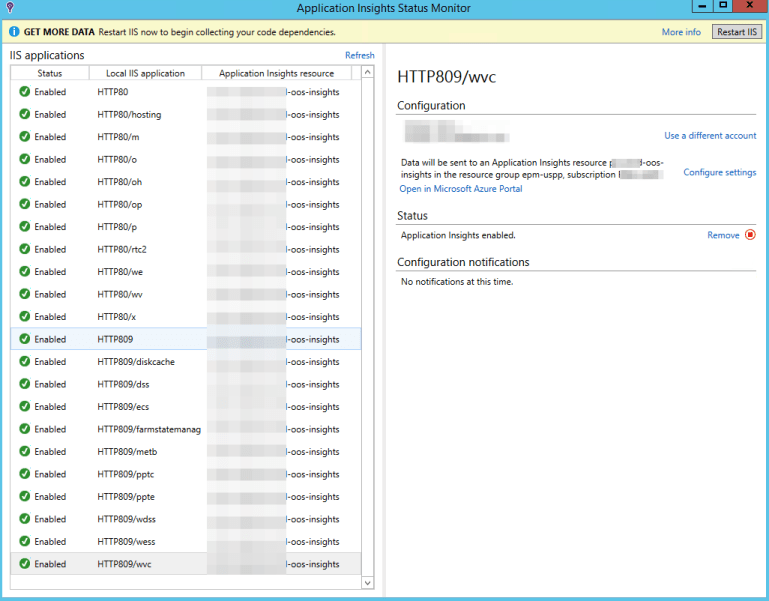
  5. Configure each IIS application to send telemetry to Application Insights resource created in step 1.
    EPAM_Laptop.png
  6. Restart IIS from the Status Monitor app to start collecting telemetry data.
  7. Wait for some time to collect enough data to analyze (for example one day).
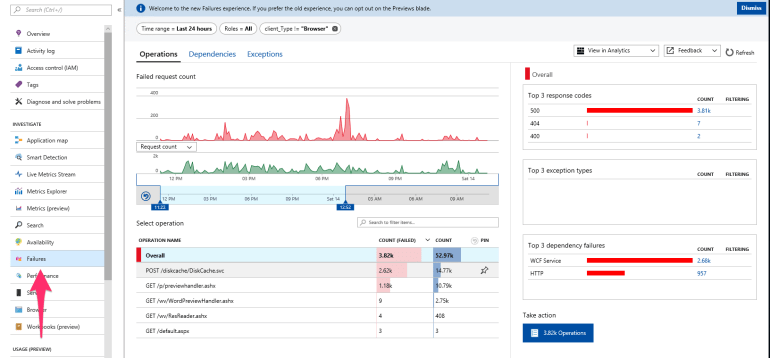
  8. After that, you can start digging deeper into collected stats to better understand what’s actually going on.
    EPAM_Laptop.png
  9. Turn on IE Enhanced Security Configuration.

Performance Counters Note: Actually Application Insights Status Monitor does two simple things: updates web.config to incorporate Application Insights and puts ApplicationInsights.config beside with configuration. By default, it is configured to collect data from performance counters, but it may not work if your Application Pool is running under an account that does not have permissions to access performance counters. Note, that in this case, you have to add App Pool account to Performance Monitor Users group. Read more.

How to restore Visual Studio 2015 after the Update 1 (dependency dance)

Update 12/11/2015: Two issues were opened as a result of investigation “Installing the fsharp power tools before installing adding VS2015 update 1 breaks Roslyn” in Visual F# Power Tools repository and “We read some settings from the devenv.exe.config file — devenv.exe.config is not user mutable” in Visual F# repository.

This post is prepared especially to save F# Advent Calendar in English 2015 schedule.

Short version of the fix posted on Stack Overflow.

Note: Described fix is not permanent, VS may reset your changes in devenv.exe.config file after the new extensions install/update.

Yesterday Microsoft released the first update to Visual Studio 2015 that contains some pretty cool features and improvements, but this update has broken “some” machines.

During the first run after the update, you may see errors like this one:

VSexception

or even NullReferenceException when you try to open the list of installed extensions

In order to fix all this stuff you need to check ActivityLog.xml file (c:\Users\{user_name}\AppData\Roaming\Microsoft\VisualStudio\14.0\) and find the exact error message. Most probably, you will see something like this

SetSite failed for package [CSharpPackage][Could not load file or assembly ‘System.Collections.Immutable, Version=1.1.36.0, Culture=neutral, PublicKeyToken=b03f5f7f11d50a3a’ or one of its dependencies. The located assembly’s manifest definition does not match the assembly reference. (Exception from HRESULT: 0x80131040)]:{ at Microsoft.VisualStudio.LanguageServices.Implementation.LanguageService.AbstractPackage`2.Initialize() at Microsoft.VisualStudio.LanguageServices.CSharp.LanguageService.CSharpPackage.Initialize() at Microsoft.VisualStudio.Shell.Package.Microsoft.VisualStudio.Shell.Interop.IVsPackage.SetSite(IServiceProvider sp)}

This error says that bindingRedirect set up incorrectly for VS process. You need to find file devenv.exe.config in c:\Users\{user_name}\AppData\Local\Microsoft\VisualStudio\14.0\ and update it. (Or c:\Program Files (x86)\Microsoft Visual Studio 14.0\Common7\IDE\, depending of location of your devenv.exe file).

For this particular case, you should find rows that setup redirects for System.Collections.Immutable and change newVersion from 1.1.36.0 to 1.1.37.0. Final config should look like this

<dependentAssembly>
  <assemblyIdentity name="System.Collections.Immutable" publicKeyToken="b03f5f7f11d50a3a" culture="neutral"/>
  <bindingRedirect oldVersion="1.0.27.0-1.1.65535.65535" newVersion="1.1.37.0"/>
</dependentAssembly>

After this fix, I was able to load my IDE and setup latest version of Azure SDK 2.8.1 that reset my changes in .config file and I needed to fix it once again.

Everything was OK, until I have tried to open my web project. This time it crashed with the following error in ActiveLog.xml:

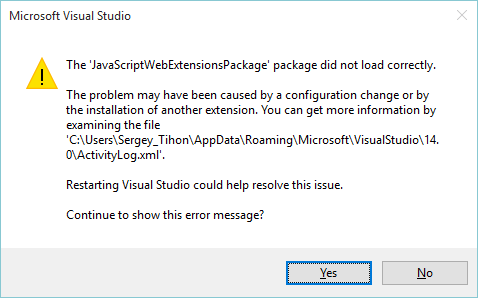
SetSite failed for package [JavaScriptWebExtensionsPackage][Could not load file or assembly 'Microsoft.VisualStudio.ProjectSystem.V14Only, Version=14.0.0.0, Culture=neutral, PublicKeyToken=b03f5f7f11d50a3a' or one of its dependencies. The located assembly's manifest definition does not match the assembly reference. (Exception from HRESULT: 0x80131040)]:{   at Microsoft.VisualStudio.Html.Package.Utilities.ProjectUtilities.IsImmersiveProject(IVsHierarchy hierarchy)   at Microsoft.VisualStudio.Html.Package.Project.WebProjectServices.IsWebProject(IVsHierarchy hierarchy)   at Microsoft.VisualStudio.Html.Package.Project.WebProjectServices.AdviseProject(IVsHierarchy hierarchy)   at Microsoft.VisualStudio.Html.Package.Project.WebProjectServices.AdviseOpenedProjects(IVsSolution solution)   at Microsoft.VisualStudio.Html.Package.Project.WebProjectServices.HookGlobalEvents()   at Microsoft.VisualStudio.Html.Package.Project.WebProjectServices.Microsoft.VisualStudio.Html.Package.Project.IWebProjectServices.get_OpenedProjects()   at Microsoft.VisualStudio.JavaScript.Web.Extensions.ReferenceAutoSync.ProjectServices.Initialize()   at Microsoft.VisualStudio.JavaScript.Web.Extensions.ReferenceAutoSync.ProjectServices..ctor()   at Microsoft.VisualStudio.JavaScript.Web.Extensions.JavaScriptWebExtensionsPackage.Initialize()   at Microsoft.VisualStudio.Shell.Package.Microsoft.VisualStudio.Shell.Interop.IVsPackage.SetSite(IServiceProvider sp)}

After the search on C:\ drive for Microsoft.VisualStudio.ProjectSystem.V14Only.dll I realized that my machine has version 14.1.0.0 instead of 14.0.0.0. So it looks like we need to add one more redirect in devenv.exe.config.

<dependentAssembly>
  <assemblyIdentity name="Microsoft.VisualStudio.ProjectSystem.V14Only" publicKeyToken="b03f5f7f11d50a3a" culture="neutral"/>
  <bindingRedirect oldVersion="14.0.0.0" newVersion="14.1.0.0"/>
</dependentAssembly>

After these fixes, I have not seen any other errors on my machine (at least for now). I hope that you understand the core idea on how to troubleshoot and fix such errors. So good luck to you and VS team with dependency fighting.

P.S. One more useful advice that can save you time – try to clear Component Model Cache if things start going wrong.

F# Neural Networks with FsLab

nn_previewNeural networks are very powerful tool and at the same time, it is not easy to use all its power. Now we are one step closer to it from F# and .NET. We will delegate model training to R using R Provider. Also we will use Deedle (that was announced some days ago) for handy data manipulation.
Prerequisites:

Learning from Data:

First of all, we need to load required assemblies into our FSI session. It is pretty easy with FsLab because package have bootstrapping script.

#load "..\packages\FsLab.0.1.4\FsLab.fsx"

The next step is to download and install missed R packages. For this demo, we need neuralnet for training neural network model and prediction, caret for data visualization.

open RProvider.utils
R.install_packages("MASS")
R.install_packages("pbkrtest")
R.install_packages("lattice")
R.install_packages("Matrix")
R.install_packages("mgcv")
R.install_packages("grid")
R.install_packages("neuralnet")
R.install_packages("caret")
R.install_packages("zoo")

Now we are ready to start work. We need to open namespaces and load a data set. For this demo, we have chosen iris data set, which is classic for lots of demos.

open Deedle
open RDotNet
open RProvider
open RProvider.``base``
open RProvider.datasets
open RProvider.neuralnet
open RProvider.caret

let iris : Frame<int, string> = R.iris.GetValue()

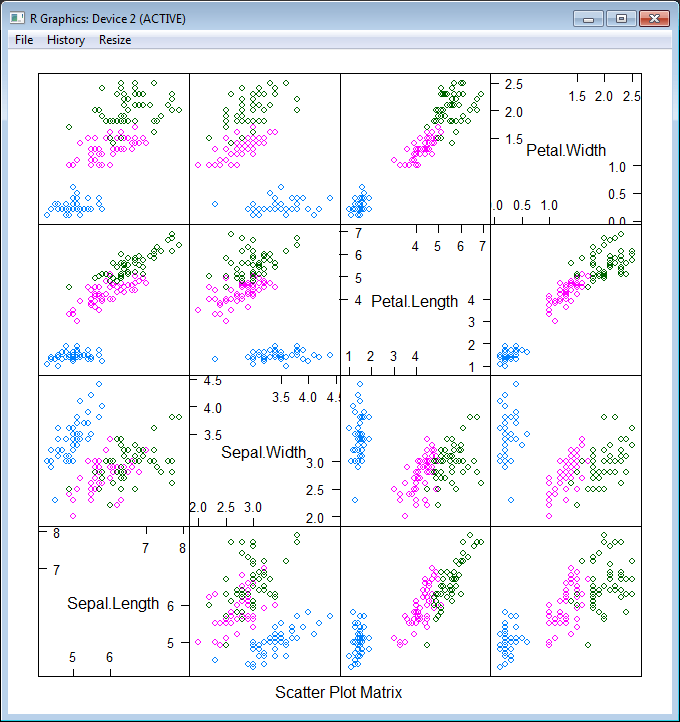
To better understand what we are going to do, let’s plot this data set. First of all, split data into two parts: features (Sepal.Length; Sepal.Width; Petal.Length; Petal.Width) and a target variable (Species). After that plot these data into different dimensions (different colors represent different Species).

let features =
iris
|> Frame.filterCols (fun c _ -> c <> "Species")
|> Frame.mapColValues (fun c -> c.As<double>())
let targets =
R.as_factor(iris.Columns.["Species"])

R.featurePlot(x = features, y = targets, plot = "pairs")

nn_features

As you see, our task is not trivial – we have 3 classes instead of 2 (that is not classic situation) and classes are not clearly separable. Nevertheless let’s try!  First of all, we need to split our data into 2 parts – training and testing data sets (70% vs 30%). The first part will be sent to the neural network for learning, the second one will be used for measuring model quality. Also let’s shuffle data to be honest.

iris.ReplaceColumn("Species", targets.AsNumeric())
let range = [1..iris.RowCount]
let trainingIdxs : int[] = R.sample(range, iris.RowCount*7/10).GetValue()
let testingIdxs : int[] = R.setdiff(range, trainingIdxs).GetValue()
let trainingSet = iris.Rows.[trainingIdxs]
let testingSet = iris.Rows.[testingIdxs]

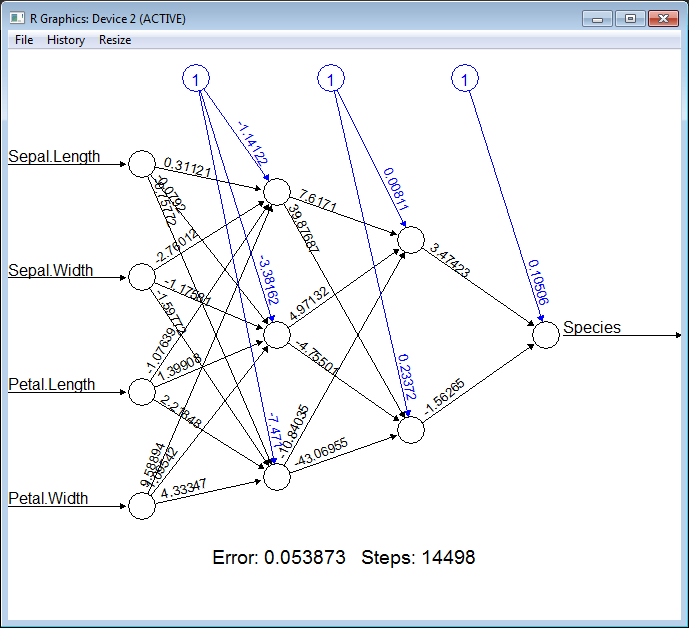
Now we are ready to train a neural network, all we need is to provide a formula (specify what is the input for our model and what is the output) “Species ~ Sepal.Length + Sepal.Width + Petal.Length + Petal.Width”, provide a data set and specify the structure of hidden layers. In the following example, we will train the network with two layers of hidden nodes, the first layer with 3 nodes and the second layer with 2 nodes.

let nn =
R.neuralnet(
"Species ~ Sepal.Length + Sepal.Width + Petal.Length + Petal.Width",
data = trainingSet, hidden = R.c(3,2),
err_fct = "ce", linear_output = true)

// Plot the resulting neural network with coefficients
R.eval(R.parse(text="library(grid)"))
R.plot_nn nn

nn_network

Cool! How simple it is. To be able to measure quality of the classification we need to split our training set into features and targets.

let testingFeatures =
testingSet
|> Frame.filterCols (fun c _ -> c <> "Species")
|> Frame.mapColValues (fun c -> c.As<double>())
let testingTargets =
testingSet.Columns.["Species"].As<int>().Values

To execute the neural network on the new data (apply our classification) we should call R.compute method and pass the training data set there.

let prediction =
R.compute(nn, testingFeatures)
.AsList().["net.result"].AsVector()
|> Seq.cast<double>
|> Seq.map (round >> int))

Finally, let’s compare prediction results with testing values:

let misclassified =
Seq.zip prediction testingTargets
|> Seq.filter (fun (a,b) -> a<>b)
|> Seq.length

printfn "Misclassified irises '%d' of '%d'" misclassified (testingSet.RowCount)

If you execute all these steps one by one, you will see that there are only ~3 misclassifies of 45 samples. Pretty well quality.

Full script:

#load "..\packages\FsLab.0.1.4\FsLab.fsx"

// You need to install 'nnet' and 'caret' packages if you do not have them
open RProvider.utils
R.install_packages("MASS")
R.install_packages("pbkrtest")
R.install_packages("lattice")
R.install_packages("Matrix")
R.install_packages("mgcv")
R.install_packages("grid")
R.install_packages("neuralnet")
R.install_packages("caret")
R.install_packages("zoo")

open Deedle
open RDotNet
open RProvider
open RProvider.``base``
open RProvider.datasets
open RProvider.neuralnet
open RProvider.caret

// Load data from R to Deedle frame
let iris : Frame<int, string> = R.iris.GetValue()

// Observe iris data set
let features =
iris
|> Frame.filterCols (fun c _ -> c <> "Species")
|> Frame.mapColValues (fun c -> c.As<double>())
let targets =
R.as_factor(iris.Columns.["Species"])

R.featurePlot(x = features, y = targets, plot = "pairs")

iris.ReplaceColumn("Species", targets.AsNumeric())
// Split data to training and testing sets (70% vs 30%)
let range = [1..iris.RowCount]
let trainingIdxs : int[] = R.sample(range, iris.RowCount*7/10).GetValue()
let testingIdxs : int[] = R.setdiff(range, trainingIdxs).GetValue()
let trainingSet = iris.Rows.[trainingIdxs]
let testingSet = iris.Rows.[testingIdxs]

// Train neural network
let nn =
R.neuralnet(
"Species ~ Sepal.Length + Sepal.Width + Petal.Length + Petal.Width",
data = trainingSet, hidden = R.c(3,2),
err_fct = "ce", linear_output = true)

// Plot the resulting neural network with coefficients
R.eval(R.parse(text="library(grid)"))
R.plot_nn nn

// Split testing set into features and targets
let testingFeatures =
testingSet
|> Frame.filterCols (fun c _ -> c <> "Species")
|> Frame.mapColValues (fun c -> c.As<double>())
let testingTargets =
testingSet.Columns.["Species"].As<int>().Values

// Predict `Species` for testingFeatures with neural network
let prediction =
R.compute(nn, testingFeatures)
.AsList().["net.result"].AsVector()
|> Seq.cast<double>
|> Seq.map (round >> int))

// Calculate number of misclassified irises
let misclassified =
Seq.zip prediction testingTargets
|> Seq.filter (fun (a,b) -> a<>b)
|> Seq.length

printfn "Misclassified irises '%d' of '%d'" misclassified (testingSet.RowCount)

P.S.

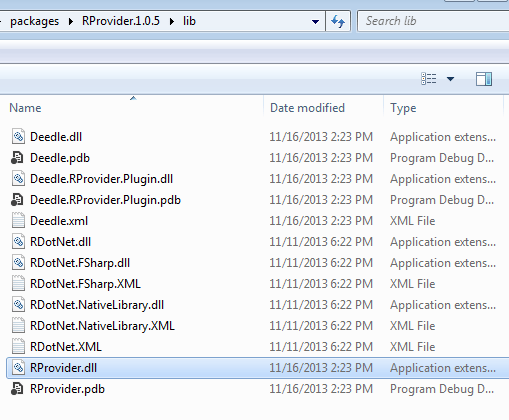
Notice, if you have problems with bootstrapping RProvider and/or converting R data frame to Deedle data frames – you need to verify that during installation of NuGet packages, all assemblies have been copied to RProvider’s lib sub-folder (see in the following picture).

deedle_rprovider

SuperSDG2: The maze game (С++ & OpenGL)

I have found that I have a large set of interesting and maybe sometimes useful applications. I have been programming for 14 years, I started from Pascal and tried Delphi, C++, Java, Perl, Clipper, FoxPro, Lua , JavaScript, C#, Octave, Python, Scala, R, F# (and may be something else that I currently do not remember). Through the years I created set of programs that may be interesting for someone else. These programs may look simple for experts, but I hope that they can be useful for beginners. So, I would like to add a new rubric to my blog, called “Apps”, where I will try to collect and share as much as I can find)

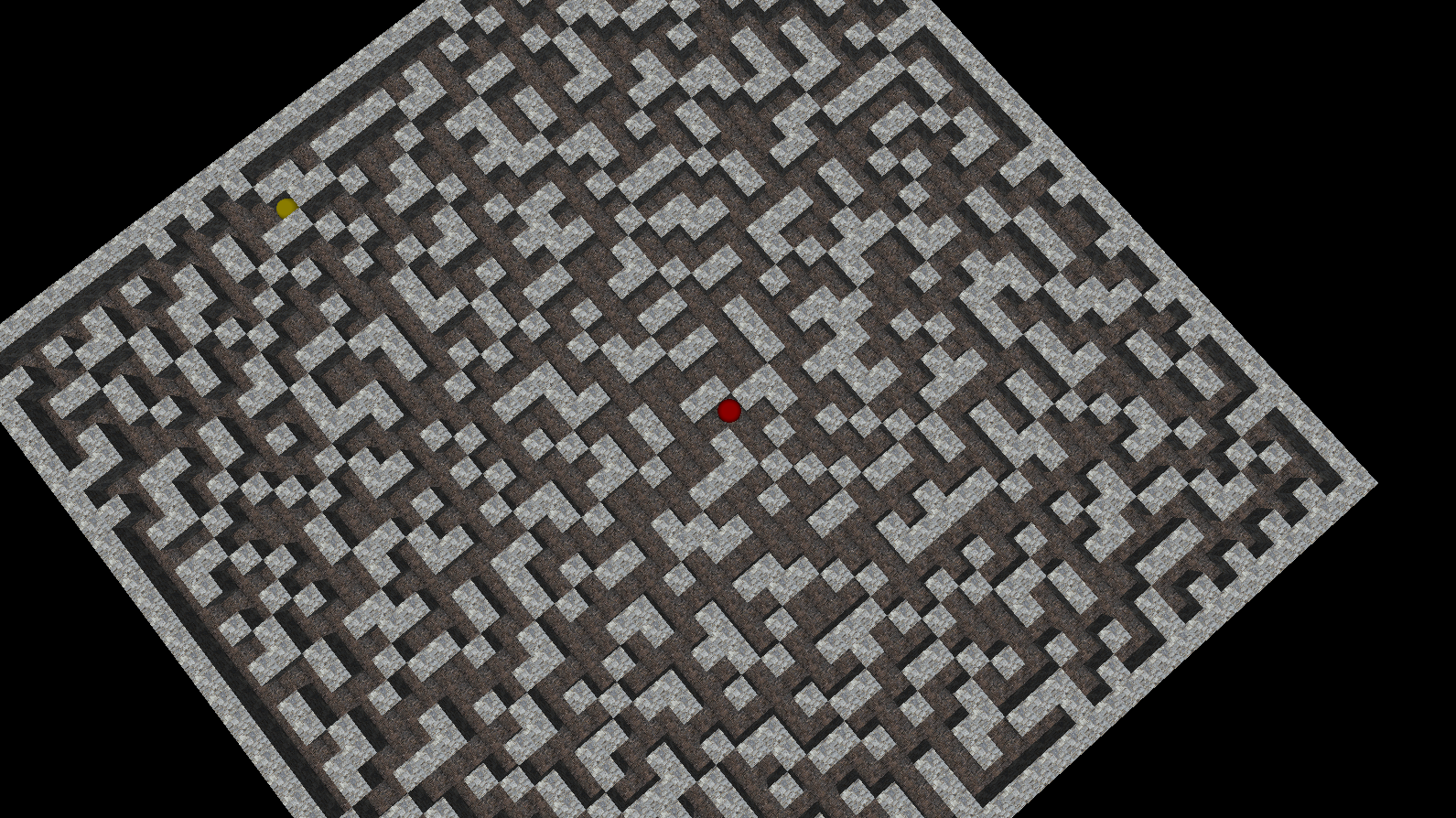
This post is about second version of the small maze game that called SuperSDG2, which was created in 2005 using C++, OpenGL(glut32) and a bit of passion. In the game, you are a lonely red ball in the large terrible maze. Your only wish is to find an exit from the random-generated maze. It is strange, but exit is a  yellow ball ;). The source code and binaries of this application are available on GitHub.

Control keys:

  • Left/Right/Up/Down – move actions
  • A/S – rotate camera
  • Z/X – up/down camera
  • R – reset camera position
  • Esc/Q – exit

Feel free to download binaries, play and modify the source code.

SuperSD2_1

SuperSD2_2

/********************************
* SuperSDG v2.2 release
* Copyright (c) 2002-2008 Ravent
* All rights reserved
*********************************/
#pragma comment (lib,"glut32.lib")
#pragma comment (lib,"glaux.lib")

#include "glaux.h"
#include "glut.h"
#include <stdio.h>
#include <stdlib.h>
#include <conio.h>
#define _USE_MATH_DEFINES
#include <math.h>
#include <time.h>

const int sMax=6, m=40, mm=m+1, direction_parts=36;
int cur_direction=0;
double distance=4.;

unsigned textureId = -1, texFloor = -1;
AUX_RGBImageRec *localTexture = NULL, *localFloor = NULL;
int glWin,pathLen,myLen=0;

struct Tpos
{char x,y;};
struct Player
{
    int x,y,z;
    int dx,dz;
    bool isGo;
}player,ex;

struct Maps
{int x,z;} map;

char data[m+2][m+2], cp[m+2][m+2];

float	lightAmb [] = { 0.03, 0.03, 0.03 };
float	lightDif [] = { 0.95, 0.95, 0.95 };
float	lightPos [] = { (int)m/2,  7,  (int)m/2 };

void display(void);
void halt(bool f=false);

void drawFloor(GLfloat x1, GLfloat x2, GLfloat z1, GLfloat z2, unsigned texture=texFloor)
{
    glBindTexture ( GL_TEXTURE_2D, texture );
    glBegin(GL_POLYGON);
        glNormal3f( 0.0, 1.0, 0.0);
        glTexCoord2f(0,0);
        glVertex3f( x1, 0, z2 );
        glTexCoord2f(1,0);
        glVertex3f( x2, 0, z2 );
        glTexCoord2f(1,1);
        glVertex3f( x2, 0, z1 );
        glTexCoord2f(0,1);
        glVertex3f( x1, 0, z1 );
    glEnd();

}

void drawBox (GLint j, GLint i, unsigned texture=textureId)
{
    GLfloat x1=i, x2=i+1, y1=0, y2=1, z1=j, z2=j+1;
    glBindTexture ( GL_TEXTURE_2D, texture );

    if ((j==map.z+1)||(data[j-1][i]!='x'))
    {
    glBegin(GL_POLYGON); // Back
        glNormal3f( 0.0, 0.0, -1.0);
        glTexCoord2f(0,0);
        glVertex3f( x2, y1, z1 );
        glTexCoord2f(1,0);
        glVertex3f( x1, y1, z1 );
        glTexCoord2f(1,1);
        glVertex3f( x1, y2, z1 );
        glTexCoord2f(0,1);
        glVertex3f( x2, y2, z1 );
    glEnd();
    }
    if ((j==map.z-1)||(data[j+1][i]!='x'))
    {
    glBegin(GL_POLYGON); // Front
        glNormal3f( 0.0, 0.0, 1.0);
        glTexCoord2f(0,0);
        glVertex3f( x1, y1, z2 );
        glTexCoord2f(1,0);
        glVertex3f( x2, y1, z2 );
        glTexCoord2f(1,1);
        glVertex3f( x2, y2, z2 );
        glTexCoord2f(0,1);
        glVertex3f( x1, y2, z2 );
    glEnd();
    }
    if ((i>0)&&(data[j][i-1]!='x'))
    {
    glBegin(GL_POLYGON); // Left
        glNormal3f( -1.0, 0.0, 0.0);
        glTexCoord2f(0,0);
        glVertex3f( x1, y1, z1 );
        glTexCoord2f(1,0);
        glVertex3f( x1, y1, z2 );
        glTexCoord2f(1,1);
        glVertex3f( x1, y2, z2 );
        glTexCoord2f(0,1);
        glVertex3f( x1, y2, z1 );
    glEnd();
    }
    if ((i<map.x)&&(data[j][i+1]!='x'))
    {
    glBegin(GL_POLYGON); // Right
        glNormal3f( 1.0, 0.0, 0.0);
        glTexCoord2f(0,0);
        glVertex3f( x2, y1, z2 );
        glTexCoord2f(1,0);
        glVertex3f( x2, y1, z1 );
        glTexCoord2f(1,1);
        glVertex3f( x2, y2, z1 );
        glTexCoord2f(0,1);
        glVertex3f( x2, y2, z2 );
    glEnd();
    }
    glBegin(GL_POLYGON); // Top
        glNormal3f( 0.0, 1.0, 0.0);
        glTexCoord2f(0,0);
        glVertex3f( x1, y2, z2 );
        glTexCoord2f(1,0);
        glVertex3f( x2, y2, z2 );
        glTexCoord2f(1,1);
        glVertex3f( x2, y2, z1 );
        glTexCoord2f(0,1);
        glVertex3f( x1, y2, z1 );
    glEnd();
}

void animate()
{
    if ((player.x == ex.x)&&(player.z==ex.z))
    {
        halt(true);
    };
    if (player.isGo==true)
    {
        if (player.dx>0)	player.dx+=1; else
        if (player.dz>0)	player.dz+=1; else
        if (player.dx<0)	player.dx-=1; else
        if (player.dz<0)	player.dz-=1;
        if ((player.dx>=sMax)||(player.dz>=sMax))
        {
            player.isGo=false;
            if (player.dx>0)	player.x+=1;
            if (player.dz>0)	player.z+=1;
            player.dx=0; player.dz=0;
        }else
        if ((player.dx<=-sMax)||(player.dz<=-sMax))
        {
            player.isGo=false;
            if (player.dx<0)	player.x-=1;
            if (player.dz<0)	player.z-=1;
            player.dx=0; player.dz=0;
        }
    }
    glutPostRedisplay();
}

void init()
{
    glClearColor( 0.0, 0.0, 0.0, 1.0 );
    glEnable( GL_DEPTH_TEST );
    glEnable( GL_TEXTURE_2D );
    glEnable( GL_CULL_FACE );
    glPixelStorei ( GL_PACK_ALIGNMENT, 1 );
    glPixelStorei ( GL_UNPACK_ALIGNMENT, 1 );
    glShadeModel (GL_SMOOTH);
    glLightfv    ( GL_LIGHT0, GL_AMBIENT,  lightAmb );
    glLightfv    ( GL_LIGHT0, GL_DIFFUSE,  lightDif );
    //glLightfv    ( GL_LIGHT0, GL_POSITION, lightPos );
    glEnable ( GL_LIGHT0 );
    glEnable ( GL_LIGHTING );
    player.dx=0; player.dz=0; player.isGo=false;
    glEnable(GL_COLOR_MATERIAL);
}

void display()
{
    glClear( GL_COLOR_BUFFER_BIT | GL_DEPTH_BUFFER_BIT );

    glMatrixMode( GL_MODELVIEW );
    glLoadIdentity();
    gluLookAt(player.x+(1.0*player.dx/sMax)+0.5f+3*cos(M_PI_2+cur_direction/double(direction_parts)*2.*M_PI),player.y+distance,player.z+(1.0*player.dz/sMax)+0.5f+3*sin(M_PI_2+cur_direction/double(direction_parts)*2.*M_PI),
              player.x+(1.0*player.dx/sMax)+0.5f,player.y+0.5f,player.z+(1.0*player.dz/sMax)+0.5f,
              0,1,0);

    for (int i=0;i<map.x;i++)
        for (int j=0;j<map.z;j++)
            if (data[j][i] == 'x')
            {
                drawBox(j,i);
            } else {
                drawFloor(i,i+1,j,j+1);
            }

    glPushMatrix();
    glTranslatef ( player.x+(1.0*player.dx/sMax)+0.5f, player.y+0.5f, player.z+(1.0*player.dz/sMax)+0.5f);
    glColor3d(1,0,0);
    glutSolidSphere(0.5,100,100);
    glColor3d(1,1,1);
    glPopMatrix(); 

    glPushMatrix();
    glTranslatef ( ex.x +0.5f, ex.y+0.5f, ex.z+0.5f);
    glColor4d(1,1,0.,0.4);
    glutSolidSphere(0.5,100,100);
    glColor3d(1,1,1);
    glPopMatrix(); 

    glutSwapBuffers();
}

void reshape ( int w, int h )
{
    glViewport( 0, 0, (GLsizei)w, (GLsizei)h);
    glMatrixMode( GL_PROJECTION );
    glLoadIdentity();
    gluPerspective( 60.0, (GLfloat)w/(GLfloat)h, 1.0, 60.0);

    glMatrixMode( GL_MODELVIEW );
    glLoadIdentity();
    gluLookAt(0,0,25,0,0,0,0,1,0);
}

void key( unsigned char key, int x, int y)
{
    if ( key=='q' || key=='Q' || key == 27) halt(false);
    if ( key=='a' || key=='A' ) { cur_direction--; if (cur_direction<0) cur_direction+=direction_parts;}
    if ( key=='s' || key=='S' ) { cur_direction++; if (cur_direction==direction_parts) cur_direction=0;}
    if ((key=='z' || key=='Z') && (distance<58.) ) distance+=0.25;
    if ((key=='x' || key=='X') && (distance>3.) ) distance-=0.25;
    if ( key=='r' || key=='R' ) { cur_direction=0; distance=4.;}
}

const int move[4][2]={{-1,0},{0,-1},{1,0},{0,1}};
const int move_key[4] = {GLUT_KEY_UP, GLUT_KEY_LEFT, GLUT_KEY_DOWN, GLUT_KEY_RIGHT };
bool good_move(int z, int x){
    return (0<=z && 0<=x && z<map.z && x<map.x && data[z][x]!='x');
}

void keys( int key, int x, int y)
{
    if (player.isGo) return;
    int dir=int(((direction_parts-cur_direction-1)/double(direction_parts))*4.+0.5);
    for (int i=0; i<4; i++)
        if ( key == move_key[i] ) {
            int newz=player.z+move[(dir+i)%4][0];
            int newx=player.x+move[(dir+i)%4][1];
            if (good_move(newz,newx)) {
                player.isGo=true;
                player.dz+=move[(dir+i)%4][0];
                player.dx+=move[(dir+i)%4][1];
                myLen++;
            }
        }
}

void genMap(void);

int main (int argc, char** argv)
{
    genMap();
    glutInit(&argc,argv);
    glutInitDisplayMode( GLUT_DOUBLE | GLUT_RGB | GLUT_DEPTH );
    glutInitWindowSize(1024,768);

    glWin = glutCreateWindow("SuperSDG 2");
    init();

    glutDisplayFunc(display);
    glutReshapeFunc(reshape);
    glutKeyboardFunc(key);
    glutSpecialFunc(keys);
    glutIdleFunc(animate);

    localTexture = auxDIBImageLoad(L"1.bmp");
    glGenTextures (1,&textureId);
    glBindTexture (GL_TEXTURE_2D,textureId);
    glPixelStorei (GL_UNPACK_ALIGNMENT,1);
    glTexParameteri (GL_TEXTURE_2D, GL_TEXTURE_WRAP_S,GL_REPEAT);
    glTexParameteri (GL_TEXTURE_2D, GL_TEXTURE_WRAP_T,GL_REPEAT);
    gluBuild2DMipmaps( GL_TEXTURE_2D, GL_RGB, localTexture->sizeX, localTexture->sizeY, GL_RGB, GL_UNSIGNED_BYTE, localTexture->data);
    glTexParameteri (GL_TEXTURE_2D, GL_TEXTURE_MAG_FILTER, GL_LINEAR);
    glTexParameteri (GL_TEXTURE_2D, GL_TEXTURE_MIN_FILTER, GL_LINEAR);

    localFloor = auxDIBImageLoad(L"2.bmp");
    glGenTextures (1,&texFloor);
    glBindTexture (GL_TEXTURE_2D,texFloor);
    glPixelStorei (GL_UNPACK_ALIGNMENT,1);
    glTexParameteri (GL_TEXTURE_2D, GL_TEXTURE_WRAP_S,GL_REPEAT);
    glTexParameteri (GL_TEXTURE_2D, GL_TEXTURE_WRAP_T,GL_REPEAT);
    gluBuild2DMipmaps( GL_TEXTURE_2D, GL_RGB, localFloor->sizeX, localFloor->sizeY, GL_RGB, GL_UNSIGNED_BYTE, localFloor->data);
    glTexParameteri (GL_TEXTURE_2D, GL_TEXTURE_MAG_FILTER, GL_LINEAR);
    glTexParameteri (GL_TEXTURE_2D, GL_TEXTURE_MIN_FILTER, GL_LINEAR);

    glutFullScreen();
    glutMainLoop();
    return 0;
}

int step(int y, int x)
{
    int res=0;
    if ((data[y][x]=='x')) res++;
    if ((y<mm)&&(data[y+1][x]=='x')) res++;
    if ((y>0 )&&(data[y-1][x]=='x')) res++;
    if ((x<mm)&&(data[y][x+1]=='x')) res++;
    if ((x>0 )&&(data[y][x-1]=='x')) res++;
    return res;
}

int stepC(int y, int x)
{
    int res=0;
    if ((cp[y][x]=='x')) res++;
    if ((y<mm)&&(cp[y+1][x]=='x')) res++;
    if ((y>0 )&&(cp[y-1][x]=='x')) res++;
    if ((x<mm)&&(cp[y][x+1]=='x')) res++;
    if ((x>0 )&&(cp[y][x-1]=='x')) res++;
    return res;
}

void DataToCp(void)
{
    for(int j=1;j<=mm;j++)
        for (int i=1;i<=mm;i++)
            cp[j][i]=data[j][i];
}

void fill (int y,int x,Tpos *v, int *l)
{
    int st=1,en=0;
    int G[mm*mm],Ll[mm*mm];
    G[0]=y*mm+x; Ll[0]=0;
    cp[y][x]='x';
    while (st!=en)
    {
        if ((G[en]%mm+1<mm)&&(cp[(int)G[en]/mm][G[en]%mm+1]=='.'))
        {
            G[st]=G[en]+1;
            Ll[st]=Ll[en]+1;
            cp[(int)G[st]/mm][G[st]%mm]='x';
            st++;
        }
        if ((G[en]%mm-1>0)&&(cp[(int)G[en]/mm][G[en]%mm-1]=='.'))
        {
            G[st]=G[en]-1;
            Ll[st]=Ll[en]+1;
            cp[(int)G[st]/mm][G[st]%mm]='x';
            st++;
        }
        if ((((int)G[en]/mm)+1<mm)&&(cp[((int)G[en]/mm)+1][G[en]%mm]=='.'))
        {
            G[st]=G[en]+mm;
            Ll[st]=Ll[en]+1;
            cp[(int)G[st]/mm][G[st]%mm]='x';
            st++;
        }
        if ((((int)G[en]/mm)-1>0)&&(cp[((int)G[en]/mm)-1][G[en]%mm]=='.'))
        {
            G[st]=G[en]-mm;
            Ll[st]=Ll[en]+1;
            cp[(int)G[st]/mm][G[st]%mm]='x';
            st++;
        }
        en++;
    }
    int rnd=rand()%5+1;
    (*v).x =(int) G[en-rnd] % mm;
    (*v).y =(int) G[en-rnd] / mm;
    *l=Ll[en-rnd];
}

bool isGood(Tpos a)
{
    DataToCp();
    int k=0,i,j,lt;
    Tpos temp;
    cp[a.y][a.x]='x';
    if ((step(a.y,a.x)>3)||(step(a.y+1,a.x)>3)||(step(a.y-1,a.x)>3)||(step(a.y,a.x+1)>3)||(step(a.y,a.x-1)>3))
        return false;
    for(j=1;j<=m;j++)
        for(i=1;i<=m;i++)
            if (cp[j][i]=='.')
            {
                if (k>0)
                    return false;
                fill(j,i,&temp,&lt);
                k++;
            }
    return true;
}

void genMap()
{
    int i,j;
    map.x=m+2; map.z=m+2;
    printf("Loading... Please Wait.\n");
    srand( (unsigned)time( NULL ) );
    for (j=0;j<map.z;j++)
        for (i=0;i<map.x;i++)
        {
            if ((i==0)||(j==0)||(i==map.x-1)||(j==map.z-1))
                data[j][i]='x';
                else
                data[j][i]='.';
        }

    int k=0;
    Tpos t;
    while (k<(int)m*m/2.5)
    {
        t.x = rand()%mm+1;
        t.y = rand()%mm+1;
        if ((data[t.y][t.x]=='.')&&(isGood(t)))
        {
            data[t.y][t.x]='x';
            k++;
        }
    }
    for (j=1;j<=m;j++)
        for (i=1;i<=m;i++)
            if ((data[j][i]=='x')&&(step(j,i)>3))
            {
                data[j][i]='.';
            }
    for (j=1;j<=m;j++)
        for (i=1;i<=m;i++)
            if ((data[j][i]=='.')&&(step(j,i)<2))
            {
                t.x = i; t.y=j;
                if (isGood(t))
                    data[j][i]='x';
            }

    Tpos ps[11]; k=0;
    while (k<=10)
    {
        t.x = rand()%mm+1;
        t.y = rand()%mm+1;
        if (data[t.y][t.x]=='.')
        {
            ps[k]=t;
            k++;
        }
    }
    k=rand()%11;
    player.x=ps[k].x;
    player.z=ps[k].y;
    DataToCp();
    fill(ps[k].y,ps[k].x,&t,&pathLen);
    ex.x=t.x;
    ex.z=t.y;

    printf("Loading complete.\n");
}

void halt(bool f)
{
        glutDestroyWindow(glWin);
        printf("-----------------------------------------------------\n");
        printf("#                    SuperSDG 2.2                   #\n");
        if (f==true)
        {
        printf("-----------------------------------------------------\n");
        printf("# The shortest path %d.                            #\n",pathLen);
        printf("# Your path %d.                                    #\n",myLen);
        printf("# Congratulate you passed the game.                 #\n");
            if (  1.2*pathLen >= myLen )
            {
                printf("-----------------------------------------------------\n");
                printf("#     YOU ONE OF THE BEST PLAYER OF THE WORLD.      #\n");
            }
        }
        printf("-----------------------------------------------------\n");
        printf("# Developers:                                       #\n");
        printf("#        Ravent     - programmer.                   #\n");
        printf("# Series found:                                     #\n");
        printf("#        Ravent     - Sergey Tihon                  #\n");
        printf("#        MasterZerg - Dima   Rudol                  #\n");
        printf("-----------------------------------------------------\n");
        printf("#          Copyright (c) Ravent 2002-2008.          #\n");
        printf("#               All rights reserved                 #\n");
        printf("-----------------------------------------------------\n");
        getch();
        exit(0);
}

Visual Studio minimap

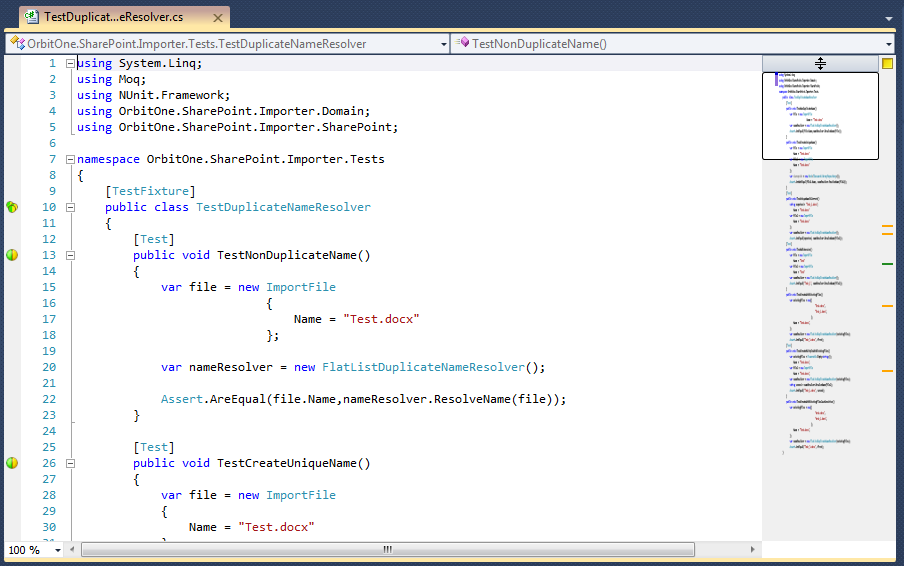
When I saw a Sublime Text 2 with their features at first time – I loved that. One of my favorite feature is a minimap.  It is a simple but very powerful idea to replace scrollbar with minimized code map. Using this feature very easy navigate directly to where you want.

I wanna this feature for Visual Studio for sure. Fortunately, it is already there. It is a part of the Productivity Power Tools.

First of all we need to setup Productivity Power Tool using Visual Studio Extension Manager.

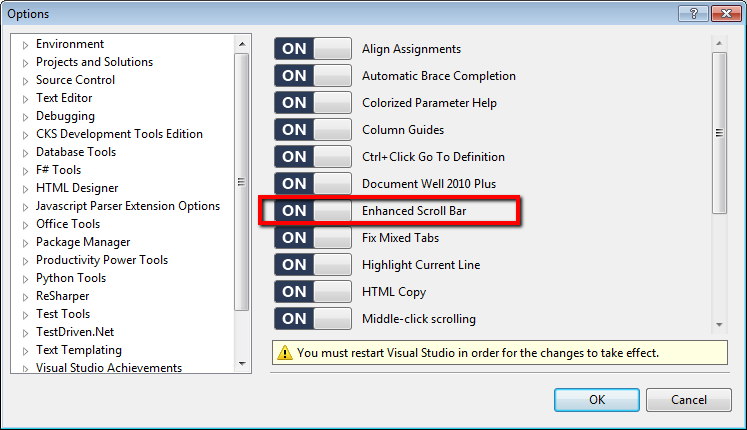
We need to enable this feature, because it is disabled by default.  Open Tool -> Options -> Productivity Power Tools, enable Enhanced Scroll Bar and restart your Visual Studio.

Choose ‘Full map mode‘ in the Productivity Power Tools->Enchanced Scroll Bar section.

You should see minimaps in your Visual Studio now. Enjoy it!!!