It is very interesting to know the most appropriate place for F# questions.
Author: Sergey Tihon 🦔🦀🦋
Father. Husband. Developer. Microsoft MVP. Likes 🦔, 🦀 and OSS.
F# and FAST Search for SharePoint 2010
If you are a SharePoint developer, an Enterprise Search developer or an employee of a large corporation with Global Search through private internal infrastructure then you may be interested in search automation. Deployment of FAST Search Server 2010 for SharePoint (F4SP) is out of the current post’s scope (you can follow TechNet F4SP Deployment Guide if you need).
F# 3.0 comes with feature called “type providers” that helps you to simplify your life in daily routine. For the case of WCF, the Wsdl type provider allows us to automate the proxy generation. Here we need to note that, F# 3.0 works only on the .NET 4.0 and later, but SharePoint 2010 server side runs exclusively on the .NET 3.0 64bit. Let’s see how this works together.
Connecting to the web service
Firstly, we create an empty F# Script file.
#r "System.ServiceModel.dll"
#r "FSharp.Data.TypeProviders.dll"
#r "System.Runtime.Serialization.dll"

open System
open System.Net
open System.Security
open System.ServiceModel
open Microsoft.FSharp.Data.TypeProviders

[<Literal>]
let SearchServiceWsdl = "https://SharePoint2010WebAppUrl/_vti_bin/search.asmx?WSDL"
type SharePointSearch = Microsoft.FSharp.Data.TypeProviders.WsdlService<SearchServiceWsdl>
At this point, the type provider creates proxy classes in the background. The only thing we need to do is to configure the access security. The following code tested on the two SharePoint 2010 farms with NTLM authentication and HTTP/HTTPS access protocols.
let getSharePointSearchService() =
    let binding = new BasicHttpBinding()
    binding.MaxReceivedMessageSize <- 10000000L
    binding.Security.Transport.ClientCredentialType <- HttpClientCredentialType.Ntlm
    binding.Security.Mode <- if (SearchServiceWsdl.StartsWith("https"))
                                 then BasicHttpSecurityMode.Transport
                                 else BasicHttpSecurityMode.TransportCredentialOnly

    let serviceUrl = SearchServiceWsdl.Remove(SearchServiceWsdl.LastIndexOf('?'))
    let service = new SharePointSearch.ServiceTypes.
                        QueryServiceSoapClient(binding, EndpointAddress(serviceUrl))
    //If server located in another domain then we may authenticate manually
    //service.ClientCredentials.Windows.ClientCredential
    //  <- (Net.NetworkCredential("User_Name", "Password"))
    service.ClientCredentials.Windows.AllowedImpersonationLevel
        <- System.Security.Principal.TokenImpersonationLevel.Delegation;
    service

let searchByQueryXml queryXml =
    use searchService = getSharePointSearchService()
    let results = searchService.QueryEx(queryXml)
    let rows = results.Tables.["RelevantResults"].Rows
    [for i in 0..rows.Count-1 do
        yield (rows.[i].ItemArray) |> Array.map (sprintf "%O")]
Building search query XML
To query F4SP we use the same web service as for build-in SharePoint 2010 search, but with a bit different query XML. The last thing that we need to do is to build query.You can find query XML syntax on Microsoft.Search.Query Schema, but it is hard enough to work with it using official documentation. There is a very useful CodePlex project called FAST Search for Sharepoint MOSS 2010 Query Tool which provides a user-friendly query builder interface.
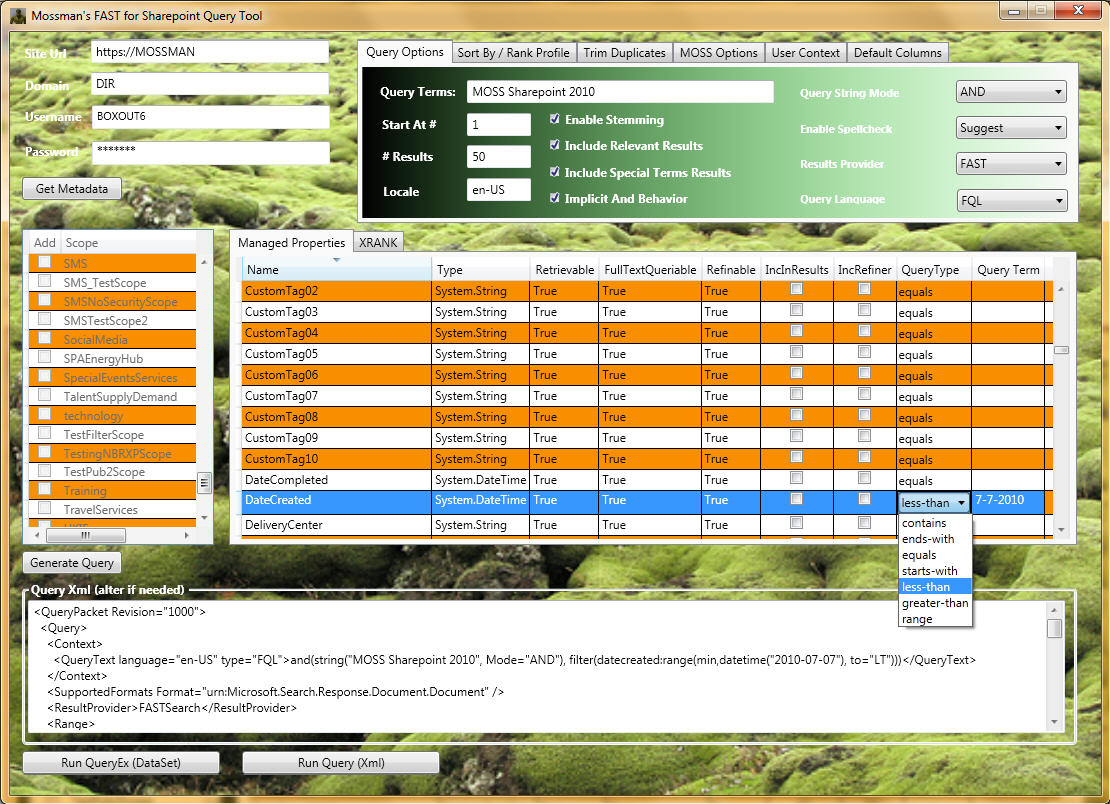
FAST Query Language (FQL) Syntax
FAST has its own query syntax(FQL Syntax) that can be directly used through SharePoint Search Web Service.
let getFQLQueryXml (fqlString:string) =
  """<QueryPacket Revision="1000">
       <Query>
         <Context>
           <QueryText language="en-US" type="FQL">{0}</QueryText>
         </Context>
         <SupportedFormats Format="urn:Microsoft.Search.Response.Document.Document" />
         <ResultProvider>FASTSearch</ResultProvider>
         <Range>
           <StartAt>1</StartAt>
           <Count>5</Count>
         </Range>
         <EnableStemming>false</EnableStemming>
         <EnableSpellCheck>Off</EnableSpellCheck>
         <IncludeSpecialTermsResults>false</IncludeSpecialTermsResults>
         <IncludeRelevantResults>true</IncludeRelevantResults>
         <ImplicitAndBehavior>false</ImplicitAndBehavior>
         <TrimDuplicates>true</TrimDuplicates>
         <Properties>
           <Property name="Url" />
           <Property name="Write" />
           <Property name="Size" />
         </Properties>
       </Query>
     </QueryPacket>"""
  |> (fun queryTemplate -> String.Format(queryTemplate,fqlString))

let fqlQueryResults =
  """and(string("Functional Programming", annotation_class="user", mode="phrase"),
         or("fileextension":string("ppt", mode="phrase"),
            "fileextension":string("pptx", mode="phrase")))
     AND filter(and(isdocument:1))"""
  |> getFQLQueryXml |> searchByQueryXml
Keyword Query Syntax
FAST also supports native SharePoint Keyword Query Syntax.
let getKeywordQueryXml (keywordString:string) =
  """<QueryPacket Revision="1000">
       <Query>
         <Context>
           <QueryText language="en-US" type="STRING">{0}</QueryText>
         </Context>
         <SupportedFormats Format="urn:Microsoft.Search.Response.Document.Document" />
         <ResultProvider>FASTSearch</ResultProvider>
         <Range>
           <StartAt>1</StartAt>
           <Count>5</Count>
         </Range>
         <EnableStemming>false</EnableStemming>
         <EnableSpellCheck>Off</EnableSpellCheck>
         <IncludeSpecialTermsResults>false</IncludeSpecialTermsResults>
         <IncludeRelevantResults>true</IncludeRelevantResults>
         <ImplicitAndBehavior>false</ImplicitAndBehavior>
         <TrimDuplicates>true</TrimDuplicates>
         <Properties>
           <Property name="Url" />
           <Property name="Write" />
           <Property name="Size" />
         </Properties>
       </Query>
     </QueryPacket>"""
  |> (fun queryTemplate -> String.Format(queryTemplate,keywordString))

let simpleKeywordQueryResults =
  """"Functional Programming" scope:"Documents" (fileextension:"PPT" OR fileextension:"PPTX")"""
  |> getKeywordQueryXml |> searchByQueryXml
Query Syntax Summary
One of the principal differences between two syntaxes is that Keyword Query needs to be converted into FQL on the SharePoint side. Keyword syntax also supports scope conditions, which will be converted into FQL filters. For example “scope:”Documents”” will be translated into ” filter(and(isdocument:1))” (In the case when Documents scope exists in the SharePoint Query Service Application). Unfortunately, we can not specify SharePoint scope in FQL query.
F# Weekly #1, 2013
Welcome to F# Weekly,
А promising start of the new year:
News
- Quick F-AI update: added a Noisy-Or learner (BN EM) and introduced some “smart” log-arithmetic.
- Released FunScript NuGet package.
- SharpDevelop 4.3 Beta was released.
- Microsoft’s ‘Orleans’ cloud programming model gets a Halo test drive.
- “Add Support for F# Code-Behind ASP.NET” is currently a Top 5 ASP.NET request with > 500 votes.
- The XML provider in F# data library now supports recursive documents like XHTML. See “Global inference mode“.
- Luca Bolognese published “Functional programming in C – I“.
- Anton Kropp presented a super simple LL(1) recursive descent parser for csv lists.
- The CSV type provider now supports custom separators and “
#N/A” values. - Foq: an F# mocking library v0.5 now available on Nuget with an optional Linq Expression based API for C# & F#
Blogs & Tutorials
- Neil Danson shared “Mono and Mac“.
- Jonathan Allen posted “Introducing the F# Software Foundation“.
- Sebastian W wrote about “F# and MS CRM“.
- Fabian Scherschel published “A foundation for F#“.
- Steffen Forkmann blogged “F# and Microsoft Dynamics NAV 2009 Web Services“.
- Jerome Laban presented “Toying around with F# Queries, Rx, Portables Libraries, Windows [Phone] 8 and the Zip operator“.
- Saxon Matt posted “Adopting F#“.
- Dave Thomas published “MonoGame Subdivision and Platonics“.
- Colin Fang presented “A Simple Overview on How Pattern Match Compiles“.
- Steffen Forkmann blogged “F# and Microsoft Dynamics NAV 2013 OData Services“.
- Jack Fox posted “Semantics and List-like Data Structures“.
- Darryl K. Taft published “F# Foundation: Taking Microsoft’s F# Language to a Higher Ground“.
That’s all for now. Have a great week and remember you can message me on twitter (@sergey_tihon) with any F# news.
Previous F# Weekly edition – #52
Enable Web Services Enhancements (WSE) 3.0 in Visual Studio 2008, 2010 and 2012
The same steps work in Visual Studio 2012

Web Service Enhancements 3 (WSE 3) is not officially supported since Visual Studio 2008. The reason is that Microsoft wants you to migrate your code to WCF. See below to enable Web Services Enhancements (WSE) 3.0 in VS2012, VS2010 and VS2008.
1. Download and install Web Services Enhancements (WSE) 3.0 for Microsoft .NET. Make sure you have all the files after installing WSE v3.0. In Window 7 the location is “C:\Program Files (x86)\Microsoft WSE\v3.0\Tools”. Note: Close Visual Studio before installing.
2. Go to the folder %ALLUSERSPROFILE%\Application Data\Microsoft\MSEnvShared\AddIns (notice that “Application Data” is hardcoded, which shouldn’t because Windows XP localizes that folder). If the folder is not there close Visual Studio and create the folder as show below.
Examples:
– Windows XP: “C:\Documents and Settings\All Users\Application Data\Microsoft\MSEnvShared\AddIns”
– Windows Vista / Windows 7: “C:\ProgramData\Microsoft\MSEnvShared\AddIns”. ( This is a hidden folder. Copy paste the UNC path to Windows Explorer.)
3. In the…
View original post 242 more words
F# Weekly #52, 2012 – New Year Edition
Welcome to F# Weekly,
This is 10th anniversary edition of F# Weekly and last in this year. I want to say thank you to those who were with me all the time. I wish you Happy New Year full of functional happiness, love and new achievements.

Last portion of news from 2012:
News
- Microsoft Dynamics CRM type provider preview have been presented.
- Completed work on a command-line compiler and nuget package for FunScript.
Blogs & Tutorials
- Neil Danson blogged “The Roslyn Incident“.
- Mathias Brandewinder presented “Support Vector Machine in F#: getting there“.
- Steve Horsfield published “F#: Composing Functions“.
- Sergey Tihon blogged “F#/.NET function minimization (optimization)“.
- Jack Fox posted “Engineering Random Bits: F# Generics“.
- Sergey Tihon wrote about “Rhythm of the F# Сommunity heartbeat“.
- Jonathan Allen posted “Building Type Providers for F#“.
- Mathias Brandewinder released “AdaBoost in F#“.
- Adam Granicz wrote about “Running the jQuery Mobile WebSharper sample“.
- Ryan Riley posted “F# Manifest“.
That’s all for now. See you in the New 2013 Year.
Previous F# Weekly edition – #51
Rhythm of the F# Сommunity heartbeat
The new year is getting closer. It is time of magic and miracles, time to sum up and to lift the veil of secrecy over F# Community.
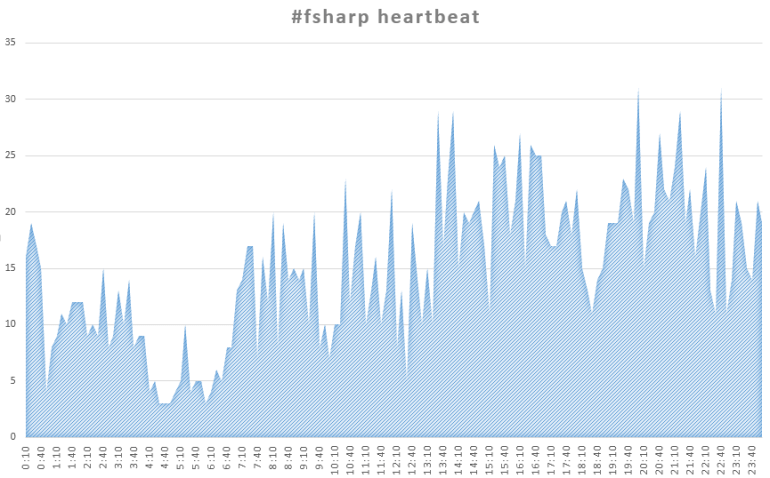
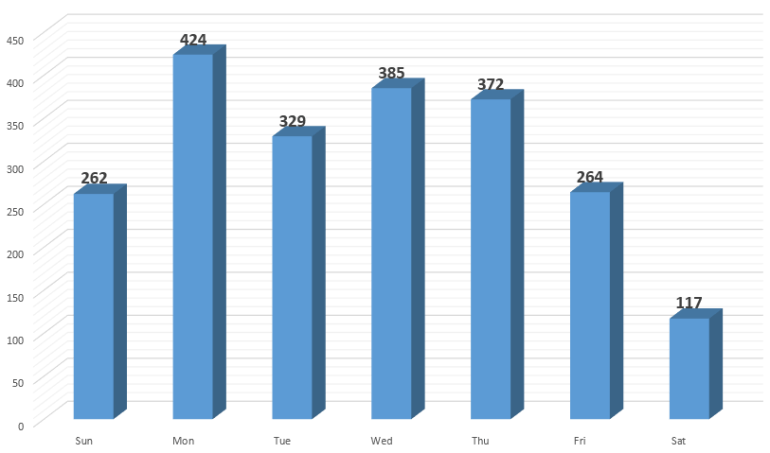
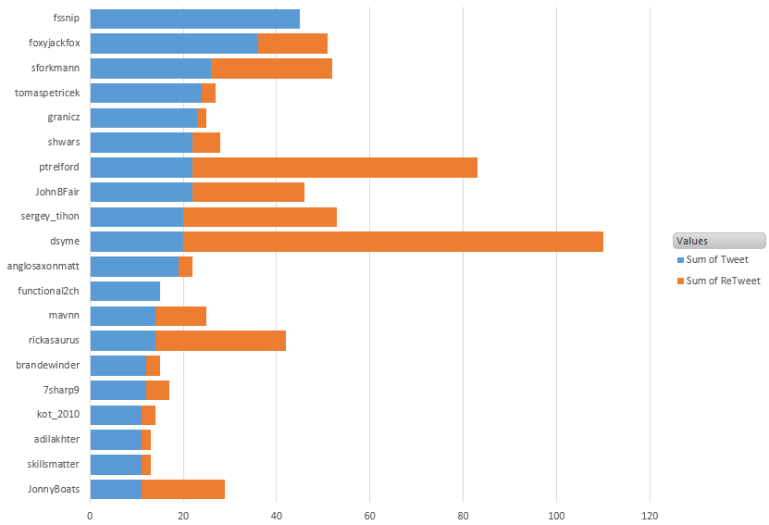
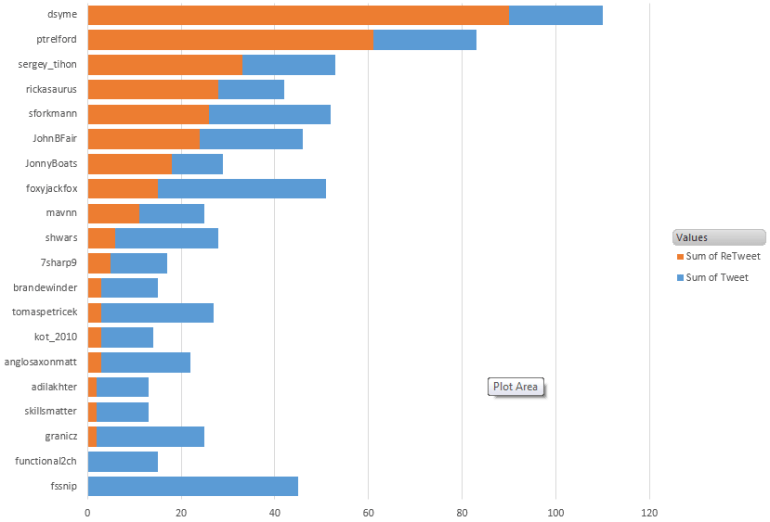
I have been collecting all tweets (and retweets) with hashtag #fsharp since the beginning of November. It is time to show up some statistics. 😉
When are we tweeting? – Always!
Do we have a rest from F#? – A bit on Saturday.
Who to follow? – Choose yourself.
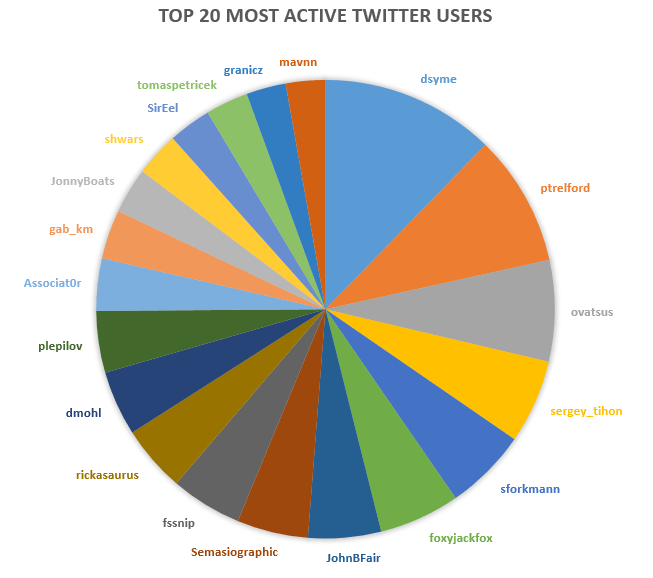
Who writes more of unique tweets?
Who is the best retweeter?
F#/.NET function minimization (optimization)
I have done some research on function minimization algorithms implemented on .NET. Short summary can be found below.
Gradient descent
Gradient descent is one of the simplest function optimization algorithms. You can implement it by yourself or using one of the following articles:
- “Gradient descent” by Jon Harrop
- “Gradient descent algorithm. F#” by Igor Shapiro
DotNumerics
DotNumerics is a Numerical Library for .NET. The library is written in pure C# and has more than 100,000 lines of code with the most advanced algorithms for Linear Algebra, Differential Equations and Optimization problems.
Unfortunately, dotNumerics does not have a detailed documentation. Let’s go through all minimization algorithms implemented in dotNumerics. First of all, we implement banana function from simplex method example available on the library site.
#r @"DotNumerics.dll"
open System
open DotNumerics.Optimization

//f(a,b) = 100*(b-a^2)^2 + (1-a)^2
let BananaFunction (x: float array) =
    100.0 * Math.Pow((x.[1] - x.[0] * x.[0]), 2.0) + Math.Pow((1.0 - x.[0]), 2.0)
Downhill Simplex
Downhill Simplex method of Nelder and Mead
The key advantage of Downhill Simplex method is that it does not require the gradient function. All you need is a function and an initial guess.
let initialGuess = [|0.1; 2.0|]

let simplexMin =
    let simplex = Simplex();
    simplex.ComputeMin(BananaFunction,initialGuess);
We have a bit of control over the evaluation model. We can restrict MaxFunEvaluations and specify custom Tolerance in Simplex model. In this case, model instantiation looks like below.
let simplex = Simplex(MaxFunEvaluations=10000, Tolerance=1e-5);
Truncated Newton
“A Survey of Truncated-Newton Methods”, Journal of Computational and Applied Mathematics.
All other algorithms require gradient function to make calculation.
//f'a(a,b) = (100*(b-a^2)^2 + (1-a)^2)'a = 100*2*(b-a^2)*(-2a) - 2*(1-a)
//f'b(a,b) = (100*(b-a^2)^2 + (1-a)^2)'b = 100*2*(b-a^2)
let BananaFunctionGradient (x: float array) =
    [|100.0 * 2.0 * (x.[1] - x.[0] * x.[0]) * (-2.0 * x.[0]) - 2.0 * (1.0 - x.[0]);
      100.0 * 2.0 * (x.[1] - x.[0] * x.[0])|]

let newtonMin =
    let newton = TruncatedNewton()
    newton.ComputeMin(BananaFunction,BananaFunctionGradient,initialGuess);
Truncated Newton algorithm has three more configuration parameters than Downhill Simplex: Accuracy, MaximunStep and SearchSeverity.
L-BFGS-B
Limited memory Broyden–Fletcher–Goldfarb–Shanno method
let bfgsMin =
    let lbfgsb = L_BFGS_B()
    lbfgsb.ComputeMin(BananaFunction, BananaFunctionGradient, initialGuess);
L-BFGS-B has one more configuration parameters than Downhill Simplex – it is AccuracyFactor.
Results
Below you can find evaluation results received from models with default parameters.
Real: 00:00:00.024, CPU: 00:00:00.062, GC gen0: 0, gen1: 0, gen2: 0
val simplexMin : float [] = [|0.999999998; 0.9999999956|]
Real: 00:00:00.074, CPU: 00:00:00.078, GC gen0: 0, gen1: 0, gen2: 0
val newtonMin : float [] = [|0.9999999999; 0.9999999999|]
Real: 00:00:00.137, CPU: 00:00:00.140, GC gen0: 0, gen1: 0, gen2: 0
val bfgsMin : float [] = [|1.0; 1.0|]
F# Weekly #51, 2012
Welcome to F# Weekly,
A roundup of F# content from this past week:
News
- New video! “An Informal Deep Dive With Don Syme: The Freebase Type Provider“.
- New F# book coming soon! 😉 “F# Deep Dives” by Tomas Petricek, Phillip Trelford and Co.
- Vote to make F# first-class language in the ASP.NET stack.
- Announced public CI for F# Community projects.
- Natallie Baikevich announced “fquanty” – a collection of common performance functions.
- Tomas Petricek proposed to use “F# Formatting” to document F# projects.
Blogs & Tutorials
- Daniel Mohl published “F# PowerPack NuGet Packages for F# 3.0, .NET 4.x, and Silverlight 5“.
- Tomas Petricek blogged “The Building Blocks of a F# Markdown Parser“.
- Reto Matter posted “Functional Feed-forward Neural Networks Part I: Setting it up“.
- Tomas Petricek posted “Manning: F# Deep Dives deal of the day“.
- Tomas Petricek blogged “Processing trees with F# zipper computation“.
- Robert Jeppesen presented “Sql optimization trick in F#“.
- Examples and slides from Functional Programming Day in Oslo.
- Tao Liu presented “Functional Programming and/or F# Conferences“.
- Sergey Tihon proposed to use “F# for heating“.
- Daniel Mohl blogged “Buiilding Web, Cloud, and Mobile Solutions with F#“.
That’s all for now. Have a great week and remember you can message me on twitter (@sergey_tihon) with any F# news.
Previous F# Weekly edition – #50
F# for heating
Sometimes, when you feel really alone and want a bit of heat then F# can help you here.
All you need is a laptop and F#. Just type the following snippet into FSI and wait for a minute. =)
[|1..999|] |> Array.Parallel.iter (fun _ ->
    while true do ignore())
Wish you warm Christmas!
P.S. The same solution works when you are freezing.
