Google Cloud Vision API from .NET\F# (OAuth2 with ServiceAccount.json)

Google Cloud Platform provides a wide range of APIs, one of which is Cloud Vision API that allows you to detect faces in images, extract sentiments, detect landmark, OCR and etc.

One of available annotators is “Logo Detection” that allows you to find company logo in your image and recognize it.

.NET is not the part of mainstream Google Cloud SDK. Google maintains google-api-dotnet-client that should allow you to authenticate to and call all available services. API design looks slightly not intuitive for .NET world (at least from my point of view).

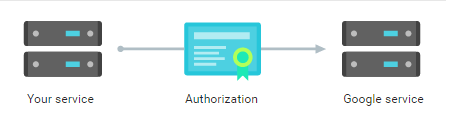
I spent some time on Google/SO/Github trying to understand how to use OAuth2 in server-to-server authentication scenario with ServiceAccount.json file generated by Google API Manager.

s2s

You cannot use this API without billing account, so you have to put your credit card info, if you want to play with this API.

Also, note that you need to have two NuGet packages Google.Apis.Vision.v1 & Google.Apis.Oauth2.v2 (and a lot of their dependencies)

So, here is the full sample:

#I __SOURCE_DIRECTORY__
#load "Scripts/load-references-debug.fsx"

open System.IO
open Google.Apis.Auth.OAuth2
open Google.Apis.Services
open Google.Apis.Vision.v1
open Google.Apis.Vision.v1.Data

// OAuth2 authentication using service account JSON file
let credentials =
    let jsonServiceAccount = @"d:\ServiceAccount.json"
    use stream = new FileStream(jsonServiceAccount, 
                         FileMode.Open, FileAccess.Read)
    GoogleCredential.FromStream(stream)
        .CreateScoped(VisionService.Scope.CloudPlatform)

let visionService = // Google Cloud Vision Service
    BaseClientService.Initializer(
        ApplicationName = "my-cool-app",
        HttpClientInitializer = credentials)
    |> VisionService

// Logo detection request for one image
let createRequest content = 
  let wrap (xs:'a list) = System.Collections.Generic.List(xs)
  BatchAnnotateImagesRequest(
    Requests = wrap
      [AnnotateImageRequest(
        Features = wrap [Feature(Type = "LOGO_DETECTION")],
        Image = Image(Content = content))
      ])
  |> visionService.Images.Annotate


let call fileName = // Call and interpret results
    let request =
        File.ReadAllBytes fileName
        |> System.Convert.ToBase64String
        |> createRequest
    let response = request.Execute()

    [ for x in response.Responses do
        for y in x.LogoAnnotations do
          yield y.Description
    ] |> List.toArray


let x = call "D:\\fsharp256.png"
// val x : string [] = [|"F#"|]

FsShelter: a Storm shell for F#

Eugene Tolmachev's avatarI think, therefore I spam.

About a year ago Prolucid adopted Apache Storm as our platform of choice for event stream processing and F# as our language of choice for all of our “cloud” development.

FsStorm was an essential part that let us iterate, scale and deliver quickly, but even from the earliest days it was obvious that the developer experience could be improved. Unfortunately, it meant a complete rewrite of FsStorm:

  • FsStorm DSL is a really thin layer on top of Nimbus API model:
    • has explicit IDs when describing components in a topology
    • uses strings in all the names
    • matching of inputs/outputs is not guaranteed
  • FsStorm uses Json AST as it’s public API:
    • messages, tuples, configuration
    • serialization mechanism is hard-baked into the API

We’ve worked around some of the problems, usually by writing more code.

It actually makes sense that Storm itself doesn’t care about the type of the tuples/fields. It runs on JVM, which is very much typed…

View original post 220 more words

About JavaScript memory leaks. Again.

Worth to read, at least, if you are not JS dev

Anton Gorbikov's avatarAnton Gorbikov's Blog

Web applications are getting more and more complex from year to year. Couple of years ago nobody cared about the memory leaks on the web pages (yeah, they were really a set of web pages, but not web applications). Even if you forget to clean up some memory – it’s not expected, that user will spend a lot of time on the same page. There were a lot of navigation links, which removed information about the entire page from memory and loaded new page.

But now you cannot relate on this behavior, because now web sites turned into web applications. User loads one small HTML file, one script file and some other stuff (like CSS and images) and that’s it. Making requests from browser to servers user can stay on on the “page” for ages. In the worst scenario you will receive a report from production user: “Oh, your application…

View original post 2,020 more words

F#ools’ Day Party – April 1, 2016

AprilFools6301st April is coming, Mark Gray and I propose F# community to celebrate this day with funny posts about F#.

All you need is to write a blog post that incorporates the idea of April fool in the content or find out a new extraordinary use of F# and destroy the myth that “F# is for Math and Science”.

Rules are even simpler than in FsAdvent:

  1. Ping @sergey-tihon on Twitter and I will put your name in the table below
  2. Tweet link to your post with  tag on April 1 (+/- 1 day).

Happy F#ools’ Day,
Let’s joke together.

Author Post Title
 Pierre Irrmann  Making program behaviour explicit
 Ross McKinlay
 Phillip Trelford  Silverlight Resurrection
 Vicenç GarcĂ­a-AltĂ©s  A Premier League team will win the Champions League this year

Application contracts with Swagger powered APIs for .NET or Why SwaggerProvider

This post is part of the F# Advent Calendar in English 2015 project.
And special thank you to Phillip Trelford for the idea of F# Advent in English year ago.

In this post I want to talk about how we design software, what we should care about and what we should not.

The story of The Contract

The initial thing is a problem. Nobody writes code without understanding what he/she is doing and what he/she expects to receive at the end. The task (problem description) may come from anywhere: it may be task from your boss or an awesome idea that pretty soon can change the world and bring you a lot of money or some tool / OSS project that will make your life easier in the future.

When you have a clear problem definition, you can start thinking about the solution. There are plenty of ways to solve any problem. You can choose any programming language, any operating system, any programming paradigm, any framework, any tool-set and so on. In order to choose one (the best in your case) solution you start applying real world constraints to reduce the number of solutions. You will probably decide to use a language and tools, which you are more familiar with or which suits better for this particular task. People do this because we all have very important real-life constraint – it is the time. Time-to-market is always important. Nobody starts writing a new operating system just because he/she can do it. We always try to minimize amount of work that should be done to speed up time-to-market.

When you actually start hacking, the thing you start with is `architecture`. Argh, I said that arch.. word. But architecture is nothing more than decomposition. If you do it right in terms of your constraints and limitations – you are almost done. After that, you should write code for small pieces and compose them to get the solution. But what defines the right decomposition? The answer is contracts!

Sounds really simple, does not it? However, it is not so far from the truth. Real-world solution architecture is always state of art, it cannot be super cool for all things, but it can fit your requirements to certain extent. All you can do mastering the architecture is to decompose your monolith idea to simple manageable components with clear responsibilities and clear contract.

The implementation of contract in programming language level is an interface (the promise of capabilities to the world). The implementation of interfaces in F#/C# is pretty good. You as a developer should only define an interface and implement it somewhere to provide a capability by contract. When you are on the other side and want to consume provided capabilities you should only reference component that defines contract and use it with almost zero overhead.

Based on the experience with interfaces, you have three ways of interaction with contract:

  1. Design (define) contract
  2. Provide (implement) contract
  3. Consume contract

But it is not so simple, when your application is larger than one executable file… What happens when you cross process and/or machine boundaries? In this case, we need a technology that allows us to setup the component that provides contract to one machine and consumes this contract on another machine with the same elegance as interfaces do this. At this moment, higher-level contracts (so called API) come to play.

There are plenty of technologies that can help you to develop some sort of API for your component. Probably first helpful thing that comes to mind is WSDL (Web Service Definition Language). When you choose WSDL as your contract language you receive plenty of tools that help you to manage your API, generate implementation from API contract, generate contract from your implementation, generate code that encapsulate all communication difficulties for consumers and so on. WSDL world is pretty mature and beautiful (I really love it), but it usually comes with SOAP and communication protocol that does not suitable for all types of cross-machine communication.

There are some real-world cases when you need more lightweight and fast communication mechanism that can be “easily” consumed from different languages and run-times. In such cases, people more often decide to provide RESTful APIs. BUT, all of you who design RESTful API for your systems and components SHOULD REMEMBER that technology that you use to design and implement contract SHOULD also provide a way to CONSUME your API. It is your responsibility to care about consumers, they should be focused on solving their own task using your API rather than writing boilerplate code to consume your API.

Swagger

One of technologies that provide such goodness for developers is Swaggernlp-logo-navbar

Swagger is a simple yet powerful representation of your RESTful API. With the largest ecosystem of API tooling on the planet, thousands of developers are supporting Swagger in almost every modern programming language and deployment environment. With a Swagger-enabled API, you get interactive documentation, client SDK generation and discoverability.

Swagger Specification is able to describe pretty wide range of RESTful APIs. Swagger comes along with Swagger Edit that allows contract first API development. APIs that have Swagger schema can easily be integrated with Swagger UI – very powerful interface that dramatically simplify studying of new API (demo). Swagger ecosystem also has tools that generate client code for wide list of languages.

In the .NET world, exists a project called Swashbuckle, which generates Swagger schema to ASP.NET WebAPI services and plugs Swagger UI in your application. I’ve already blogged about how to use Swashbuckle from F# Web Apps.

Swagger is used in ASP.NET API app in Azure App Service and may come to Nancy very soon as well.

F# Swagger Provider

swaggerAs you may already understand, Swagger ecosystem looks very promising in general and Swagger Specification perfectly matches with F# Type Providers approach. So, I am glad to present the SwaggerProvider.

In order to start you need to add reference to SwaggerProvider NuGet package and pass Swagger JSON schema to it (for this example I will use a schema from Petstore – Swagger demo app).

#r "SwaggerProvider/SwaggerProvider.dll"
open SwaggerProvider

type PetStore = SwaggerProvider<"http://petstore.swagger.io/v2/swagger.json">

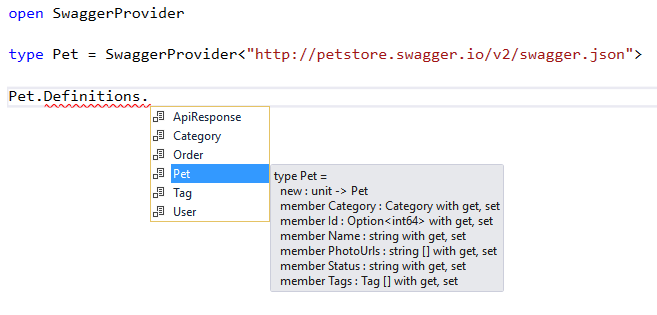
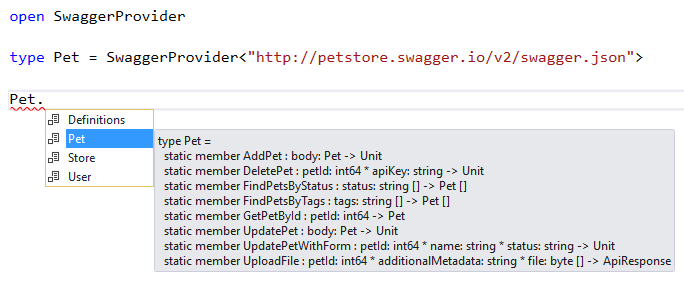
So, you are generally done. Type Provider parses provided schema and generates all required data types and methods to call API. Note that SwaggerProvider is generative type provider and generates types and methods that exist in run-time, so that means that it can be used from C# code as well.

swagger_defs

swagger_pets

Even if the RESTful API that you need to consume does not gently provide Swagger schema for you, you still can use SwaggerProvider to call it. It should be easier to manually describe schema once than to write and support source code for all REST calls.

Let’s say that we want to call GitHub API to get all fsprojects repositories. For this API call schema will look like this

{
    "swagger": "2.0",
    "info": {
        "description": "This is a Sample for GitHub API.",
        "version": "1.0.0",
        "title": "Swagger GitHub"
    },
    "host": "api.github.com",
    "basePath": "/",
    "tags": [
        {
            "name": "repos",
            "description": "Repositories API"
        }
    ],
    "schemes": [ "https" ],
    "paths": {
        "orgs/{orgId}/repos": {
            "get": {
                "tags": [ "repos" ],
                "summary": "List organization repositories",
                "description": "",
                "operationId": "orgRepos",
                "consumes": [ "application/json" ],
                "produces": [ "application/json" ],
                "parameters": [
                    {
                        "name": "orgId",
                        "in": "path",
                        "description": "Organization name",
                        "required": true,
                        "type": "string"
                    }
                ],
                "responses": {
                    "200": {
                        "description": "successful operation",
                        "schema": {
                            "type": "array",
                            "items": {
                                "$ref": "#/definitions/Repo"
                            }
                        }
                    }
                }
            }
        }
    },
    "definitions": {
        "Repo": {
            "type": "object",
            "properties": {
                "id": {
                    "type": "integer",
                    "format": "int64"
                },
                "name": {
                    "type": "string"
                }
            }
        }
    }
}

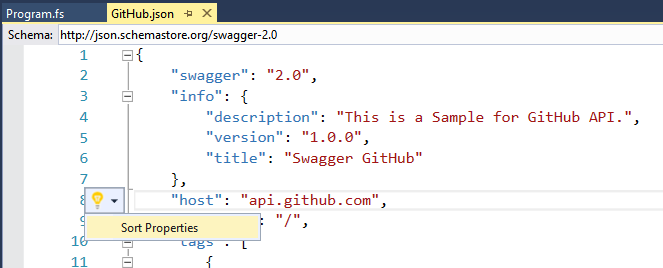
If you use Visual Studio to edit Swagger schema, you will be pleasantly surprised by “Intellisense for JSON Schema in the JSON Editor

gh-vs

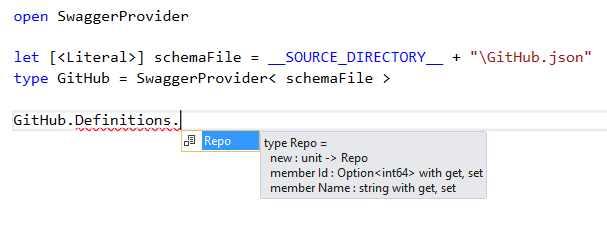
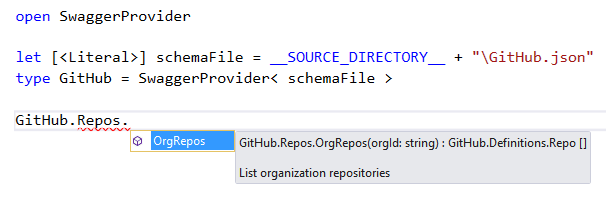
This JSON describes one data type Repo, that contains simplified version of GitHub Repository data type, and description of one API method /orgs/{orgId}/repos that does the job. Now you are able to use this schema to call GitHub API.

gh_def

gh_repos

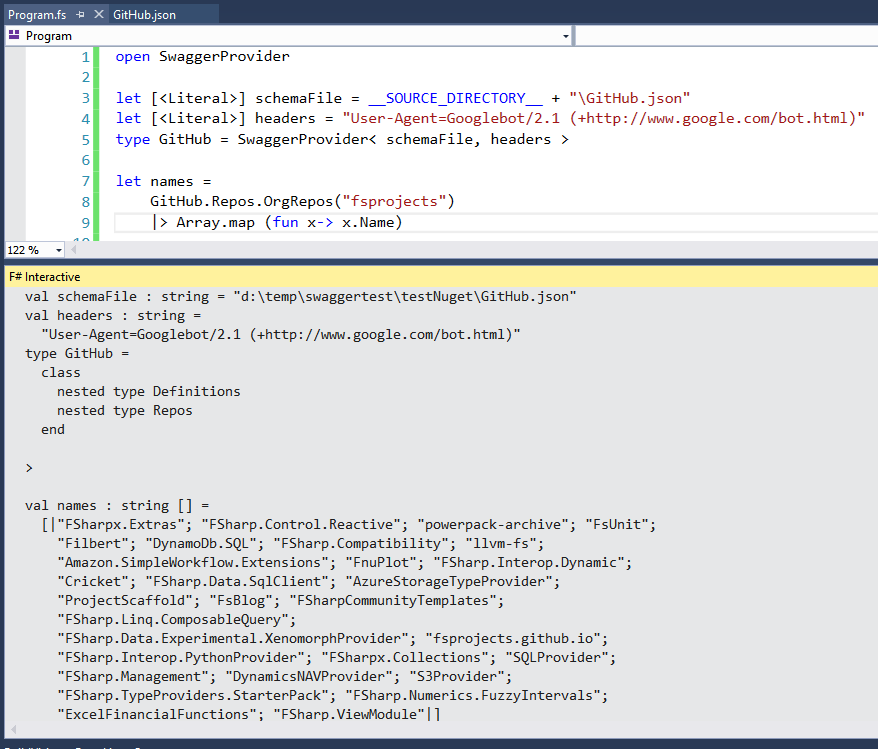
But if you really want to make a call to GitHub API, you need to specify real user agent header and SwaggerProvider allows you to do this:

open SwaggerProvider

let [<Literal>] schemaFile = __SOURCE_DIRECTORY__ + "\GitHub.json"
let [<Literal>] headers = "User-Agent=Googlebot/2.1 (+http://www.google.com/bot.html)"
type GitHub = SwaggerProvider< schemaFile, headers >;

let names =
    GitHub.Repos.OrgRepos("fsprojects")
    |> Array.map (fun x -> x.Name)

gh_works

Note: SwaggerProvider does not support schemes in YAML format yet. But this feature is definitely will be implemented, because it dramatically simplifies manual schema creation.

Please share your thoughts about SwaggerProvider and do not be shy to try it and report issues if any.

Special thanks to APIs.guru project for maintenance of wide range of real-world Swagger schemes that were used to test SwaggerProvider.

How to restore Visual Studio 2015 after the Update 1 (dependency dance)

Update 12/11/2015: Two issues were opened as a result of investigation “Installing the fsharp power tools before installing adding VS2015 update 1 breaks Roslyn” in Visual F# Power Tools repository and “We read some settings from the devenv.exe.config file — devenv.exe.config is not user mutable” in Visual F# repository.

This post is prepared especially to save F# Advent Calendar in English 2015 schedule.

Short version of the fix posted on Stack Overflow.

Note: Described fix is not permanent, VS may reset your changes in devenv.exe.config file after the new extensions install/update.

Yesterday Microsoft released the first update to Visual Studio 2015 that contains some pretty cool features and improvements, but this update has broken “some” machines.

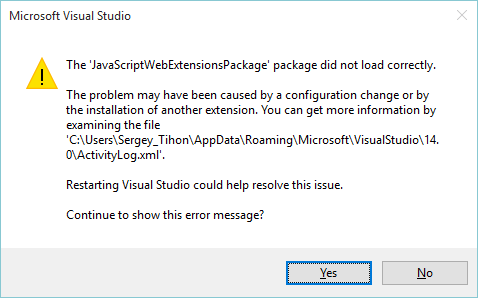
During the first run after the update, you may see errors like this one:

VSexception

or even NullReferenceException when you try to open the list of installed extensions

In order to fix all this stuff you need to check ActivityLog.xml file (c:\Users\{user_name}\AppData\Roaming\Microsoft\VisualStudio\14.0\) and find the exact error message. Most probably, you will see something like this

SetSite failed for package [CSharpPackage][Could not load file or assembly ‘System.Collections.Immutable, Version=1.1.36.0, Culture=neutral, PublicKeyToken=b03f5f7f11d50a3a’ or one of its dependencies. The located assembly’s manifest definition does not match the assembly reference. (Exception from HRESULT: 0x80131040)]:{ at Microsoft.VisualStudio.LanguageServices.Implementation.LanguageService.AbstractPackage`2.Initialize() at Microsoft.VisualStudio.LanguageServices.CSharp.LanguageService.CSharpPackage.Initialize() at Microsoft.VisualStudio.Shell.Package.Microsoft.VisualStudio.Shell.Interop.IVsPackage.SetSite(IServiceProvider sp)}

This error says that bindingRedirect set up incorrectly for VS process. You need to find file devenv.exe.config in c:\Users\{user_name}\AppData\Local\Microsoft\VisualStudio\14.0\ and update it. (Or c:\Program Files (x86)\Microsoft Visual Studio 14.0\Common7\IDE\, depending of location of your devenv.exe file).

For this particular case, you should find rows that setup redirects for System.Collections.Immutable and change newVersion from 1.1.36.0 to 1.1.37.0. Final config should look like this

&lt;dependentAssembly&gt;
  &lt;assemblyIdentity name="System.Collections.Immutable" publicKeyToken="b03f5f7f11d50a3a" culture="neutral"/&gt;
  &lt;bindingRedirect oldVersion="1.0.27.0-1.1.65535.65535" newVersion="1.1.37.0"/&gt;
&lt;/dependentAssembly&gt;

After this fix, I was able to load my IDE and setup latest version of Azure SDK 2.8.1 that reset my changes in .config file and I needed to fix it once again.

Everything was OK, until I have tried to open my web project. This time it crashed with the following error in ActiveLog.xml:

SetSite failed for package [JavaScriptWebExtensionsPackage][Could not load file or assembly &apos;Microsoft.VisualStudio.ProjectSystem.V14Only, Version=14.0.0.0, Culture=neutral, PublicKeyToken=b03f5f7f11d50a3a&apos; or one of its dependencies. The located assembly&apos;s manifest definition does not match the assembly reference. (Exception from HRESULT: 0x80131040)]:{   at Microsoft.VisualStudio.Html.Package.Utilities.ProjectUtilities.IsImmersiveProject(IVsHierarchy hierarchy)   at Microsoft.VisualStudio.Html.Package.Project.WebProjectServices.IsWebProject(IVsHierarchy hierarchy)   at Microsoft.VisualStudio.Html.Package.Project.WebProjectServices.AdviseProject(IVsHierarchy hierarchy)   at Microsoft.VisualStudio.Html.Package.Project.WebProjectServices.AdviseOpenedProjects(IVsSolution solution)   at Microsoft.VisualStudio.Html.Package.Project.WebProjectServices.HookGlobalEvents()   at Microsoft.VisualStudio.Html.Package.Project.WebProjectServices.Microsoft.VisualStudio.Html.Package.Project.IWebProjectServices.get_OpenedProjects()   at Microsoft.VisualStudio.JavaScript.Web.Extensions.ReferenceAutoSync.ProjectServices.Initialize()   at Microsoft.VisualStudio.JavaScript.Web.Extensions.ReferenceAutoSync.ProjectServices..ctor()   at Microsoft.VisualStudio.JavaScript.Web.Extensions.JavaScriptWebExtensionsPackage.Initialize()   at Microsoft.VisualStudio.Shell.Package.Microsoft.VisualStudio.Shell.Interop.IVsPackage.SetSite(IServiceProvider sp)}

After the search on C:\ drive for Microsoft.VisualStudio.ProjectSystem.V14Only.dll I realized that my machine has version 14.1.0.0 instead of 14.0.0.0. So it looks like we need to add one more redirect in devenv.exe.config.

&lt;dependentAssembly&gt;
  &lt;assemblyIdentity name="Microsoft.VisualStudio.ProjectSystem.V14Only" publicKeyToken="b03f5f7f11d50a3a" culture="neutral"/&gt;
  &lt;bindingRedirect oldVersion="14.0.0.0" newVersion="14.1.0.0"/&gt;
&lt;/dependentAssembly&gt;

After these fixes, I have not seen any other errors on my machine (at least for now). I hope that you understand the core idea on how to troubleshoot and fix such errors. So good luck to you and VS team with dependency fighting.

P.S. One more useful advice that can save you time – try to clear Component Model Cache if things start going wrong.

Simple Web API OWIN host using F#

Very nice starter pack for OWIN Web API with F#. If you use Paket manager you need only one dependency to `Microsoft.AspNet.WebApi.OwinSelfHost` NuGet package

Also Web API can be easily configured to use Swagger UI.

Kevin Holditch's avatarException Caught

I thought it would be good to write a simple OWIN Web Api host using F# to show how easy it is to interop between the two languages and as a fun experiment. You can find all of the source code from this blog post at the FSharpWebApi github repository.

If you open the Program.fs solution in the github repository you will see the following two lines of code are reponsible for starting the web server:

The getAppBuilder function is defined in the WebServerBuilder module as follows:

The getAppBuilder function returns a function with the signature (IAppBuilder) -> (). This signature is the same as the one expected by the first parameter of WebApp.Start. The reason for breaking this function off into its own module is so that it can be tested.

The cool thing about the Web Api Owin Self host stack is that there is a nuget…

View original post 491 more words

SharePoint 2013: Content Enrichment and performance of 3rd party services

There are a lot of cases when people write Content Enrichment service for SharePoint 2013 to integrate it with some 3rd party tagging/enrichment API. Such integration very often leads to huge crawl time degradation, the same happened in my case too.

The first thought was to measure the time that CPES (Content Processing Enrichment Service) spends on calls. I wrapped all my calls to external system in timers and run Full Crawl again. The results were awful, calls were in average from 10 to 30 times slower from CPES than from POC console app. Code was the same and of course perfect, so, probably my 3rd party service was not able to handle such an incredible load that was generated by my super-fast SharePoint Farm.

If you are in the same situation with fast SharePoint, awesome CPES implementation and bad 3rd party service, you probably should try async integration approach described in “Advanced Content Enrichment in SharePoint 2013 Search” by Richard diZerega.

But what if the problem is in my source code… what if execution environment affects execution time of REST calls… Some time later, I found a nice post “Quick Ways to Boost Performance and Scalability of ASP.NET, WCF and Desktop Clients” from Omar Al Zabir. This article describes the notion of Connection Manager:

By default, system.net has two concurrent connections per IP allowed. This means on a webserver, if it’s calling WCF service on another server or making any outbound call to a particular server, it will only be able to make two concurrent calls. When you have a distributed application and your web servers need to make frequent service calls to another server, this becomes the greatest bottleneck

WHOA! That means that it does not matter how fast our SharePoint Search service is. Our CPES executes no more than two calls to 3rd party service at the same time and queues other. Let’s fix this unpleasant injustice in web.config:

 <system.net>
   <connectionManagement>
     <add address="*" maxconnection="128"/>
   </connectionManagement>
 </system.net>

Now performance degradation should be fixed and if your 3rd party service is good enough your crawl time will be reasonable, otherwise you need to go back to advice from Richard diZereg.

SharePoint 2013: Content Enrichment for Large Files

There are a couple of guides on how to write Content Enrichment services for SharePoint 2013. One of them is official MSDN article “How to: Use the Content Enrichment web service callout for SharePoint Server“.

This article advice you two configuration steps to adjust max size of document that will be processed by CPES (Content Processing Enrichment Service).

  1. Modify web.config to accept messages up to 8 MB, and configure readerQuotas to be a sufficiently large value.
    <bindings>
     <basicHttpBinding>
       <!-- The service will accept a maximum blob of 8 MB. -->
       <binding maxReceivedMessageSize = "8388608">
       <readerQuotas maxDepth="32"
         maxStringContentLength="2147483647"
         maxArrayLength="2147483647" 
         maxBytesPerRead="2147483647" 
         maxNameTableCharCount="2147483647" /> 
       <security mode="None" />
       </binding>
     </basicHttpBinding>
    </bindings>
    
  2. Modify SPEnterpriseSearchContentEnrichmentConfiguration.
    $ssa = Get-SPEnterpriseSearchServiceApplication
    $config = New-SPEnterpriseSearchContentEnrichmentConfiguration
    $config.Endpoint = http://Site_URL/ContentEnrichmentService.svc
    $config.InputProperties = "Author", "Filename"
    $config.OutputProperties = "Author"
    $config.SendRawData = $True
    $config.MaxRawDataSize = 8192
    Set-SPEnterpriseSearchContentEnrichmentConfiguration –SearchApplication
    $ssa –ContentEnrichmentConfiguration $config
    

The concept is generally good, but what if you need to process files larger than 8MB? Let’s try to increase this number up to 300Mb for example (I think that ideally this limit should be not less than max file size allowed for your web apps).

Let’s change both values and run full crawl of SharePoint site. After that, if you are lucky, you will see something like that in your “Error Breakdown”:

crawl_errors_001

WAT? Something went wrong, but what it was … Let’s investigate ULS logs on the machine with Search Service. After a couple of unforgettable minutes of reading ULS logs, I’ve found the following error message:

[Microsoft.CrawlerFlow-cb9134ec-91c6-4bac-89f9-a0cc9fe1e481] Microsoft.Ceres.Evaluation.Engine.ErrorHandling.HandleExceptionHelper : Evaluation failure detected: Operator : ContentEnrichment Operator type : ContentEnrichmentClient Error id : 3206 Correlation id : 60ef1afd-038a-4f64-8230-2b2493923f80 Partition id : 0c37852b-34d0-418e-91c6-2ac25af4be5b Message : Failed to send the item to the content processing enrichment service. 49691C90-7E17-101A-A91C-08002B2ECDA9:#9: https://mysite.com/MyDoc.pptx id : ssic://780174 System.ServiceModel.EndpointNotFoundException: There was no endpoint listening
at http://MyServer:8081/ContentProcessingEnrichmentService.svc that could accept the message. This is often caused by an incorrect address or SOAP action. See InnerException, if present, for more details. —> System.Net.WebException: The remote server returned an error: (404) Not Found.
at System.Net.HttpWebRequest.GetResponse()
at System.ServiceModel.Channels.HttpChannelFactory`1.HttpRequestChannel.HttpChannelRequest.WaitForReply(TimeSpan timeout) –

WAT? “The remote server returned an error: (404) Not Found”. Does the service not exist sometimes? How could it be? Let’s go to IIS log (on the machine where your CPES is installed). Path to the IIS logs should look similar to this c:\inetpub\logs\LogFiles\W3SVC3\.

iislog

It is true – CPES sometimes returns 404.13 status. Let’s google what this status code means.

404.13 – Content length too large. The request contains a Content-Length header. The value of the Content-Length header is larger than the limit that is allowed for the server.

Seems that IIS is not ready yet to receive our 300Mb files. There is one more parameter in web config that should be tweaked to  handle really large files, this parameter is maxAllowedContentLength (default value is 30000000, that is ~30Mb). Let’s change it in web.config:

 <system.webServer>
   <security>
     <requestFiltering>
       <requestLimits maxAllowedContentLength="314572800" />
     </requestFiltering>
   </security>
 </system.webServer>

Recrawl your content once again, and Voila, strange errors gone! Enjoy your content enrichment!)