Explain rank in Sharepoint 2013 Search

Add your thoughts here… (optional)

alexeykozhemiakin's avatarInsights into search black magic

Default ranking model in Sharepoint 2013 is completely different from what we’ve seen in FS4SP and is definitely a step forward comparing to SP2010. In a nutshell it uses multiple features (to take into account query terms, it’s proximity; document click-through, authority, anchor text, url depth etc ) which are mixed with help of neural network as a final step. Details can be found in patent claim http://www.google.com/patents/US8296292.

Hopefully there’s a way to bring more light into this black magic. I’ve modified default Display Template and added “Explain Rank” link to each item. This link redirects user to ExplainRank page which hosted under {search_center_url}/_layouts/15/ folder.

1 - starwars

I used

  • d=ctx.CurrentItem.Path
  • q=ctx.DataProvider.$2_3.k  (have found this hidden property using trial & error method)
  • another option is to extract value for q= from QueryText from ctx.ListData.Properties.SerializedQuery which value was<Query Culture=”en-US” EnableStemming=”True” EnablePhonetic=”False” EnableNicknames=”False” IgnoreAllNoiseQuery=”True” SummaryLength=”180″ MaxSnippetLength=”180″ DesiredSnippetLength=”90″ KeywordInclusion=”0″ QueryText=”star wars” QueryTemplate=”{searchboxquery}” TrimDuplicates=”True”…

View original post 150 more words

F# and FAST Search for SharePoint 2010

If you are a SharePoint developer, an Enterprise Search developer or an employee of a large corporation with Global Search through private internal infrastructure then you may be interested in search automation. Deployment of FAST Search Server 2010 for SharePoint (F4SP) is out of the current post’s scope (you can follow TechNet F4SP Deployment Guide if you need).

F# 3.0 comes with feature called “type providers” that helps you to simplify your life in daily routine. For the case of WCF, the Wsdl type provider allows us to automate the proxy generation. Here we need to note that, F# 3.0 works only on the .NET 4.0 and later, but SharePoint 2010 server side runs exclusively on the .NET 3.0 64bit. Let’s see how this works together.

Connecting to the web service

Firstly, we create an empty F# Script file.

#r "System.ServiceModel.dll"
#r "FSharp.Data.TypeProviders.dll"
#r "System.Runtime.Serialization.dll"

open System
open System.Net
open System.Security
open System.ServiceModel
open Microsoft.FSharp.Data.TypeProviders

[<Literal>]
let SearchServiceWsdl = "https://SharePoint2010WebAppUrl/_vti_bin/search.asmx?WSDL"
type SharePointSearch = Microsoft.FSharp.Data.TypeProviders.WsdlService<SearchServiceWsdl>

At this point, the type provider creates proxy classes in the background. The only thing we need to do is to configure the access security. The following code tested on the two SharePoint 2010 farms with NTLM authentication and HTTP/HTTPS access protocols.

let getSharePointSearchService() =
    let binding = new BasicHttpBinding()
    binding.MaxReceivedMessageSize <- 10000000L
    binding.Security.Transport.ClientCredentialType <- HttpClientCredentialType.Ntlm
    binding.Security.Mode <- if (SearchServiceWsdl.StartsWith("https"))
                                 then BasicHttpSecurityMode.Transport
                                 else BasicHttpSecurityMode.TransportCredentialOnly

    let serviceUrl = SearchServiceWsdl.Remove(SearchServiceWsdl.LastIndexOf('?'))
    let service = new SharePointSearch.ServiceTypes.
                        QueryServiceSoapClient(binding, EndpointAddress(serviceUrl))
    //If server located in another domain then we may authenticate manually
    //service.ClientCredentials.Windows.ClientCredential
    //  <- (Net.NetworkCredential("User_Name", "Password"))
    service.ClientCredentials.Windows.AllowedImpersonationLevel
        <- System.Security.Principal.TokenImpersonationLevel.Delegation;
    service

let searchByQueryXml queryXml =
    use searchService = getSharePointSearchService()
    let results = searchService.QueryEx(queryXml)
    let rows = results.Tables.["RelevantResults"].Rows
    [for i in 0..rows.Count-1 do
        yield (rows.[i].ItemArray) |> Array.map (sprintf "%O")]

Building search query XML

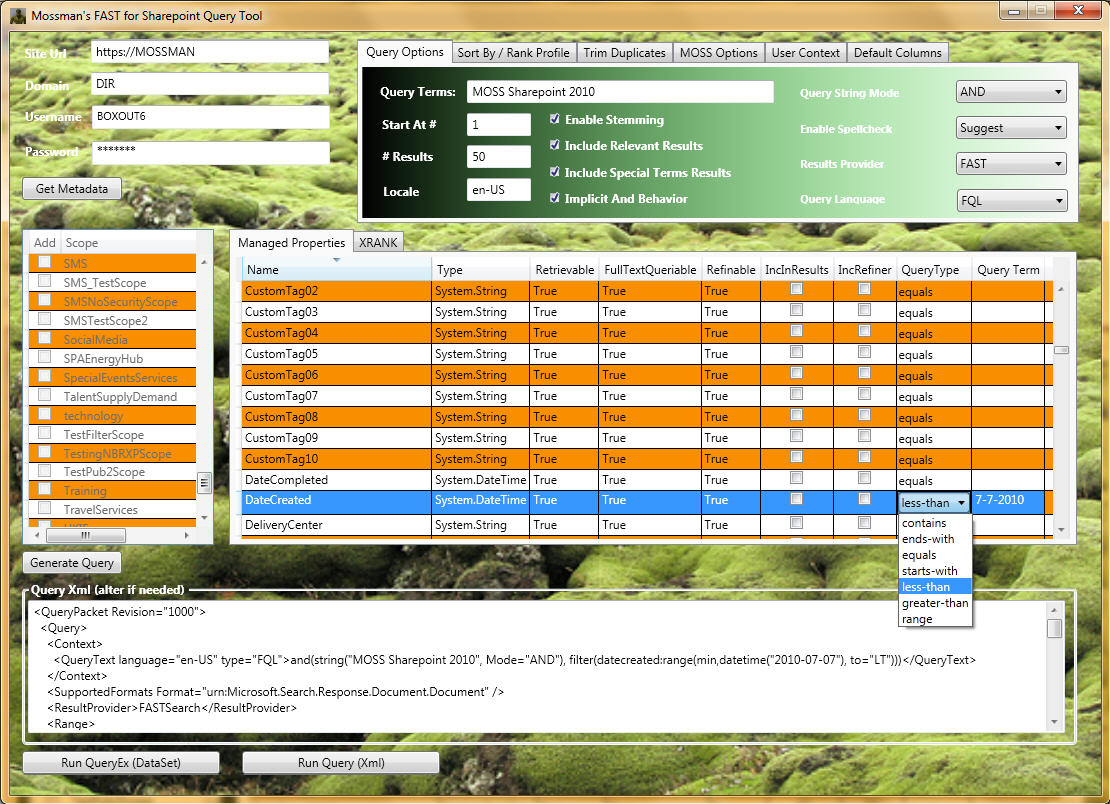
To query F4SP we use the same web service as for build-in SharePoint 2010 search, but with a bit different query XML. The last thing that we need to do is to build query.You can find query XML syntax on Microsoft.Search.Query Schema, but it is hard enough to work with it using official documentation. There is a very useful CodePlex project called FAST Search for Sharepoint MOSS 2010 Query Tool which provides a user-friendly query builder interface.

F4SPQueryTool

FAST Query Language (FQL) Syntax

FAST has its own query syntax(FQL Syntax) that can be directly used through SharePoint Search Web Service.

let getFQLQueryXml (fqlString:string) =
  """<QueryPacket Revision="1000">
       <Query>
         <Context>
           <QueryText language="en-US" type="FQL">{0}</QueryText>
         </Context>
         <SupportedFormats Format="urn:Microsoft.Search.Response.Document.Document" />
         <ResultProvider>FASTSearch</ResultProvider>
         <Range>
           <StartAt>1</StartAt>
           <Count>5</Count>
         </Range>
         <EnableStemming>false</EnableStemming>
         <EnableSpellCheck>Off</EnableSpellCheck>
         <IncludeSpecialTermsResults>false</IncludeSpecialTermsResults>
         <IncludeRelevantResults>true</IncludeRelevantResults>
         <ImplicitAndBehavior>false</ImplicitAndBehavior>
         <TrimDuplicates>true</TrimDuplicates>
         <Properties>
           <Property name="Url" />
           <Property name="Write" />
           <Property name="Size" />
         </Properties>
       </Query>
     </QueryPacket>"""
  |> (fun queryTemplate -> String.Format(queryTemplate,fqlString))

let fqlQueryResults =
  """and(string("Functional Programming", annotation_class="user", mode="phrase"),
         or("fileextension":string("ppt", mode="phrase"),
            "fileextension":string("pptx", mode="phrase")))
     AND filter(and(isdocument:1))"""
  |> getFQLQueryXml |> searchByQueryXml

Keyword Query Syntax

FAST also supports native SharePoint Keyword Query Syntax.

let getKeywordQueryXml (keywordString:string) =
  """<QueryPacket Revision="1000">
       <Query>
         <Context>
           <QueryText language="en-US" type="STRING">{0}</QueryText>
         </Context>
         <SupportedFormats Format="urn:Microsoft.Search.Response.Document.Document" />
         <ResultProvider>FASTSearch</ResultProvider>
         <Range>
           <StartAt>1</StartAt>
           <Count>5</Count>
         </Range>
         <EnableStemming>false</EnableStemming>
         <EnableSpellCheck>Off</EnableSpellCheck>
         <IncludeSpecialTermsResults>false</IncludeSpecialTermsResults>
         <IncludeRelevantResults>true</IncludeRelevantResults>
         <ImplicitAndBehavior>false</ImplicitAndBehavior>
         <TrimDuplicates>true</TrimDuplicates>
         <Properties>
           <Property name="Url" />
           <Property name="Write" />
           <Property name="Size" />
         </Properties>
       </Query>
     </QueryPacket>"""
  |> (fun queryTemplate -> String.Format(queryTemplate,keywordString))

let simpleKeywordQueryResults =
  """"Functional Programming" scope:"Documents" (fileextension:"PPT" OR fileextension:"PPTX")"""
  |> getKeywordQueryXml |> searchByQueryXml

Query Syntax Summary

One of the principal differences between two syntaxes is that Keyword Query needs to be converted into FQL on the SharePoint side. Keyword syntax also supports scope conditions, which will be converted into FQL filters. For example “scope:”Documents”” will be translated into ” filter(and(isdocument:1))” (In the case when Documents scope exists in the SharePoint Query Service Application).  Unfortunately, we can not specify SharePoint scope in FQL query.

Enable Web Services Enhancements (WSE) 3.0 in Visual Studio 2008, 2010 and 2012

The same steps work in Visual Studio 2012

Diganta Kumar's avatarDiganta Kumar's Blog

Web Service Enhancements 3 (WSE 3) is not officially supported since Visual Studio 2008. The reason is that Microsoft wants you to migrate your code to WCF. See below to enable Web Services Enhancements (WSE) 3.0 in VS2012, VS2010 and VS2008.

1. Download and install Web Services Enhancements (WSE) 3.0 for Microsoft .NET. Make sure you have all the files after installing WSE v3.0. In Window 7 the location is “C:\Program Files (x86)\Microsoft WSE\v3.0\Tools”. Note: Close Visual Studio before installing.

2. Go to the folder %ALLUSERSPROFILE%\Application Data\Microsoft\MSEnvShared\AddIns (notice that “Application Data” is hardcoded, which shouldn’t because Windows XP localizes that folder). If the folder is not there close Visual Studio and create the folder as show below.

Examples:
– Windows XP: “C:\Documents and Settings\All Users\Application Data\Microsoft\MSEnvShared\AddIns”
– Windows Vista / Windows 7: “C:\ProgramData\Microsoft\MSEnvShared\AddIns”. ( This is a hidden folder. Copy paste the UNC path to Windows Explorer.)

3. In the…

View original post 242 more words

Rhythm of the F# Сommunity heartbeat

The new year is getting closer. It is time of magic and miracles, time to sum up and to lift the veil of secrecy over F# Community.

I have been collecting all tweets (and retweets) with hashtag #fsharp since the beginning of November. It is time to show up some statistics. 😉

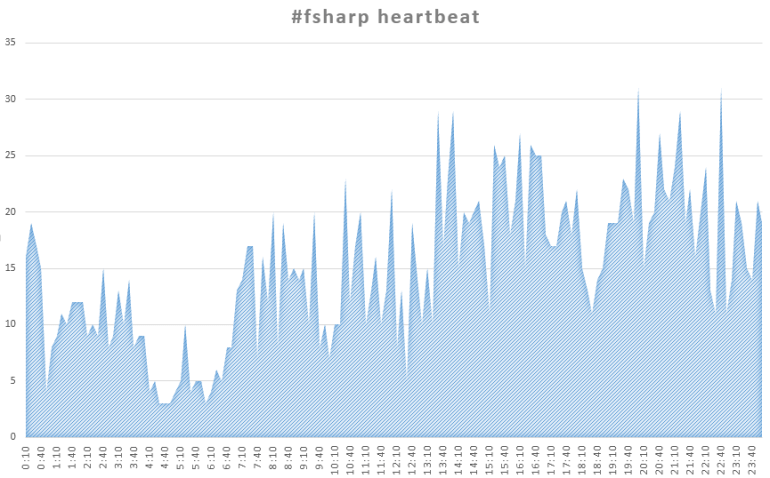
When are we tweeting? – Always!

F# Community Heartbeat
F# Community Heartbeat. London time zone (UTC)

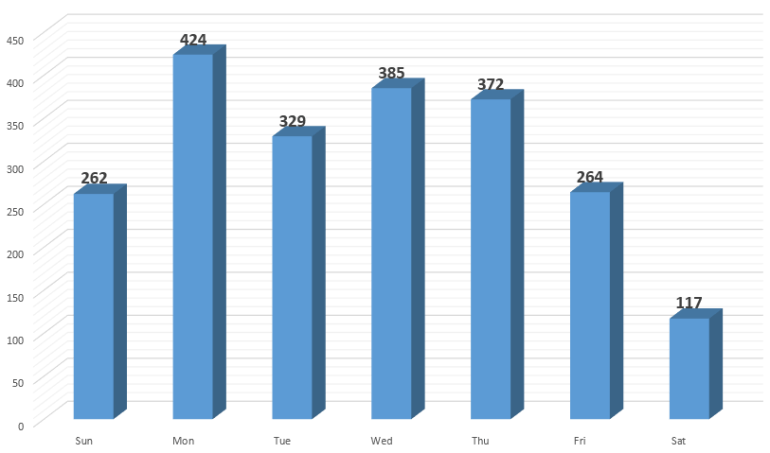
Do we have a rest from F#? – A bit on Saturday.

DayOfWeek
Tweets distribution by day of week.

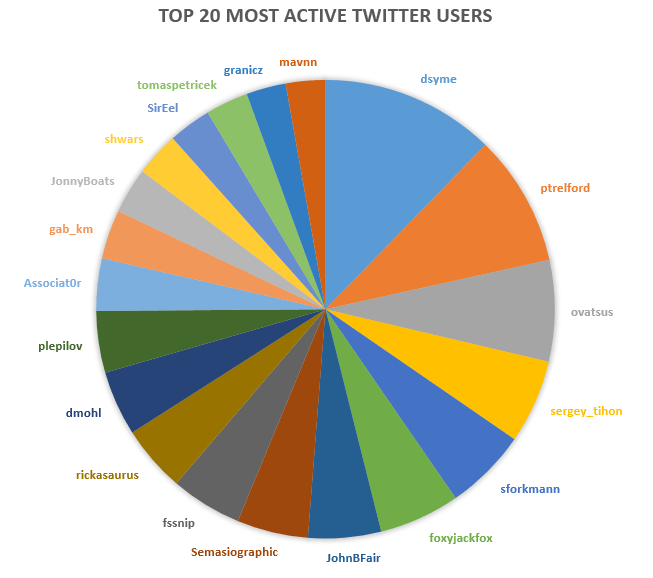
Who to follow? – Choose yourself.

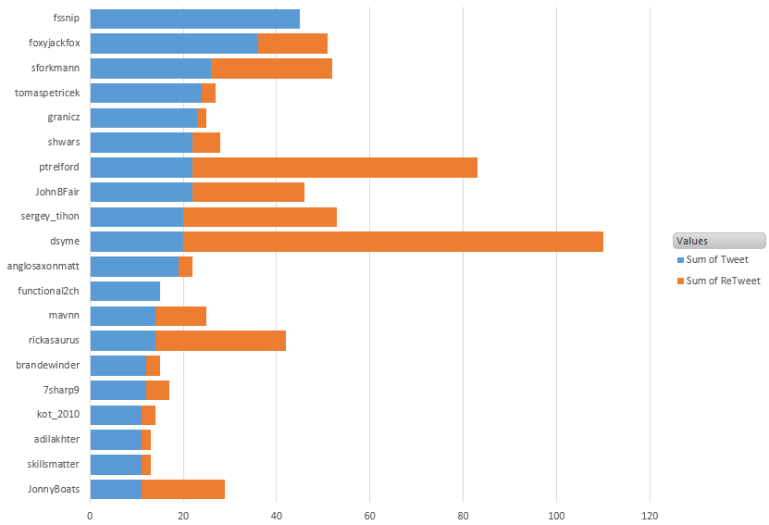
Top 20 most active users (based on the tweets and RT)

Who writes more of unique tweets?

Top 20 users that generates unique tweets.

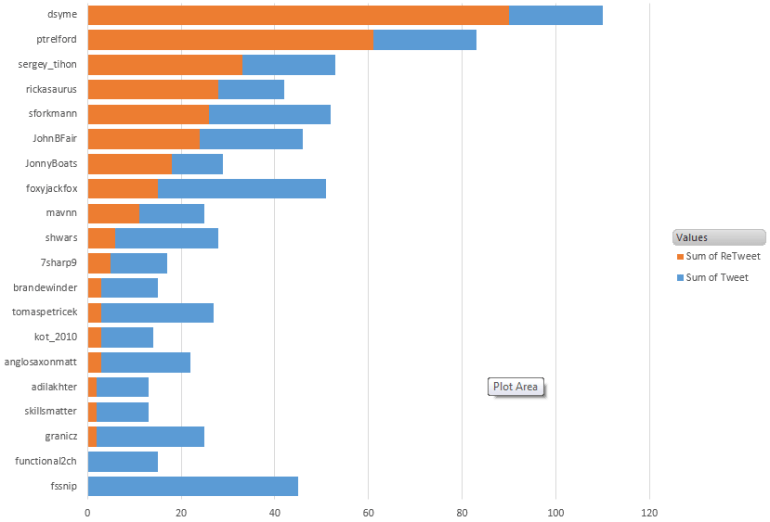
Who is the best retweeter?

Top 20 best retweeters.
Top 20 the best retweeters.

F#/.NET function minimization (optimization)

I have done some research on function minimization algorithms implemented on .NET. Short summary can be found below.

Gradient descent

Gradient descent is one of the simplest function optimization algorithms. You can implement it by yourself or using one of the following articles:

DotNumerics

DotNumerics is a Numerical Library for .NET. The library is written in pure C# and has more than 100,000 lines of code with the most advanced algorithms for Linear Algebra, Differential Equations and Optimization problems.

Unfortunately, dotNumerics does not have a detailed documentation. Let’s go through all minimization algorithms implemented in dotNumerics. First of all, we implement banana function from simplex method example available on the library site.

#r @"DotNumerics.dll"
open System
open DotNumerics.Optimization

//f(a,b) = 100*(b-a^2)^2 + (1-a)^2
let BananaFunction (x: float array) =
    100.0 * Math.Pow((x.[1] - x.[0] * x.[0]), 2.0) + Math.Pow((1.0 - x.[0]), 2.0)

Downhill Simplex

Downhill Simplex method of Nelder and Mead

The key advantage of Downhill Simplex method is that it does not require the gradient function. All you need is a function and an initial guess.

let initialGuess = [|0.1; 2.0|]

let simplexMin =
    let simplex = Simplex();
    simplex.ComputeMin(BananaFunction,initialGuess);

We have a bit of control over the evaluation model. We can restrict MaxFunEvaluations and specify custom Tolerance in Simplex model. In this case, model instantiation looks like below.

    let simplex = Simplex(MaxFunEvaluations=10000, Tolerance=1e-5);

Truncated Newton

“A Survey of Truncated-Newton Methods”, Journal of Computational and Applied Mathematics.

All other algorithms require gradient function to make calculation.


//f'a(a,b) = (100*(b-a^2)^2 + (1-a)^2)'a = 100*2*(b-a^2)*(-2a) - 2*(1-a)
//f'b(a,b) = (100*(b-a^2)^2 + (1-a)^2)'b = 100*2*(b-a^2)
let BananaFunctionGradient (x: float array) =
    [|100.0 * 2.0 * (x.[1] - x.[0] * x.[0]) * (-2.0 * x.[0]) - 2.0 * (1.0 - x.[0]);
      100.0 * 2.0 * (x.[1] - x.[0] * x.[0])|]

let newtonMin =
    let newton = TruncatedNewton()
    newton.ComputeMin(BananaFunction,BananaFunctionGradient,initialGuess);

Truncated Newton algorithm has three more configuration parameters than Downhill Simplex: Accuracy, MaximunStep and SearchSeverity.

L-BFGS-B

Limited memory Broyden–Fletcher–Goldfarb–Shanno method

let bfgsMin =
    let lbfgsb = L_BFGS_B()
    lbfgsb.ComputeMin(BananaFunction, BananaFunctionGradient, initialGuess);

L-BFGS-B has one more configuration parameters than Downhill Simplex – it is AccuracyFactor.

Results

Below you can find evaluation results received from models with default parameters.

Real: 00:00:00.024, CPU: 00:00:00.062, GC gen0: 0, gen1: 0, gen2: 0
val simplexMin : float [] = [|0.999999998; 0.9999999956|]
Real: 00:00:00.074, CPU: 00:00:00.078, GC gen0: 0, gen1: 0, gen2: 0
val newtonMin : float [] = [|0.9999999999; 0.9999999999|]
Real: 00:00:00.137, CPU: 00:00:00.140, GC gen0: 0, gen1: 0, gen2: 0
val bfgsMin : float [] = [|1.0; 1.0|]

F# for heating

Sometimes, when you feel really alone and want a bit of heat then F# can help you here.

All you need is a laptop and F#. Just type the following snippet into FSI and wait for a minute. =)

[|1..999|] |> Array.Parallel.iter (fun _ ->
    while true do ignore())

Wish you warm Christmas!

P.S. The same solution works when you are freezing.

SharePoint 2013 Development Environment

Talbott Crowell's avatarTalbott Crowell's Software Development Blog

In this post, I’m going to describe my setup and some of the software and system requirements I needed for getting a SharePoint 2013 development environment up and running.  I’ll try to update this post as new releases of the Microsoft Office Developer Tools for Visual Studio 2012 are released or I make major changes or discoveries as time progresses.

sharepoint2013

Development Environment Setup

I’ve been using CloudShare for some of my SharePoint 2013 development ever since I purchased my new MacBook Air 11 inch which is maxed out at 8 GB and running Parallels so I can run Windows 7.  But recently I’ve decided to pull out my old Dell Precision M6500 laptop which has 16 GB to get a SharePoint 2013 development environment set up locally.  This beast is a great laptop for SharePoint development, but it is very heavy (the power supply is heavier then my MacBook Air). …

View original post 1,930 more words

Accessing Local Variable Information in FSI

It’s time to make first steps to the new improved FSI. I feel that I should start looking for ways to implement something from My wish list for FSI. Let’s begin from #3 and try to find a list of declared variables and functions.

Before execution of any piece of code, FSI compiles it and creates a new type in current assembly. This type contain all named variables as properties and named function as function. The latest unnamed variable/function stores in property that called ‘it‘. So, it means that we can collect all required information using reflection.

Below you can find my implementation of the function objects() that prints lists of declared variables and functions.

let objects() =
  let methods =
    System.Reflection.Assembly.GetExecutingAssembly().GetTypes()
      |> Seq.filter (fun t ->
        t.CustomAttributes |> Seq.exists (fun a ->
          a.AttributeType = typeof<Microsoft.FSharp.Core.CompilationMappingAttribute>))
      |> Seq.sortBy (fun t -> t.Name)
      |> Seq.map (fun t ->
        t.GetMethods() |> Seq.filter(fun m -> not(m.IsHideBySig)))
      |> Seq.concat
      |> List.ofSeq
  let var, func =
    Map.empty<string, System.Reflection.MethodInfo>
      |> List.foldBack (fun (m:System.Reflection.MethodInfo) map ->
              let name = if (not(m.IsSpecialName)) then m.Name
                         else m.Name.Substring(4)
              if ((m.IsSpecialName && (m.GetParameters().Length > 0)) ||
                  map.ContainsKey(name)) then map
              else map.Add(name, m))
         methods
      |> Map.toList
      |> List.partition (fun (_,m) -> m.IsSpecialName)

  let printList title ls =
    printfn "%s : %A" title ( ls |> List.map fst |> List.sort )
  var  |> printList "Variables"
  func |> printList "Functions"

Now let’s look at a real-life example on the screenshot below.