My first disappointment on F# type system.

Today I found that there are examples of code that correct for C# and could not be compiled in F#. I was very surprised and upset.

I continued playing with Neo4jClient and tried to implement more complex model. I have found that it  is not possible to define F# type for cross entity relationship. To make such relationship I need to define type that implements two interfaces, like this:

type FollowRelationship(target) =
    inherit Relationship(target)
    interface IRelationshipAllowingSourceNode<Person>
    interface IRelationshipAllowingTargetNode<Company>

    override this.RelationshipTypeKey
        with get() = "follow"

But F# compiler does not allow the creation of such type. I’ve got the following compilation error:

This type implements or inherits the same interface at different generic instantiations ‘IRelationshipAllowingParticipantNode’ and ‘IRelationshipAllowingParticipantNode’. This is not permitted in this version of F#.

It happens because IRelationshipAllowingSourceNode and IRelationshipAllowingTargetNode inherited from a single generic interface IRelationshipAllowingParticipantNode and F# does not allow to implement the same interface in different generic instantiations.

Here is an implementation of these interfaces from Neo4jClient source code.

public interface IRelationshipAllowingParticipantNode<out TNode>
{
}
public interface IRelationshipAllowingSourceNode<out TNode>
    : IRelationshipAllowingParticipantNode<TNode>
{
}
public interface IRelationshipAllowingTargetNode<out TNode>
    : IRelationshipAllowingParticipantNode<TNode>
{
}

As I found, there is actually no way to do it in F#. An only option is to write such types in C#. We have a similar question about this on StackOverflow: “Implementing the same interface at different generic instantiations“.

May be it is not a real constrain of F#, but it adds a noise to C#/F# integration. It is means that not all C# design patterns are integrable with F#.

It can be one more answer to

Microsoft Patents related to SharePoint 2013 Search

Extremely useful to understand what is under the hood of SharePoint 2013 Search.

alexeykozhemiakin's avatarInsights into search black magic

While investigating relevancy calculation in new SharePoint 2013, I did a research and it turned out that there are a lot publicly available patents which cover search in SharePoint, most of them are done in scope of Microsoft Research programs, according to names of inventors. Although there is no direct evidence that it was implemented exactly as described in patents, I created an Excel spreadsheet which mimiques logic described in patents which actual values from SharePoint – and numbers match!

I hope most curious of you will find it helpful to deep dive into Enterprise Search relevancy and better understand what happens behind the curtain.

Enterprise relevancy ranking using a neural network

Internal ranking model representation schema

Techniques to perform relative ranking for search results

Ranking and providing search results based in part on a number of click-through features

Document length as…

View original post 28 more words

Using Neo4j Graph DB With F#

Neo4j_logo

Today, I have found Neo4j and could do nothing but play with it. It looks extremely attractive(for example, for enterprise social data).

Neo4j is an open-source, high-performance, enterprise-grade NOSQL graph database.

Neo4j stores data in nodes connected by directed, typed relationships with properties on both, also known as a Property Graph.

First good news, Neo4j has REST API and .NET client library that is available on NuGet. Let’s download it and reference from our script.

#r "System.Net.Http.dll"
#r "System.Net.Http.WebRequest.dll"
#r "Neo4jClient.dll"
#r "Newtonsoft.Json.dll"

open System
open Neo4jClient
open System.Linq

Than, we model a twitter data with following and friendship relationships. Let’s define a Person entity, we need to do nothing more than define a new .NET type.

[<CLIMutable>]
type Person = { Name:string; Twitter:string }

We also need to define relationships. Let’s start from following relationship that is simple and does not store any extra data. To define such relationship we need to write new type that inherits Relationship then implement two interfaces which constrain types of source and target entities that can be connected by this relationship. The last step is to define RelationshipTypeKey property that helps us to identify this relationship in graph.

type FollowRelationship(target) =
    inherit Relationship(target)
    interface IRelationshipAllowingSourceNode<Person>
    interface IRelationshipAllowingTargetNode<Person>

    override this.RelationshipTypeKey
        with get() = "follows"

We also can define relationship that store any extra data. To do so, we need to create a new class for metadata and pass it into Relationship constructor.

[<CLIMutable>]
type KnowsData = { Details:string }

type KnowsRelationship(target, data) =
    inherit Relationship(target, data)
    interface IRelationshipAllowingSourceNode<Person>
    interface IRelationshipAllowingTargetNode<Person>

    override this.RelationshipTypeKey
        with get() = "knows"

So, we are ready to build a graph. Let’s setup a connection to DB and create data.

let client = new GraphClient(new Uri("http://localhost:7474/db/data"));
client.Connect();

let createPerson person =
    client.Create person

let pA = createPerson { Name = "Person A"; Twitter="tA"}
let pB = createPerson { Name = "Person B"; Twitter="tB"}
let pC = createPerson { Name = "Person C"; Twitter="tC"}
let pD = createPerson { Name = "Person D"; Twitter="tD"}

let follows target source =
    client.CreateRelationship(source, FollowRelationship target)

pB |> follows pA
pC |> follows pA
pD |> follows pB
pD |> follows pC

let knows target details source =
  client.CreateRelationship(source,KnowsRelationship(target,{Details=details}))

pB |> knows pC "colleagues"

We have built the graph. It’s time to make a query to search something. Neo4j supports a special graph oriented query language – Cypher that looks readable even for analysts, not only for programmers. Neo4jClient has a LINQ-like query builder for Cypher.

let pAfollowers =
    client.Cypher
        .Start("n", pA)
        .Match("n<-[r:follows]-e")
        .Return<Person>("e")
        .Results
        .Select(fun x -> x.Name)

If you execute this query, you will see a list of followers of “Person A“. It is [“Person B”; “Person C”].

Neo4j has a cool web UI, where you can not only maintain server, but browse, edit and query your data.

Let’s open Data Browser tab, click on the Layout button and add a new layout. Here we can define rules for how we want to show entities based on their internal properties values. Please fill the form according to the picture below.

Neo4j_Layout

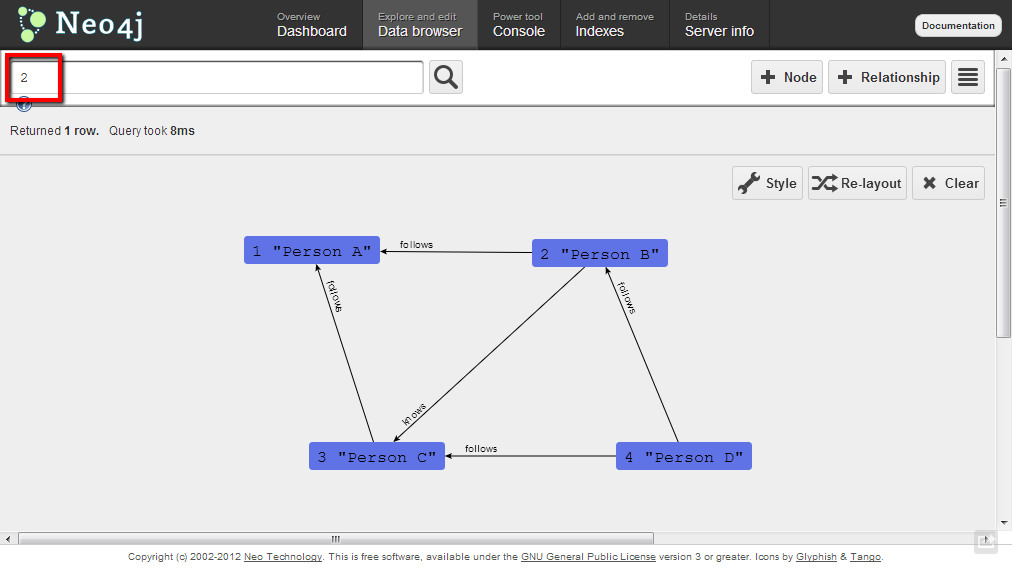
After that save the layout, open Data browse tab one more time and search entity by id 2. You should see the following beautiful graph.

Neo4j_graph

Have a good time playing with graphs! 🙂

Using Neo4j with F# – Cypher 2.0” is a new version of this demo that is updated to VS2013 and Cypher 2.0. Thanks to Chris Skardon.

SuperSDG2: The maze game (С++ & OpenGL)

I have found that I have a large set of interesting and maybe sometimes useful applications. I have been programming for 14 years, I started from Pascal and tried Delphi, C++, Java, Perl, Clipper, FoxPro, Lua , JavaScript, C#, Octave, Python, Scala, R, F# (and may be something else that I currently do not remember). Through the years I created set of programs that may be interesting for someone else. These programs may look simple for experts, but I hope that they can be useful for beginners. So, I would like to add a new rubric to my blog, called “Apps”, where I will try to collect and share as much as I can find)

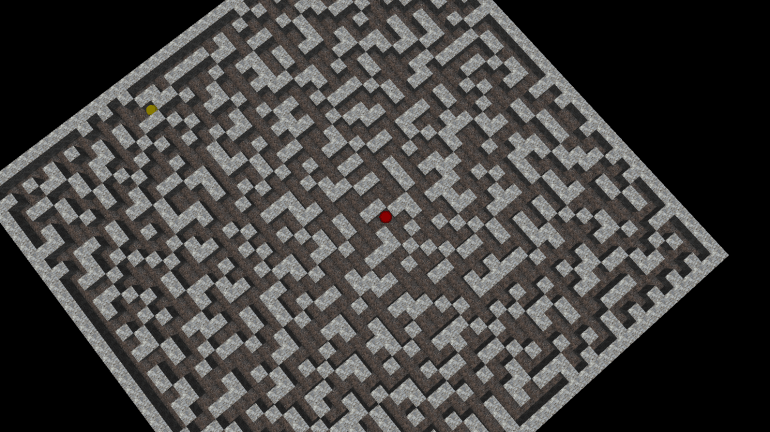
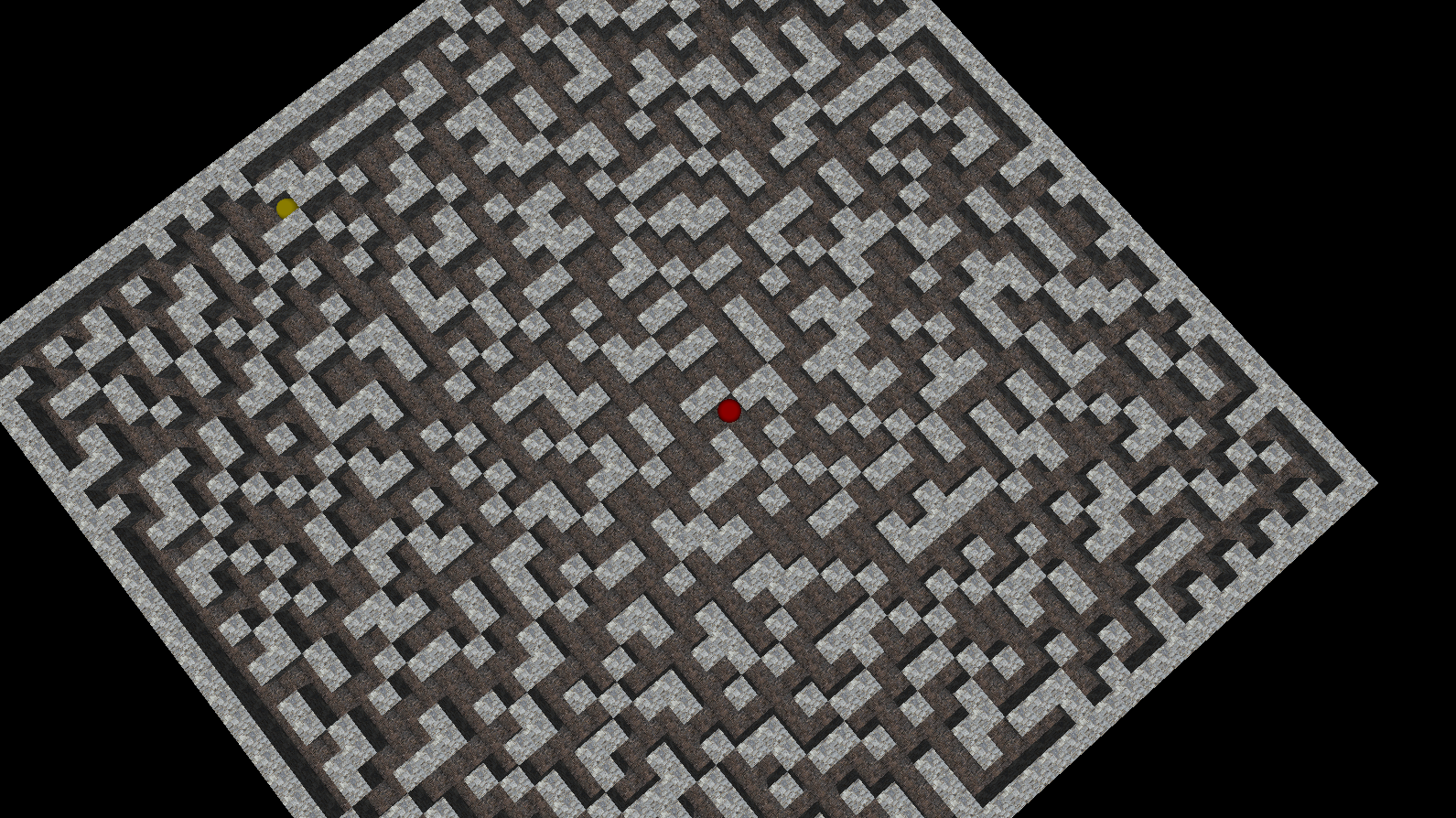
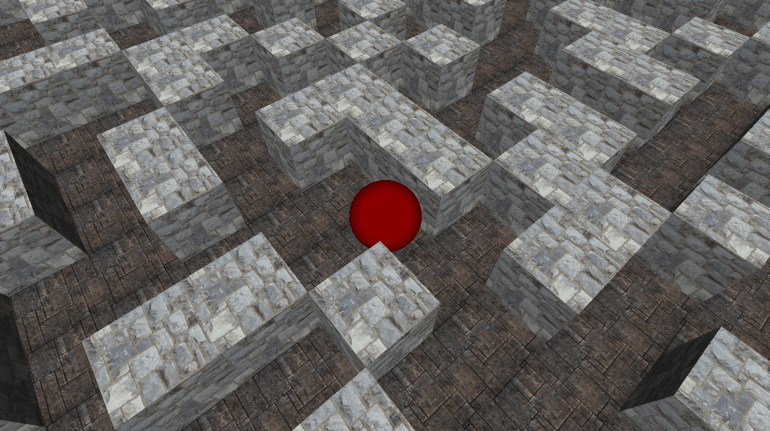
This post is about second version of the small maze game that called SuperSDG2, which was created in 2005 using C++, OpenGL(glut32) and a bit of passion. In the game, you are a lonely red ball in the large terrible maze. Your only wish is to find an exit from the random-generated maze. It is strange, but exit is a  yellow ball ;). The source code and binaries of this application are available on GitHub.

Control keys:

  • Left/Right/Up/Down – move actions
  • A/S – rotate camera
  • Z/X – up/down camera
  • R – reset camera position
  • Esc/Q – exit

Feel free to download binaries, play and modify the source code.
SuperSD2_1

SuperSD2_2

/********************************
* SuperSDG v2.2 release
* Copyright (c) 2002-2008 Ravent
* All rights reserved
*********************************/
#pragma comment (lib,"glut32.lib")
#pragma comment (lib,"glaux.lib")

#include "glaux.h"
#include "glut.h"
#include <stdio.h>
#include <stdlib.h>
#include <conio.h>
#define _USE_MATH_DEFINES
#include <math.h>
#include <time.h>

const int sMax=6, m=40, mm=m+1, direction_parts=36;
int cur_direction=0;
double distance=4.;

unsigned textureId = -1, texFloor = -1;
AUX_RGBImageRec *localTexture = NULL, *localFloor = NULL;
int glWin,pathLen,myLen=0;

struct Tpos
{char x,y;};
struct Player
{
    int x,y,z;
    int dx,dz;
    bool isGo;
}player,ex;

struct Maps
{int x,z;} map;

char data[m+2][m+2], cp[m+2][m+2];

float	lightAmb [] = { 0.03, 0.03, 0.03 };
float	lightDif [] = { 0.95, 0.95, 0.95 };
float	lightPos [] = { (int)m/2,  7,  (int)m/2 };

void display(void);
void halt(bool f=false);

void drawFloor(GLfloat x1, GLfloat x2, GLfloat z1, GLfloat z2, unsigned texture=texFloor)
{
    glBindTexture ( GL_TEXTURE_2D, texture );
    glBegin(GL_POLYGON);
        glNormal3f( 0.0, 1.0, 0.0);
        glTexCoord2f(0,0);
        glVertex3f( x1, 0, z2 );
        glTexCoord2f(1,0);
        glVertex3f( x2, 0, z2 );
        glTexCoord2f(1,1);
        glVertex3f( x2, 0, z1 );
        glTexCoord2f(0,1);
        glVertex3f( x1, 0, z1 );
    glEnd();

}

void drawBox (GLint j, GLint i, unsigned texture=textureId)
{
    GLfloat x1=i, x2=i+1, y1=0, y2=1, z1=j, z2=j+1;
    glBindTexture ( GL_TEXTURE_2D, texture );

    if ((j==map.z+1)||(data[j-1][i]!='x'))
    {
    glBegin(GL_POLYGON); // Back
        glNormal3f( 0.0, 0.0, -1.0);
        glTexCoord2f(0,0);
        glVertex3f( x2, y1, z1 );
        glTexCoord2f(1,0);
        glVertex3f( x1, y1, z1 );
        glTexCoord2f(1,1);
        glVertex3f( x1, y2, z1 );
        glTexCoord2f(0,1);
        glVertex3f( x2, y2, z1 );
    glEnd();
    }
    if ((j==map.z-1)||(data[j+1][i]!='x'))
    {
    glBegin(GL_POLYGON); // Front
        glNormal3f( 0.0, 0.0, 1.0);
        glTexCoord2f(0,0);
        glVertex3f( x1, y1, z2 );
        glTexCoord2f(1,0);
        glVertex3f( x2, y1, z2 );
        glTexCoord2f(1,1);
        glVertex3f( x2, y2, z2 );
        glTexCoord2f(0,1);
        glVertex3f( x1, y2, z2 );
    glEnd();
    }
    if ((i>0)&&(data[j][i-1]!='x'))
    {
    glBegin(GL_POLYGON); // Left
        glNormal3f( -1.0, 0.0, 0.0);
        glTexCoord2f(0,0);
        glVertex3f( x1, y1, z1 );
        glTexCoord2f(1,0);
        glVertex3f( x1, y1, z2 );
        glTexCoord2f(1,1);
        glVertex3f( x1, y2, z2 );
        glTexCoord2f(0,1);
        glVertex3f( x1, y2, z1 );
    glEnd();
    }
    if ((i<map.x)&&(data[j][i+1]!='x'))
    {
    glBegin(GL_POLYGON); // Right
        glNormal3f( 1.0, 0.0, 0.0);
        glTexCoord2f(0,0);
        glVertex3f( x2, y1, z2 );
        glTexCoord2f(1,0);
        glVertex3f( x2, y1, z1 );
        glTexCoord2f(1,1);
        glVertex3f( x2, y2, z1 );
        glTexCoord2f(0,1);
        glVertex3f( x2, y2, z2 );
    glEnd();
    }
    glBegin(GL_POLYGON); // Top
        glNormal3f( 0.0, 1.0, 0.0);
        glTexCoord2f(0,0);
        glVertex3f( x1, y2, z2 );
        glTexCoord2f(1,0);
        glVertex3f( x2, y2, z2 );
        glTexCoord2f(1,1);
        glVertex3f( x2, y2, z1 );
        glTexCoord2f(0,1);
        glVertex3f( x1, y2, z1 );
    glEnd();
}

void animate()
{
    if ((player.x == ex.x)&&(player.z==ex.z))
    {
        halt(true);
    };
    if (player.isGo==true)
    {
        if (player.dx>0)	player.dx+=1; else
        if (player.dz>0)	player.dz+=1; else
        if (player.dx<0)	player.dx-=1; else
        if (player.dz<0)	player.dz-=1;
        if ((player.dx>=sMax)||(player.dz>=sMax))
        {
            player.isGo=false;
            if (player.dx>0)	player.x+=1;
            if (player.dz>0)	player.z+=1;
            player.dx=0; player.dz=0;
        }else
        if ((player.dx<=-sMax)||(player.dz<=-sMax))
        {
            player.isGo=false;
            if (player.dx<0)	player.x-=1;
            if (player.dz<0)	player.z-=1;
            player.dx=0; player.dz=0;
        }
    }
    glutPostRedisplay();
}

void init()
{
    glClearColor( 0.0, 0.0, 0.0, 1.0 );
    glEnable( GL_DEPTH_TEST );
    glEnable( GL_TEXTURE_2D );
    glEnable( GL_CULL_FACE );
    glPixelStorei ( GL_PACK_ALIGNMENT, 1 );
    glPixelStorei ( GL_UNPACK_ALIGNMENT, 1 );
    glShadeModel (GL_SMOOTH);
    glLightfv    ( GL_LIGHT0, GL_AMBIENT,  lightAmb );
    glLightfv    ( GL_LIGHT0, GL_DIFFUSE,  lightDif );
    //glLightfv    ( GL_LIGHT0, GL_POSITION, lightPos );
    glEnable ( GL_LIGHT0 );
    glEnable ( GL_LIGHTING );
    player.dx=0; player.dz=0; player.isGo=false;
    glEnable(GL_COLOR_MATERIAL);
}

void display()
{
    glClear( GL_COLOR_BUFFER_BIT | GL_DEPTH_BUFFER_BIT );

    glMatrixMode( GL_MODELVIEW );
    glLoadIdentity();
    gluLookAt(player.x+(1.0*player.dx/sMax)+0.5f+3*cos(M_PI_2+cur_direction/double(direction_parts)*2.*M_PI),player.y+distance,player.z+(1.0*player.dz/sMax)+0.5f+3*sin(M_PI_2+cur_direction/double(direction_parts)*2.*M_PI),
              player.x+(1.0*player.dx/sMax)+0.5f,player.y+0.5f,player.z+(1.0*player.dz/sMax)+0.5f,
              0,1,0);

    for (int i=0;i<map.x;i++)
        for (int j=0;j<map.z;j++)
            if (data[j][i] == 'x')
            {
                drawBox(j,i);
            } else {
                drawFloor(i,i+1,j,j+1);
            }

    glPushMatrix();
    glTranslatef ( player.x+(1.0*player.dx/sMax)+0.5f, player.y+0.5f, player.z+(1.0*player.dz/sMax)+0.5f);
    glColor3d(1,0,0);
    glutSolidSphere(0.5,100,100);
    glColor3d(1,1,1);
    glPopMatrix(); 

    glPushMatrix();
    glTranslatef ( ex.x +0.5f, ex.y+0.5f, ex.z+0.5f);
    glColor4d(1,1,0.,0.4);
    glutSolidSphere(0.5,100,100);
    glColor3d(1,1,1);
    glPopMatrix(); 

    glutSwapBuffers();
}

void reshape ( int w, int h )
{
    glViewport( 0, 0, (GLsizei)w, (GLsizei)h);
    glMatrixMode( GL_PROJECTION );
    glLoadIdentity();
    gluPerspective( 60.0, (GLfloat)w/(GLfloat)h, 1.0, 60.0);

    glMatrixMode( GL_MODELVIEW );
    glLoadIdentity();
    gluLookAt(0,0,25,0,0,0,0,1,0);
}

void key( unsigned char key, int x, int y)
{
    if ( key=='q' || key=='Q' || key == 27) halt(false);
    if ( key=='a' || key=='A' ) { cur_direction--; if (cur_direction<0) cur_direction+=direction_parts;}
    if ( key=='s' || key=='S' ) { cur_direction++; if (cur_direction==direction_parts) cur_direction=0;}
    if ((key=='z' || key=='Z') && (distance<58.) ) distance+=0.25;
    if ((key=='x' || key=='X') && (distance>3.) ) distance-=0.25;
    if ( key=='r' || key=='R' ) { cur_direction=0; distance=4.;}
}

const int move[4][2]={{-1,0},{0,-1},{1,0},{0,1}};
const int move_key[4] = {GLUT_KEY_UP, GLUT_KEY_LEFT, GLUT_KEY_DOWN, GLUT_KEY_RIGHT };
bool good_move(int z, int x){
    return (0<=z && 0<=x && z<map.z && x<map.x && data[z][x]!='x');
}

void keys( int key, int x, int y)
{
    if (player.isGo) return;
    int dir=int(((direction_parts-cur_direction-1)/double(direction_parts))*4.+0.5);
    for (int i=0; i<4; i++)
        if ( key == move_key[i] ) {
            int newz=player.z+move[(dir+i)%4][0];
            int newx=player.x+move[(dir+i)%4][1];
            if (good_move(newz,newx)) {
                player.isGo=true;
                player.dz+=move[(dir+i)%4][0];
                player.dx+=move[(dir+i)%4][1];
                myLen++;
            }
        }
}

void genMap(void);

int main (int argc, char** argv)
{
    genMap();
    glutInit(&argc,argv);
    glutInitDisplayMode( GLUT_DOUBLE | GLUT_RGB | GLUT_DEPTH );
    glutInitWindowSize(1024,768);

    glWin = glutCreateWindow("SuperSDG 2");
    init();

    glutDisplayFunc(display);
    glutReshapeFunc(reshape);
    glutKeyboardFunc(key);
    glutSpecialFunc(keys);
    glutIdleFunc(animate);

    localTexture = auxDIBImageLoad(L"1.bmp");
    glGenTextures (1,&textureId);
    glBindTexture (GL_TEXTURE_2D,textureId);
    glPixelStorei (GL_UNPACK_ALIGNMENT,1);
    glTexParameteri (GL_TEXTURE_2D, GL_TEXTURE_WRAP_S,GL_REPEAT);
    glTexParameteri (GL_TEXTURE_2D, GL_TEXTURE_WRAP_T,GL_REPEAT);
    gluBuild2DMipmaps( GL_TEXTURE_2D, GL_RGB, localTexture->sizeX, localTexture->sizeY, GL_RGB, GL_UNSIGNED_BYTE, localTexture->data);
    glTexParameteri (GL_TEXTURE_2D, GL_TEXTURE_MAG_FILTER, GL_LINEAR);
    glTexParameteri (GL_TEXTURE_2D, GL_TEXTURE_MIN_FILTER, GL_LINEAR);

    localFloor = auxDIBImageLoad(L"2.bmp");
    glGenTextures (1,&texFloor);
    glBindTexture (GL_TEXTURE_2D,texFloor);
    glPixelStorei (GL_UNPACK_ALIGNMENT,1);
    glTexParameteri (GL_TEXTURE_2D, GL_TEXTURE_WRAP_S,GL_REPEAT);
    glTexParameteri (GL_TEXTURE_2D, GL_TEXTURE_WRAP_T,GL_REPEAT);
    gluBuild2DMipmaps( GL_TEXTURE_2D, GL_RGB, localFloor->sizeX, localFloor->sizeY, GL_RGB, GL_UNSIGNED_BYTE, localFloor->data);
    glTexParameteri (GL_TEXTURE_2D, GL_TEXTURE_MAG_FILTER, GL_LINEAR);
    glTexParameteri (GL_TEXTURE_2D, GL_TEXTURE_MIN_FILTER, GL_LINEAR);

    glutFullScreen();
    glutMainLoop();
    return 0;
}

int step(int y, int x)
{
    int res=0;
    if ((data[y][x]=='x')) res++;
    if ((y<mm)&&(data[y+1][x]=='x')) res++;
    if ((y>0 )&&(data[y-1][x]=='x')) res++;
    if ((x<mm)&&(data[y][x+1]=='x')) res++;
    if ((x>0 )&&(data[y][x-1]=='x')) res++;
    return res;
}

int stepC(int y, int x)
{
    int res=0;
    if ((cp[y][x]=='x')) res++;
    if ((y<mm)&&(cp[y+1][x]=='x')) res++;
    if ((y>0 )&&(cp[y-1][x]=='x')) res++;
    if ((x<mm)&&(cp[y][x+1]=='x')) res++;
    if ((x>0 )&&(cp[y][x-1]=='x')) res++;
    return res;
}

void DataToCp(void)
{
    for(int j=1;j<=mm;j++)
        for (int i=1;i<=mm;i++)
            cp[j][i]=data[j][i];
}

void fill (int y,int x,Tpos *v, int *l)
{
    int st=1,en=0;
    int G[mm*mm],Ll[mm*mm];
    G[0]=y*mm+x; Ll[0]=0;
    cp[y][x]='x';
    while (st!=en)
    {
        if ((G[en]%mm+1<mm)&&(cp[(int)G[en]/mm][G[en]%mm+1]=='.'))
        {
            G[st]=G[en]+1;
            Ll[st]=Ll[en]+1;
            cp[(int)G[st]/mm][G[st]%mm]='x';
            st++;
        }
        if ((G[en]%mm-1>0)&&(cp[(int)G[en]/mm][G[en]%mm-1]=='.'))
        {
            G[st]=G[en]-1;
            Ll[st]=Ll[en]+1;
            cp[(int)G[st]/mm][G[st]%mm]='x';
            st++;
        }
        if ((((int)G[en]/mm)+1<mm)&&(cp[((int)G[en]/mm)+1][G[en]%mm]=='.'))
        {
            G[st]=G[en]+mm;
            Ll[st]=Ll[en]+1;
            cp[(int)G[st]/mm][G[st]%mm]='x';
            st++;
        }
        if ((((int)G[en]/mm)-1>0)&&(cp[((int)G[en]/mm)-1][G[en]%mm]=='.'))
        {
            G[st]=G[en]-mm;
            Ll[st]=Ll[en]+1;
            cp[(int)G[st]/mm][G[st]%mm]='x';
            st++;
        }
        en++;
    }
    int rnd=rand()%5+1;
    (*v).x =(int) G[en-rnd] % mm;
    (*v).y =(int) G[en-rnd] / mm;
    *l=Ll[en-rnd];
}

bool isGood(Tpos a)
{
    DataToCp();
    int k=0,i,j,lt;
    Tpos temp;
    cp[a.y][a.x]='x';
    if ((step(a.y,a.x)>3)||(step(a.y+1,a.x)>3)||(step(a.y-1,a.x)>3)||(step(a.y,a.x+1)>3)||(step(a.y,a.x-1)>3))
        return false;
    for(j=1;j<=m;j++)
        for(i=1;i<=m;i++)
            if (cp[j][i]=='.')
            {
                if (k>0)
                    return false;
                fill(j,i,&temp,&lt);
                k++;
            }
    return true;
}

void genMap()
{
    int i,j;
    map.x=m+2; map.z=m+2;
    printf("Loading... Please Wait.\n");
    srand( (unsigned)time( NULL ) );
    for (j=0;j<map.z;j++)
        for (i=0;i<map.x;i++)
        {
            if ((i==0)||(j==0)||(i==map.x-1)||(j==map.z-1))
                data[j][i]='x';
                else
                data[j][i]='.';
        }

    int k=0;
    Tpos t;
    while (k<(int)m*m/2.5)
    {
        t.x = rand()%mm+1;
        t.y = rand()%mm+1;
        if ((data[t.y][t.x]=='.')&&(isGood(t)))
        {
            data[t.y][t.x]='x';
            k++;
        }
    }
    for (j=1;j<=m;j++)
        for (i=1;i<=m;i++)
            if ((data[j][i]=='x')&&(step(j,i)>3))
            {
                data[j][i]='.';
            }
    for (j=1;j<=m;j++)
        for (i=1;i<=m;i++)
            if ((data[j][i]=='.')&&(step(j,i)<2))
            {
                t.x = i; t.y=j;
                if (isGood(t))
                    data[j][i]='x';
            }

    Tpos ps[11]; k=0;
    while (k<=10)
    {
        t.x = rand()%mm+1;
        t.y = rand()%mm+1;
        if (data[t.y][t.x]=='.')
        {
            ps[k]=t;
            k++;
        }
    }
    k=rand()%11;
    player.x=ps[k].x;
    player.z=ps[k].y;
    DataToCp();
    fill(ps[k].y,ps[k].x,&t,&pathLen);
    ex.x=t.x;
    ex.z=t.y;

    printf("Loading complete.\n");
}

void halt(bool f)
{
        glutDestroyWindow(glWin);
        printf("-----------------------------------------------------\n");
        printf("#                    SuperSDG 2.2                   #\n");
        if (f==true)
        {
        printf("-----------------------------------------------------\n");
        printf("# The shortest path %d.                            #\n",pathLen);
        printf("# Your path %d.                                    #\n",myLen);
        printf("# Congratulate you passed the game.                 #\n");
            if (  1.2*pathLen >= myLen )
            {
                printf("-----------------------------------------------------\n");
                printf("#     YOU ONE OF THE BEST PLAYER OF THE WORLD.      #\n");
            }
        }
        printf("-----------------------------------------------------\n");
        printf("# Developers:                                       #\n");
        printf("#        Ravent     - programmer.                   #\n");
        printf("# Series found:                                     #\n");
        printf("#        Ravent     - Sergey Tihon                  #\n");
        printf("#        MasterZerg - Dima   Rudol                  #\n");
        printf("-----------------------------------------------------\n");
        printf("#          Copyright (c) Ravent 2002-2008.          #\n");
        printf("#               All rights reserved                 #\n");
        printf("-----------------------------------------------------\n");
        getch();
        exit(0);
}
Getting started with 3D XNA in F#

XNA Game Studio is one of the main pure managed 3D data visualization tools. It is widely used for game development and operates not only on PC but on Xbox and Windows Phones too.

As you probably know, The F# Software Foundation has a “Game And Visualization Stacks” page with description of options available from F#. On this page you can find a link to the “F# With XNA Game Studio” post by AzerDark (@azer89). In the post you can find the detailed guide of how to create a new F# project, reference all required assemblies and create minimal XNA application that shows up an empty window.

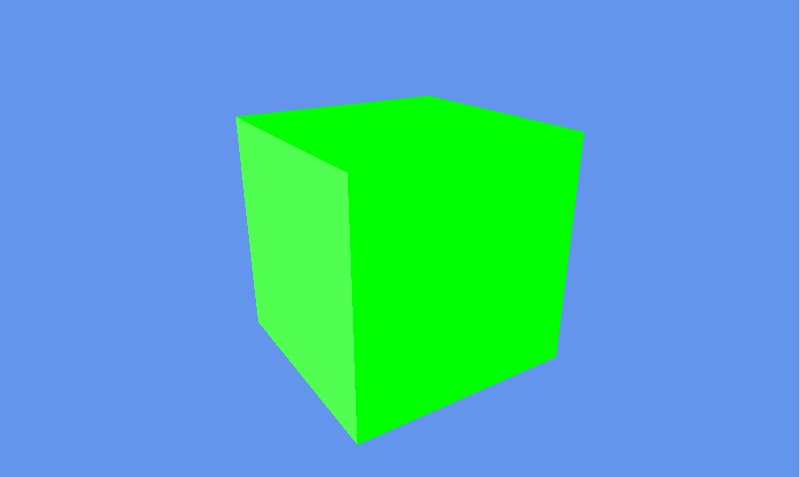
I have tried to create something a bit more interesting than an empty window. It is a rotating cube :). A full description of how it works you can find in the post “Getting started with 3D XNA” by David Conrad (with source code in C#). In this post you can see F# code that create XNA game object and model of cube, initialize basic effect (turn on light and configure light, projection and view), create an animation(rotating) for cube and render it in XNA window. As a result, you will see something like that (but with animation 😉 ):

XNA

open System
open Microsoft.Xna.Framework
open Microsoft.Xna.Framework.Graphics
open Microsoft.Xna.Framework.Input

type Game1() as this =
    inherit Game()
    let graphics = new GraphicsDeviceManager(this)

    let cube =
        let texCoords = new Vector2(0.0f, 0.0f);
        let face = [|Vector3(-1.0f, 1.0f, 0.0f); Vector3(-1.0f, -1.0f, 0.0f);
                     Vector3(1.0f, 1.0f, 0.0f);   //TopLeft-BottomLeft-TopRight
                     Vector3(-1.0f, -1.0f, 0.0f); Vector3(1.0f, -1.0f, 0.0f);
                     Vector3(1.0f, 1.0f, 0.0f);|] //BottomLeft-BottomRight-TopRight
        let faceNormals = [|Vector3.UnitZ; -Vector3.UnitZ;   //Front & Back faces
                            Vector3.UnitX; -Vector3.UnitX;   //Left & Right faces
                            Vector3.UnitY; -Vector3.UnitY|]; //Top & Bottom faces
        let ang90 = (float32)Math.PI / 2.0f;
        let faceRotations = [|Matrix.CreateRotationY(2.0f*ang90); Matrix.CreateRotationY(0.0f);
                              Matrix.CreateRotationY(-ang90); Matrix.CreateRotationY(ang90);
                              Matrix.CreateRotationX(ang90); Matrix.CreateRotationX(-ang90)|];
        Array.init 36 (fun x ->
            let i,j = x%6, x/6
            VertexPositionNormalTexture(
                Vector3.Transform(face.[i], faceRotations.[j])
                    + faceNormals.[j], faceNormals.[j], texCoords))

    let mutable effect = null
    let angle = ref 0.0f;

    override Game.Initialize() =
        effect <- new BasicEffect(graphics.GraphicsDevice,
                    AmbientLightColor = Vector3(0.0f, 1.0f, 0.0f),
                    LightingEnabled = true,
                    View = Matrix.CreateTranslation(0.0f,0.0f,-10.0f),
                    Projection =
                        Matrix.CreatePerspectiveFieldOfView(
                            (float32)Math.PI / 4.0f,
                            (float32)this.Window.ClientBounds.Width
                                / (float32)this.Window.ClientBounds.Height,
                            1.0f, 10.0f));
        effect.DirectionalLight0.Enabled <- true;
        effect.DirectionalLight0.DiffuseColor <- Vector3.One;
        effect.DirectionalLight0.Direction <- Vector3.Normalize(Vector3.One);
        base.Initialize()

    override Game.Update gameTime =
        angle := !angle + 0.005f
        if (!angle > 2.0f * (float32)Math.PI) then angle := 0.0f;
        let R = Matrix.CreateRotationY(!angle) * Matrix.CreateRotationX(0.4f);
        let T = Matrix.CreateTranslation(0.0f, 0.0f, 5.0f);
        effect.World <- R * T;
        base.Update gameTime

    override Game.Draw gameTime =
        this.GraphicsDevice.Clear(Color.CornflowerBlue)
        graphics.GraphicsDevice.RasterizerState <- new RasterizerState();
        effect.CurrentTechnique.Passes |> Seq.iter (fun pass ->
            pass.Apply()
            graphics.GraphicsDevice.DrawUserPrimitives(
                PrimitiveType.TriangleList, cube, 0, 12))
        base.Draw gameTime

[<EntryPoint>]
let main argv =
    use g = new Game1()
    g.Run()
    0

How to determine browser type in JavaScript (for SharePoint 2010 sites)

According to the sad situation in nowadays front-end development, we have to check current browser type and version in JavaScript code and behave differently depend on that. There are many options to do so like this or this. But working in SharePoint 2010 environment you have one more, init.js defines browseris object (see on the picture below) which contains most of required data. Be free to rely on SharePoint in this case.
browseris