you will see that this update comes with this built-in DNS server dnsmasq that already occupies port :53
COMMAND PID USER FD TYPE DEVICE SIZE/OFF NODE NAME
dnsmasq 1573 dnsmasq 4u IPv4 1961 0t0 UDP localhost:domain
dnsmasq 1573 dnsmasq 5u IPv4 1962 0t0 TCP localhost:domain (LISTEN)
This DNS server is probably needed for a new feature that promises container apps access over UGREENlink: Added UGREENlink support for remote access to some container apps (firmware and client update required).
So what to do? Let’s find out how dnsmasq is configured.
Just stop dnsmasq if you do not plan to use UGREENlink remote access to container apps. This solutions is not recommended, especially if you use Virtual Machines functionality (see explanation from UGREEN Technical Support).
6. Test that DNS resolution works (from another machine)
dig 192.168.68.53 google.com
With this approach, you will lose benefits to pi-hole’s network overview feature. You will see that all traffic comes from the first DNS server (dnsmasq), and your devices will not be distinguishable.
Workaround 3
Use Macvlan network driver and ask docker to assign new IP for Pi-hole container (thanks to JCS and Krishna from Discord)
networks:
macvlan_net:
driver: macvlan
driver_opts:
parent: eth0 # Or your physical network interface
ipam:
config:
- subnet: 192.168.1.0/24 # Replace with your desired subnet
gateway: 192.168.1.1 # Replace with your gateway
services:
pihole:
image: pihole/pihole:latest
networks:
- macvlan_net
...
Technical Support
Update 2025-07-02: Here is what I got as a reply to my support ticker.
UGOS PRO system port 53 is occupied by the following service: 1. dnsmasq within the virtual machine environment 2. Host system's dnsmasq
If you want to disable dnsmasq, consider executing the following operations in the background:
1. Clean up virtual machine network configuration:
2. Then disable the Virtual Machine service in App Center, execute it on demand, and if you are not using a Virtual Machine, you don't need to execute it.
3. Stop the host machine's dnsmasq service.
systemctl stop dnsmasq
It needs to be made clear that:
1. Is deploying a Pi-hole container for DNS service filtering ads? If so, it will conflict with the NAS's own DNS service.
2. If you need to stop the dnsmasq service in the background, please be aware that it may affect virtual machine functionality.
Since 2014, faithfully every Monday, I’ve dispatched the F# Weekly Newsletter to your mailboxes, amounting to nearly 500 editions to date. From the outset, I’ve adopted Tinyletter, a simple platform allowing seamless subscription and delivery of the F# Weekly newsletter.
However, Mailchimp, who took over TinyLetter in 2011, decided to bring it to an end on February 29, 2024. Consequently, I find myself compelled to seek a new home for the newsletter.
Seeing as the F# Weekly newsletter boasts nearly 1000 subscribers—a number exceeding the free tier limit offered by most services—I made the decision to move the newsletter into my WordPress blog, a resource I’ve already invested in, rather than integrating or purchasing a new service. Some of you are already reading this post from within your inbox.
You may wonder, what does this mean to you? It implies that you will also receive email notifications about my occasional blog posts, aside from the F# Weekly newsletters. If this deviates from your initial subscription interest, I deeply apologize. Feel free to modify or cancel your subscription. Gratefully, I’ve managed to configure WordPress to allow you to set your subscription preferences (as seen in the screenshot below). If my “musings” outnumber your tolerance, you can simply select the F# Weekly category 😁
I am immensely grateful to you for joining me on this journey and consuming every piece of F# news I’ve delivered. Still not subscribed? You can do so from this page 😉
Update #2: Twitter/X API Drama
Several moons ago, I put together an automation system that enabled me to gather #fsharp tweets with links, trimming my time spent crafting each F# Weekly down from 3-4 hours to about a single hour. Half a decade ago, I made this tool publicly available, transitioning it to .NET Core and Azure Functions, and deployed it on Azure via my MVP Azure credits.
But as fate would have it, in March 2023, Elon Musk decided to phase out Twitter API v1.1, charging a hefty $100+ monthly fee from enthusiasts who rely on programmatically reading tweets. This abrupt change drove me back to manually penning F# Weekly by hand, a decision that left me heartbroken. 💔
If you’ve noticed a dip in the quality of F# Weekly or found that I’ve overlooked your posts or videos on occasion:
Make sure to attach the #fsharp tag to your posts if you choose to announce them on X.
Don’t hesitate to tag me directly or @fsharponline if you’d like more visibility or retweets. If either account retweets your post, it’s almost certain to catch my eye during newsletter assembly.
If X isn’t your platform of choice, feel free to mention me on Mastodon or send me an email at sergey.tihon[at]gmail.com if you abstain from social media altogether.
If you have any genius ideas on improving the news collection process, making it more resilient, or possibly even rolling it out on a wider scale, I’m all ears! Don’t hesitate to reach out on social media or leave a comment on this post.
Update #3: Warm Gratitude for Donations
In 2021, I set up the buy me a coffee service as a delightful way for you to treat me to a cup of coffee. I want to pour out a tidal wave of THANKS to everyone who kindly donated over the last 3 years! Your generosity warms my heart. ❤️
The donations have sprinkled extra joy into my everyday life, allowing me to occasionally indulge in non-essential buys without the guilt of dipping into family funds. Here are a few examples of how I’ve put your contributions to use (beyond covering my WordPress subscription and domain expenses):
First and foremost, I’ve made a monthly donation to the Ionide project, and I would earnestly implore you to consider the same if you’re able. It’s crucial that we preserve the presence of a free, cross-platform F# IDE.
I’ve been battling with hand discomfort, which sometimes shoots pain back into my wrists and fingers. I regularly find myself alternating mouses and occasionally keyboards. This year, I decided to give myself an early Christmas present—an ergonomic columnar curved keyboard, the MoErgo Glove 80 with Red Pro Linear 35gf switches, and so far, it has won me over. 😊 I’ve swiftly adjusted to a comfortable typing speed that allows me to work without interruptions throughout the day.
Three years ago, I embarked on a journey to balance my screen time by swapping my digital device for the tactile joy of printed books, finding solace in their immersive stories just before bedtime. The therapeutic effect has improved not only my sleep but also my overall well-being. Over time, I’ve amassed a collection of captivating books. For those who share my love for reading, feel free to send me a friend request on Goodreads. I’m always intrigued to know what tales are keeping you hooked!
Recently, I found it impossible to resist spoiling my “big dog” 🐶 with a cozy new kennel for her to curl up in.
Once again, my heartfelt thanks to all of you for your generosity and for investing your time into reading F# Weekly. Here’s wishing you a 2024 brimming with joy and success!
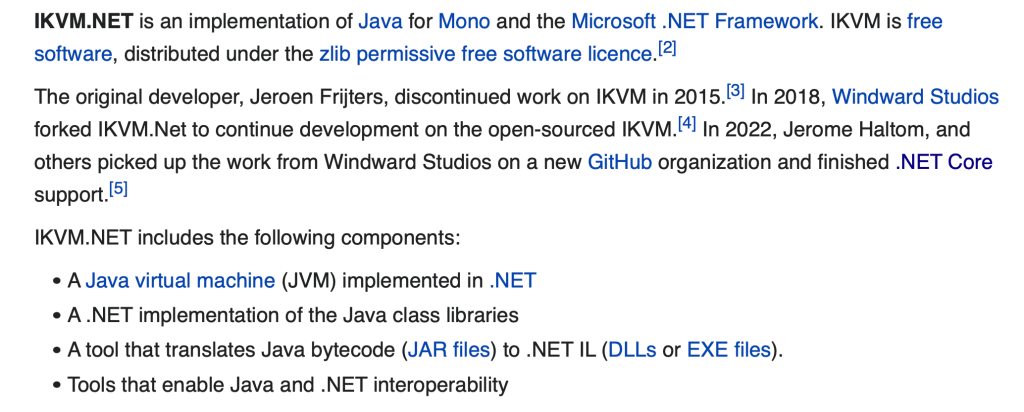
First of all, it works! I am glad to see that project was revived and .NET Core was supported. It really opens up a lot of new possibilities for .NET developers. But, not everything is perfect yet:
No support for JDK higher than JDK 8. This means that you cannot use JAR files compiled by JDK 9 for example. It is quite an old limitation, and the project requires an incredible amount of work to catch up with later versions. Everyone can help here 😉
IKVM Compiler (IKMVc) is hard to use. Currently project ships two compilers (IKVMc): one for .NET Framework and one for .NET Core as well as two sets of runtime libraries for two runtimes. You should use .NET Core version of IKVMc with .NET Core set of runtime libraries to produce .NET Core version of a JAR file. Is it confusing and quite hard to use! In most cases, you should not IKVMc use directly anymore, because the project gives you access to MavenReference / MSBuild integration (read further for details).
You should build on Windows with .NET Core 3.1 installed. Windows is the only fully supported platform (once again, it only build-time dependency, produced DLLs will work on all platforms including Linux & macOS, and runtimes like .NET 6). Linux version almost works, except for Sockets support. The macOS version does not exist yet but looks like something is coming…
MavenReference
MavenReference is a very cute new addition to the IKVM family of tools that hide from you the complexity of IKVMc. All you need is to edit your csprof/fsproj file and reference to Maven package! (You may think about Maven like a Nuget from Java world)
That is all you need to get started using Maven dependencies from .NET Core!
P.S.If something co wrong, just check that run build on Windows and Maven package compiled using JDK 8. JDK version (Build-Jdk-Spec) you can find in the manifest inside of the JAR file, do not confuse it with Bundle-RequiredExecutionEnvironment!
Recently some of out users complained that they no longer see previews. Instead, they see very interesting message “Hmm… looks like this file doesn’t have preview we can show you”.
If you try to Google this issue you won’t find much, but if you bing it you will find few questions on MS Tech Community site that aren’t really helpful.
Let’s open Edge/Chrome dev tools (F12) and find out what is going on. On the network tab, I found few failed requests (related to online preview) with 404 status code.
Network tab of browser dev tools
What interesting about this image is that the response comes from ServiceWorker (and not from actual backend). This means that your browser has service worker installed for SharePoint Online that intercept request to the server and reply with 404 instead of passing the request to server.
Solution
We need to find and remove service worker that break our previews.
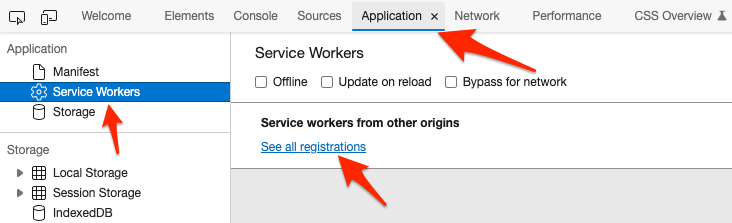
Or go to Application > Service Workers > See all registrations
All registered service workers
Find service worker registered for your SharePoint Online tenant (*.sharepoint.com) and Unregister it.
Unregister *.sharepoint.com service worker
That it, next time when you reload page with web preview, it should work.
When you visit web preview of a document in SharePoint Online it most likely register the service worker again, but new one should not break your previews.
I am excited to announce my new project “OpenXML Package Explorer” extension for Visual Studio Code.
It allows to explore content of Office Open XML packages (*.pptx, *.docx, *.xlsx) inside Visual Studio Code. You can open any valid OpenXML package in Tree View, explore parts inside package, their relationships and content of xml parts (pre-formatted xml with highlighting).
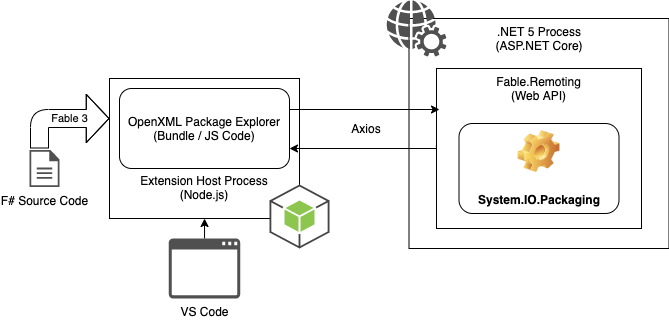
I believe that source code of this extension can be used as one more sample of Fable-powered VSCode extension. Here is how it currently works:
F# source code compiled to JS using Fable 3 and bundled with webpack.
Code that interacts with OpenXML packages is written in .NET and uses the latest version of System.IO.Packaging
When extension is activated it starts .NET 5 process with API exposed using Fable.Remoting.
Extension assumes that .NET 5 runtime is installed on user machine but it depends on .NET Install Tool for Extension Authors that should help to install runtime to users that do not have it yet.
Fable.Remoting.Client cannot be used, because it is built on top of XMLHttpRequest that does not exist in Node.js world. Here is feature request for Fable.Remoting.NodeClient that may become a thing one day.
Current client-server communication is built on top of axios library and Fable.Axios bindings with manually written client.
Microsoft.Identity.Web is new (GA from Sept 30, 2020) library which contains a set of reusable classes used in conjunction with ASP.NET Core for integrating with the Microsoft identity platform (formerly Azure AD v2.0 endpoint) and AAD B2C.
The reason is not obvious from the error message. In fact, you browser calls the server with .AspNetCore.Cookies cookies that server cannot accept and cannot renew. What to do? Easy – open dev tool, clean cookies, refresh the page, wait for next server restart and repeat it again. You won’t last long.
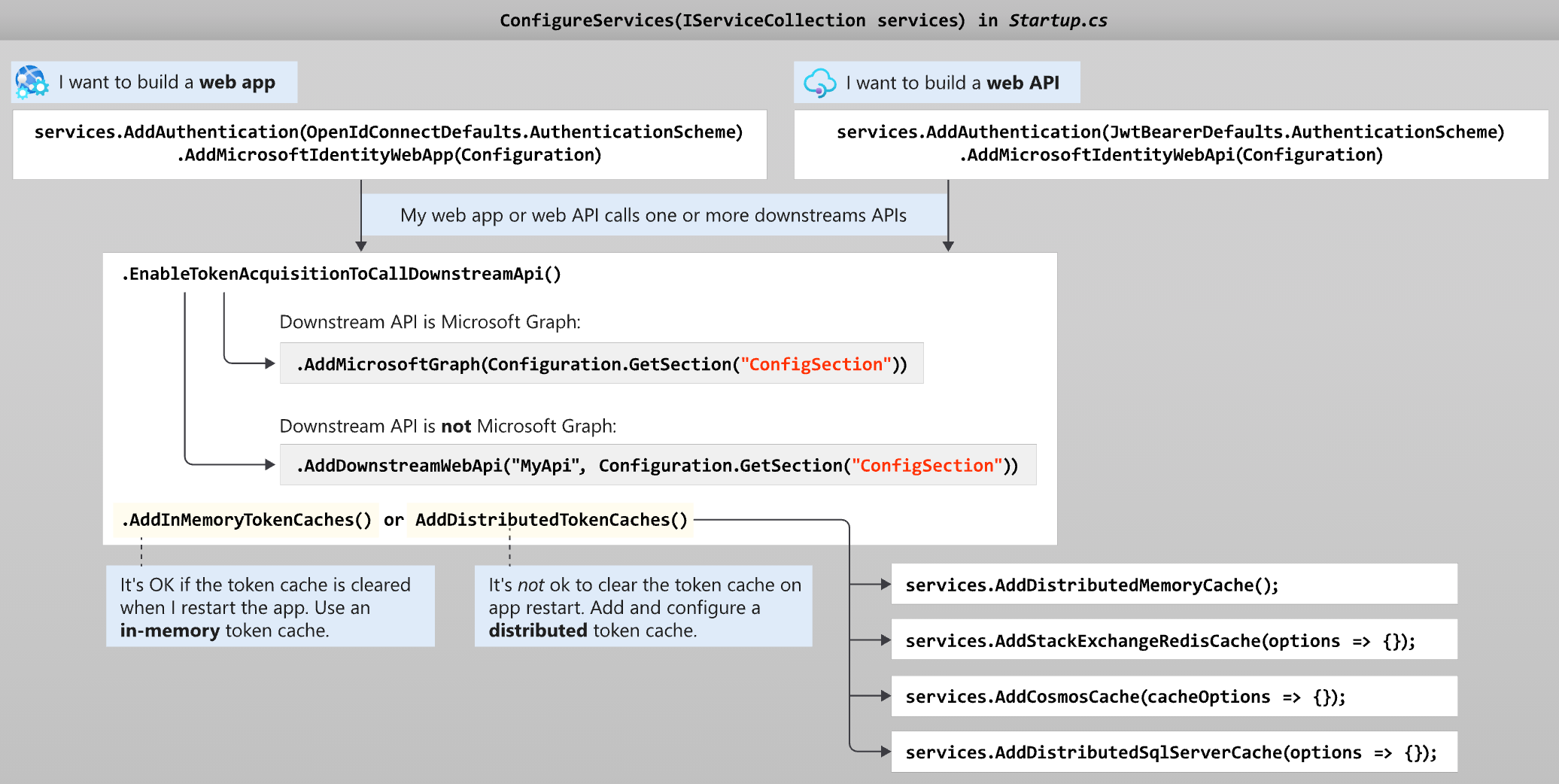
The last line (AddInMemoryTokenCaches) configure application to use in-memory cache that is empty after each server restart. We need to find a way to store tokens outside the app process and restore the cache after process restart.
The only alternative to AddInMemoryTokenCaches is AddDistributedTokenCaches with ability to store tokens in memory, Redis, CosmosDB, SqlServer. Last three are nice options to distributed application but all of them are complicated for localhost development.
For our use case would be enough to serialise token cache to local file between restart. Luckily, it is not that complicated. We can implement IDistributedCache interface using TestDistributedCache as reference implementation.
public class LocalFileTokenCache : IDistributedCache
{
private class FileTransaction : IDisposable
{
public FileTransaction(string fileName = "cache.json")
{
var root = Path.GetDirectoryName(GetType().Assembly.Location);
_fileName = Path.Combine(root, fileName);
if (File.Exists(_fileName))
{
var str = File.ReadAllText(_fileName);
Dict = JsonSerializer.Deserialize<Dictionary<string, byte[]>>(str);
}
Dict ??= new Dictionary<string, byte[]>();
}
private readonly string _fileName;
public Dictionary<string, byte[]> Dict { get; }
public void Dispose()
{
var str =JsonSerializer.Serialize(Dict);
File.WriteAllText(_fileName, str);
}
}
public byte[] Get(string key)
{
using var cache = new FileTransaction();
return cache.Dict.TryGetValue(key, out var value) ? cache.Dict[key] : null;
}
public Task<byte[]> GetAsync(string key, CancellationToken token = default)
{
return Task.FromResult(Get(key));
}
public void Refresh(string key)
{
// Don't process anything
}
public Task RefreshAsync(string key, CancellationToken token = default)
{
Refresh(key);
return Task.CompletedTask;
}
public void Remove(string key)
{
using var cache = new FileTransaction();
cache.Dict.Remove(key, out _);
}
public Task RemoveAsync(string key, CancellationToken token = default)
{
Remove(key);
return Task.CompletedTask;
}
public void Set(string key, byte[] value, DistributedCacheEntryOptions options)
{
using var cache = new FileTransaction();
cache.Dict[key] = value;
}
public Task SetAsync(string key, byte[] value, DistributedCacheEntryOptions options, CancellationToken token = default)
{
Set(key, value, options);
return Task.CompletedTask;
}
}
LocalFileTokenCache implementation is not suitable for anything rather than local development.
The last step is to register LocalFileTokenCache in DI container as implementation of IDistributedCache instead of MemoryDistributedCache for development environment.
public class Startup
{
public Startup(IConfiguration configuration, IWebHostEnvironment env)
{
Configuration = configuration;
CurrentEnvironment = env;
}
public IConfiguration Configuration { get; }
private IWebHostEnvironment CurrentEnvironment{ get; set; }
public void ConfigureServices(IServiceCollection services)
{
services.AddMicrosoftIdentityWebAppAuthentication(Configuration)
.EnableTokenAcquisitionToCallDownstreamApi(new[]
{
"User.Read", "Files.ReadWrite.AppFolder", "Files.ReadWrite"
}).AddDistributedTokenCaches();
if (CurrentEnvironment.IsDevelopment())
{
services.AddSingleton<IDistributedCache, LocalFileTokenCache>();
}
else
{
services.AddSingleton<IDistributedCache, MemoryDistributedCache>();
}
//...
}
//...
}
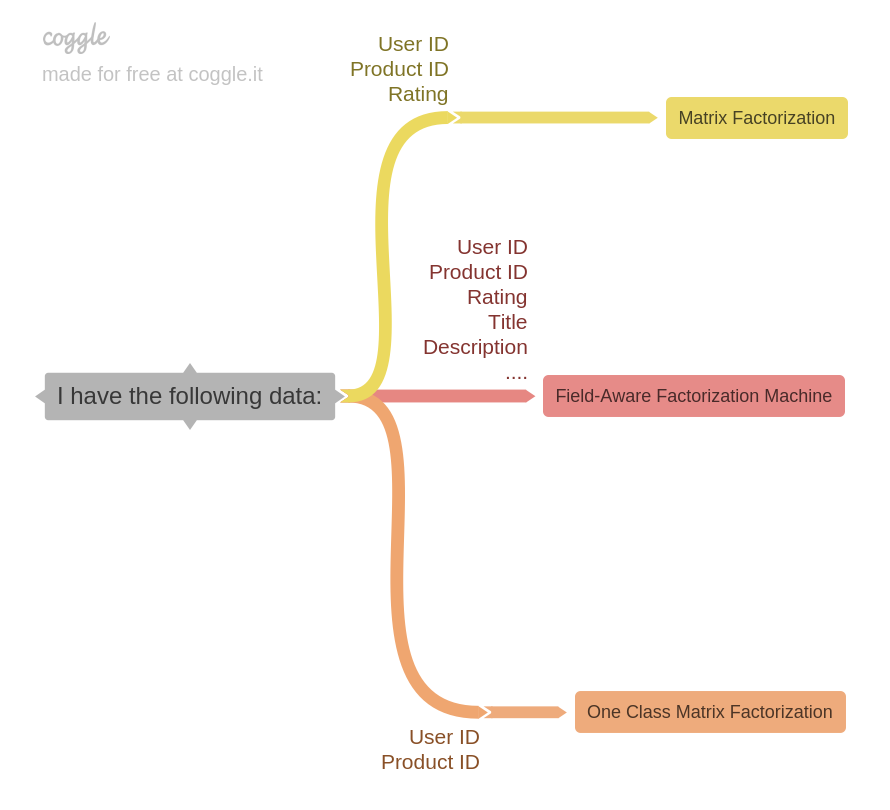
If you have sophisticated user feedback like rating (or likes and most importantly dislikes) then we can use Matrix Factorization algorithm to estimate unknown ratings.
If we have not only rating but other product fields, we can use more advanced algorithm called “Field-Aware Factorization Machine”
If we have no rating at all then “One Class Matrix Factorization” is the only option for us.
In this post I would like to focus on the last option.
One-Class Matrix Factorization
This algorithm can be used when data is limited. For example:
Books store: We have history of purchases (list of pairs userId + bookId) without user’s feedback and want to recommend new books for existing users.
Amazon store: We have history of co-purchases (list of pairs productId + productId) and want to recommend products in section “Customers Who Bought This Item Also Bought”.
Social network: We have information about user friendship (list of pairs userId + userId) and want to recommend users in section “People You May Know”.
As you already understood, it is applicable for a pair of 2 categorical variables, not only for userId + productId pairs.
Google showed several relevant posts about the usage of ML.NET One Class Matrix Factorizarion:
After reading all these 3 samples I realised that I do not fully understand what is Label column is used for. Later I came to a conclusion that all three samples most likely are incorrect and here is why.
There are three input columns required, one for matrix row indexes, one for matrix column indexes, and one for values (i.e., labels) in matrix. They together define a matrix in COO format. The type for label column is a vector of Single (float) while the other two columns are key type scalar.
COO stores a list of (row, column, value) tuples. Ideally, the entries are sorted first by row index and then by column index, to improve random access times. This is another format that is good for incremental matrix construction
So anyway we need three columns. If in the classic Matrix Factorization the Label column is the rating, then for One-Class Matrix Factorization we need to fill it with something else.
The second gem is
The coordinate descent method included is specifically for one-class matrix factorization where all observed ratings are positive signals (that is, all rating values are 1). Notice that the only way to invoke one-class matrix factorization is to assign one-class squared loss to loss function when calling MatrixFactorization(Options). See Page 6 and Page 28 here for a brief introduction to standard matrix factorization and one-class matrix factorization. The default setting induces standard matrix factorization. The underlying library used in ML.NET matrix factorization can be found on a Github repository.
As you see, Label is expected to be always 1, because we watched only One Class (positive rating): user downloaded a book, user purchased 2 items together, there is a friendship between two users.
In the case when data set does not provide rating to us, it is our responsibility to provide 1s to MatrixFactorizationTrainer and specify MatrixFactorizationTrainer.LossFunctionType as loss function.
Clippit is .NETStandard 2.0 library that allows you to easily and efficiently extract all slides from PPTX presentation into one-slide presentations or compose slides back together into one presentation.
Why?
PowerPoint is still the most popular way to present information. Sales and marketing people regularly produce new presentations. But when they work on new presentation they often reuse slides from previous ones. Here is the gap: when you compose presentation you need slides that can be reused, but result of your work is the presentation and you are not generally interested in “slide management”.
One of my projects is enterprise search solution, that help people find Office documents across different enterprise storage systems. One of cool features is that we let our users find particular relevant slide from presentation rather than huge pptx with something relevant on slide 57.
How it was done before
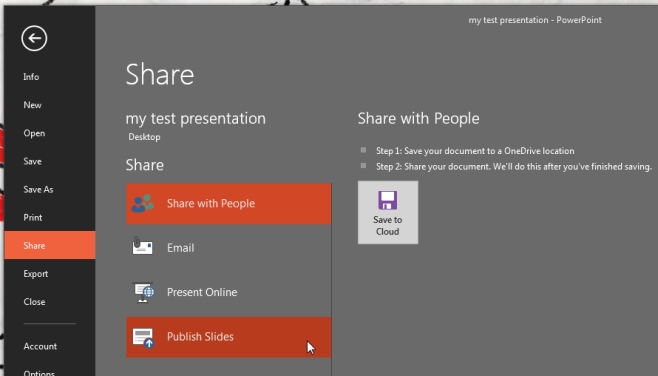
Back in the day, Microsoft PowerPoint allowed us to “Publish slides” (save each individual slide into separate file). I am absolutely sure that this button was in PowerPoint 2013 and as far as I know was removed from PowerPoint 365 and 2019 versions.
When this feature was in the box, you could use Microsoft.Office.Interop.PowerPoint.dll to start instance of PowerPoint and communicate with it using COM Interop.
This file contains hidden or bidirectional Unicode text that may be interpreted or compiled differently than what appears below. To review, open the file in an editor that reveals hidden Unicode characters.
Learn more about bidirectional Unicode characters
But server-side Automation of Office has never been recommended by Microsoft. You were never able to reliably scale your automation, like start multiple instances to work with different document (because you need to think about active window and any on them may stop responding to your command). There is no guarantee that File->Open command will return control to you program, because for example if file is password-protected Office will show popup and ask for password and so on.
That was hard, but doable. PowerPoint guarantees that published slides will be valid PowerPoint documents that user will be able to open and preview. So it is worth playing the ceremony of single-thread automation with retries, timeouts and process kills (when you do not receive control back).
Over the time it became clear that it is the dead end. We need to keep the old version of PowerPoint on some VM and never touch it or find a better way to do it.
The History
Windows only solution that requires MS Office installed on the machine and COM interop is not something that you expect from modern .NET solution.
Ideally it should be .NETStandard library on NuGet that platform-agnostic and able to solve you task anywhere and as fast as possible. But there was nothing on Nuget few months ago.
If you ever work with Office documents from C# you know that there is an OpenXml library that opens office document, deserialize it internals to an object model, let you modify it and then save it back. But OpenXml API is low-level and you need to know a lot about OpenXml internals to be able to extract slides with images, embedding, layouts, masters and cross-references into new presentation correctly.
If you google more you will find that there is a project “Open-Xml-PowerTools” developed by Microsoft since 2015 that have never been officially released on NuGet. Currently this project is archived by OfficeDev team and most actively maintained fork belongs to EricWhiteDev (No NuGet.org feed at this time).
Open-Xml-PowerTools has a feature called PresentationBuilder that was created for similar purpose – compose slide ranges from multiple presentations into one presentation. After playing with this library, I realized that it does a great job but does not fully satisfy my requirements:
Resource usage are not efficient, same streams are opened multiple times and not always properly disposed.
Library is much slower than it could be with proper resource management and less GC pressure.
It generates slides with total size much larger than original presentation, because it copies all layouts when only one is needed.
It does not properly name image parts inside slide, corrupt file extensions and does not support SVG.
It was a great starting point, but I realized that I can improve it. Not only fix all mentioned issues and improve performance 6x times but also add support for new image types, properly extract slide titles and convert then into presentation titles, propagate modification date and erase metadata that does not belong to slide.
How it is done today
So today, I am ready to present the new library Clippit that is technically a fork of most recent version of EricWhiteDev/Open-Xml-PowerTools that is extended and improved for one particular use case: extracting slides from presentation and composing them back efficiently.
All classes were moved to Clippit namespace, so you can load it side-by-side with any version of Open-Xml-PowerTools if you already use it.
The library is already available on NuGet, it is written using C# 8.0 (nullable reference types), compiled for .NET Standard 2.0, tested with .NET Core 3.1. It works perfectly on macOS/Linux and battle-tested on hundreds of real world PowerPoint presentations.
New API is quite simple and easy to use
This file contains hidden or bidirectional Unicode text that may be interpreted or compiled differently than what appears below. To review, open the file in an editor that reveals hidden Unicode characters.
Learn more about bidirectional Unicode characters
HashiCorp Vault is a tool for secrets management, encryption as a service, and privileged access management. It is quite popular nowadays, especially if you own your own infrastructure, private cloud or just cannot store your secrets using Key Vault services provided by Azure/AWS/GCP.
I assume that you already have one up and running instance of HashiCorp Vault, otherwise you may install one using official Installing Vault guide.
Why TLS certificate authentication?
Vault supports many Auth Methods. But what if you are still deploying your app on plain old Windows Server VMs or develop SharePoint application (like I am 😝).
The challenge in this case, that you have to authenticate in Vault in order to get a secret. This means that we need to choose auth method that protects our auth secrets from an accident IT guys who may login on the VM (or malicious code that may find it on file system)
TLS Certificate Auth is a good solution candidate, because we can install certificate into windows certificate store, protect private key (mark it as not-exportable) and even specify list of service accounts, allowed to use this certificate for authentication.
TLS certificate generation
I will be using ssh command on my macOS for certificate generation and Vault configuration, but you can repeat the same step from Window for sure.
For our needs we will use self-signed certificate. You can generate one using OpenSSL. If you do not have OpenSSL installed, you can install from Homebrew.
brew install openssl
First of all we generate private key (it is highly secured, do not share it)
openssl genrsa 2048 > vault_private.pem
Then we generate public part of the key in .pem format (.pem file will be uploaded to Vault for client validation during authentication)
Answer all questions properly, it will help you identify this certificate in future (I’ve created certificate that is valid for 365 days, but you should follow security standards defined in you company).
Note: Common Name cannot be empty, otherwise you will not be able to use this certificate to retrieve the secret (Vault returns ‘missing name in alias’ error). Thank you Vadzim Makarchyk for this note.
The final step is to archive both parts in .pfx format (.pfx file will be deployed into Windows Server certificate store on all machines from where our code should have access to Vault)
I uses Enterprise version of Vault that is used by several teams, that it why I also specify namespace (aka folder for my secrets)
VAULT_NAMESPACE=dev/my-teamexport VAULT_NAMESPACE
I am lazy to properly setup certificates for Vault CLI, that is why I skip certificate validation (never repeat it in production 😉)
VAULT_SKIP_VERIFY=trueexport VAULT_SKIP_VERIFY
We are almost ready to login. The easiest option is to login using Web UI and then reuse issued token in the terminal. Login using your favorite browser, pass authentication and copy token in buffer.
vault login s.fJTY5S51oIfXKnBAG3Qq5eWp.9GKyY
That is it! Token is saved into ~/.vault-token and CLI is ready to use!
Key/Value secret engine creation
Vault supports multiple Secret Engines, but for our demo we create simple Key/Value storage for secrets (for example to store logins and passwords)
vault secrets enable -path=kv kv
This command enable key/value engine (V1) and name kv (-path param)
NOTE: The kv secrets engine has two versions: kv and kv-v2. To enable versioned kv secrets engine, pass kv-v2 instead.
Engine is ready, but it is empty – let’s fix it.
vault write kv/my-secret value="s3c(eT"
This command effectively creates my-secret secret inside kv secret engine and store one key/value pair inside value=”s3c(eT”
ACL Policy creation
Secret engine is secured, nobody (except you, admin) has access to secrets. We need to create rules/policy that define what access we want to provide. Create new files policy-file.hcl and put following content inside.
path "kv/*" { capabilities = ["read", "list"]}
This policy allows to read and list all secrets inside kv secret engine. All users with this policy will be able to read secrets from our engine. Read more about policies.
Write this policy to the server (and name it policy-name)
vault policy write policy-name policy-file.hcl
TLS Certificates – Auth Method
The last step is to assign this policy. But we want to assign it to all clients authenticated in Vault using TLS certificate created by us earlier.
Fist of all we need to enable certificate authentication in our namespace
vault auth enable cert
and create certificate auth in Vault (name it app), assign policy-name to it and upload the public part of generated key (vault_public.pem)
That is it! Vault is configured and waiting for first connection.
TLS certificate deployment
TLS certificate allows us to deploy it to certain set of machines that should have access to the Vault and then specify which accounts (on these machines) may use it for authentication.
On the screenshot you see the step that imports certificate on all target machines with tag SharePoint (in my case) to LocalMachine certificate store to My/Personal store, mark private-key as not exportable and provide access to private key to 2 service accounts.
If your deployment is not automated, you may script the same steps using PowerShell and run it on all machines.
This file contains hidden or bidirectional Unicode text that may be interpreted or compiled differently than what appears below. To review, open the file in an editor that reveals hidden Unicode characters. Learn more about bidirectional Unicode characters
If you are brave, you can click it even manually! 🙈
Double click on vault.pfx file and choose LocalMachine store location
Click Next, Next and type password used during *.pfx creation and Next again.
Choose Personal certificate store.
Click Next, Finish, OK – your certificated in the store!
Execute mmc (Microsoft Managed Console) from start menu.
File -> Add/Remove Snap-in …
Certificate, Add, Computer account and click Next & Ok
Find our certificate and click Manage Private Keys…
On this screen you can manage the list of accounts that will be able to use this certificate for authentication on the current machine.
.NET client application
Vault is ready, machine is ready (service account / current user is allowed to use certificate from the LocalMachine/Personal store). Few lines of code are separating us from success 😊.
This file contains hidden or bidirectional Unicode text that may be interpreted or compiled differently than what appears below. To review, open the file in an editor that reveals hidden Unicode characters. Learn more about bidirectional Unicode characters
VaultSecretProvider find X509 certificate in StoreName.My / StoreLocation.LocalMachine, then create CertAuthMethodInfo using certificate and VaultClient that X-Vault-Namespace header to each request with vaultNamespace name.
Using configured instance of VaultClient we can request our secret from Vault _vaultClient.V1.Secrets.KeyValue.V1.ReadSecretAsync(path, mountPoint) specifying path to the secret and mountPoint (name of secret engine).
We are ready to call and receive secrets
This file contains hidden or bidirectional Unicode text that may be interpreted or compiled differently than what appears below. To review, open the file in an editor that reveals hidden Unicode characters. Learn more about bidirectional Unicode characters