Tag: F#
Mike Falanga speaks about Discriminated Unions at Cleveland F# SIG

I was able to record the Cleveland F# SIG, where Mike Falanga spoke about F# language’s Discriminated Unions feature (http://msdn.microsoft.com/en-us/library/dd233226.aspx).
Here are the videos I took of the event for all attendees that weren’t able to make it:
View original post 283 more words
WPF MVVM with Xaml Type Provider
About a year ago XAML type provider (that now a part of fsharpx project) was born. First of all, happy birthday XAML type provider and thank you everyone who was involved.
Up to XAML type provider release the best option for F# WPF development was to split app into two parts: C# project with all XAML stuff for best tooling support and F# project with all source code. Daniel Mohl have created a project template “F# and C# Win App (WPF, MVVM)” that illustrates this approach end to end (read more about this in his blog).
XAML type provider is an amazing thing that makes available full-featured WPF development completely in F#. Steffen Forkmann has an excellent blog post about its usage “WPF Designer for F#“. It is probably one of my favorite posts about F# at all, it shows a real beauty and excellence of the technology. This approach was already templated by Daniel Mohl – “F# Empty Windows App (WPF)“.
I think that a natural desire is to have an F# MVVM app using XAML type provider. It can be done by combining these two templates. At the first step, create a new project from “F# Empty Windows App (WPF)” template, and leave App.fs file without any changes.
module MainApp

open System
open System.Windows
open System.Windows.Controls
open FSharpx

type MainWindow = XAML<"MainWindow.xaml">

let loadWindow() =
   let window = MainWindow()
   window.Root

[<STAThread>]
(new Application()).Run(loadWindow()) |> ignore
Now we need to define a ViewModel for MainWindow. I have reused BaseViewModel and RelayCommand from polyglot approach template.
namespace ViewModels

open System
open System.Windows
open System.Windows.Input
open System.ComponentModel

type ViewModelBase() =
    let propertyChangedEvent = new DelegateEvent<PropertyChangedEventHandler>()
    interface INotifyPropertyChanged with
        [<CLIEvent>]
        member x.PropertyChanged = propertyChangedEvent.Publish
    member x.OnPropertyChanged propertyName =
        propertyChangedEvent.Trigger([| x; new PropertyChangedEventArgs(propertyName) |])

type RelayCommand (canExecute:(obj -> bool), action:(obj -> unit)) =
    let event = new DelegateEvent<EventHandler>()
    interface ICommand with
        [<CLIEvent>]
        member x.CanExecuteChanged = event.Publish
        member x.CanExecute arg = canExecute(arg)
        member x.Execute arg = action(arg)

type MainViewModel () =
    inherit ViewModelBase()

    let mutable name = "Noname"
    member x.Name
        with get () = name
        and set value = name <- value
                        x.OnPropertyChanged "Name"

    member x.OkCommand =
        new RelayCommand ((fun canExecute -> true),
            (fun action -> MessageBox.Show(sprintf "Hello, %s" x.Name) |> ignore))
The last and probably most tricky part is a XAML. Pay attention to the row number four (local namespace definition). You need to specify assembly part even if your view model located in the same assembly as XAML. It happens because type provider works in another one.
<Window
        xmlns="http://schemas.microsoft.com/winfx/2006/xaml/presentation"
        xmlns:x="http://schemas.microsoft.com/winfx/2006/xaml"
        xmlns:local="clr-namespace:ViewModels;assembly=FsharpMVVMWindowsApp"
        Title="MVVM and XAML Type provider" Height="120" Width="300">
    <Window.DataContext>
        <local:MainViewModel></local:MainViewModel>
    </Window.DataContext>
    <Grid >
        <Grid.RowDefinitions>
            <RowDefinition/>
            <RowDefinition/>
            <RowDefinition/>
        </Grid.RowDefinitions>
        <Label FontSize="16">What is your name?</Label>
        <TextBox Grid.Row="1" FontSize="16" Text="{Binding Name, Mode=TwoWay}"/>
        <Button Grid.Row="2" FontSize="16" Command="{Binding OkCommand}">Ok</Button>
    </Grid>
</Window>
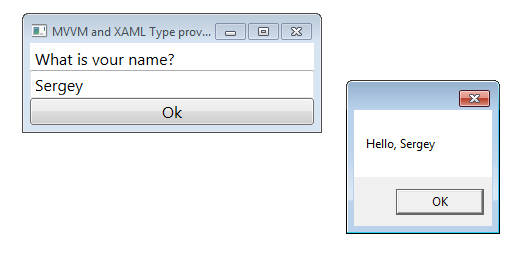
Voila, it works now.
Neo4jClient new Cypher Start notation & F# Extra Top Level Operators
Some weeks ago a new version of Neo4jClient was released. There were introduced some changes in the Cypher Start notation. The new Start notation for sure has become nicer for C#, but it is still a bit ugly for F#. Recommended way of using new Start notation are anonymous classes that do not supported in F#.
The one reasonable option is to use dictionary-like interface, which in C# looks in the following way:
graphClient
    .Cypher
    .Start(new Dictionary<string, object>
    {
        { "foo", nodeRef },
        { "bar", otherNodeRef }
    });
We need to create IDictionary<string,obj> object somehow. Luckily, F# has a set of Extra Top Level Operators one of which is dict that does exactly what we need. The last thing what we need to do is to box dictionary values to convert them to obj.
dict : seq<'Key * 'Value> -> IDictionary<'Key,'Value> (requires equality)
box : 'T -> obj
Some examples:
let getById (queryObject:'T when 'T :> NeoEntity) =
    client.Cypher
        .Start(dict ["n", box(sprintf "node(%d)" (queryObject.Id))])
        .Return<Node<'T>>("n")
        .Results

let simpleConnection connectionType (target:Node<_>) (source:Node<_>) =
    client.Cypher
        .Start(dict [("n", box(source.Reference)); ("m", box(target.Reference))])
        .CreateUnique(sprintf "n-[:%s]->m" connectionType)
        .ExecuteWithoutResults()
Update: Start notation supports wide range of possible object references:
graphClient
  .Cypher
  .Start(dict [
    ("n1", box "custom");
    ("n2", box nodeRef);
    ("n3", box Node.ByIndexLookup("indexName", "property", "value"));
    ("n4", box Node.ByIndexQuery("indexName", "query"));
    ("r1", box relRef);
    ("moreRels", box [|relRef; relRef2|]);
    ("r2", box Relationship.ByIndexLookup("indexName", "property", "value"));
    ("r3", box Relationship.ByIndexQuery("indexName", "query"));
    ("all", box All.Nodes)
  ])
New selectors with Canopy 0.7.3
 New version of canopy has been released today. This version includes an improved set of selectors:
Relative selectors.
New functions elementWithin and elementsWithin provide an ability to select element/elements in DOM sub-tree:
elementWithin  : (string -> IWebElement -> IWebElement)
elementsWithin : (string -> ISearchContext -> IWebElement list)
You are able to write more complex page parsing code, for example like this:
elements "#div.section-item"
|> Seq.map(fun el ->
    let name = (el |> elementWithin "h2").Text
    let items = el |> elementsWithin "li a"
                   |> List.map (fun a -> a.GetAttribute("href"))
    name, items)
XPath support.
From now, all selectors support XPath. There was also introduced new parent selector that returns parent web element.
parent : (IWebElement -> IWebElement)
"/some/xpath/query" << "some value"
"/some/xpath/query" == "some value"
let results = elements "xpath/query"
Options selectors.
Three new options selectors were added: someElement, someElementWithin, someParent. All the selectors behave in the following way:
- Return Some(element) if exactly one element match to the selector
- Return None if there is no such elements
- Throw an exception in other cases.
someElement : (string -> IWebElement option)
someElementWithin : (string -> ISearchContext -> IWebElement option)
someParent : (ISearchContext -> IWebElement option)
With these selectors you can use all power of F# Options type:
let currentUser =
    someElement "#profile a"
    |> Option.bind (fun el -> el |> parent |> Some)
    |> Option.bind (fun el -> el |> getHref |> getParamFromUrl "id" |> Some)
    |> Option.bind (fun id -> Person(id) |> Some)
Feel free to try it in action!
DNS collisions detection with F# Async Workflows
There is one more useful application of script from the “Explore local network with F# Async Workflows” post. During the check of the machine availability we can collect IP addresses of all machines. After that we can compare IPs of different host names for collision. It is a good way to understand what is going on in your network.
#r "System.DirectoryServices.dll"
open System
open System.Collections
open System.DirectoryServices
open System.Net.NetworkInformation
open System.Threading.Tasks

let hosts =
    use searcher =
        new DirectorySearcher(new DirectoryEntry(),
            Filter="(objectClass=computer)", PageSize=10000)
    (searcher.FindAll() :> IEnumerable)
    |> Seq.cast<SearchResult>
    |> Seq.map (fun x -> x.GetDirectoryEntry().Name)
    |> Seq.map (fun n -> n.Substring(n.IndexOf("=")+1))
    |> Seq.toList

let checkHosts hosts =
    let rec ping attempts (host:string) =
        async {
            let! pingResult =
                (new Ping()).SendPingAsync(host)
                |> Async.AwaitTask |> Async.Catch
            match pingResult with
            | Choice2Of2 e -> return None
            | Choice1Of2 reply when reply.Status = IPStatus.Success ->
                return Some(reply.Address.MapToIPv4().ToString())
            | _ when attempts > 0 -> return! ping (attempts-1) host
            | _ -> return None
        }
    let results =
        hosts
        |> Seq.map (ping 4)
        |> Async.Parallel
        |> Async.RunSynchronously
        |> Seq.toList
    List.zip results hosts

let dnsConflicts =
    hosts
    |> checkHosts
    |> List.filter (fst >> Option.isSome)
    |> Seq.groupBy fst
    |> Seq.filter (fun (_, seq) -> Seq.length seq > 1)
    |> Seq.map (fun (k, seq) ->
        (Option.get k, seq |> Seq.map snd |> Seq.toList) )
    |> Seq.toList
Explore local network with F# Async Workflows
 One more interesting task is to explore local network and check which computers are alive.
As a first step we need to get a list of computers which registered in Active Directory (as you understand, this approach works only for networks with Active Directory). Here we can use DirectorySearcher from System.DirectoryServices namespace. We create DirectoryEntry that by default points to the current domain and makes search over computers in this domain.
#r <System.DirectoryServices.dll>
open System
open System.Collections
open System.DirectoryServices
open System.Net.NetworkInformation
open System.Threading.Tasks

let hosts =
    use searcher =
        new DirectorySearcher(new DirectoryEntry(),
            Filter="(objectClass=computer)", PageSize=50000)
    (searcher.FindAll() :> IEnumerable)
    |> Seq.cast<SearchResult>
    |> Seq.map (fun x -> x.GetDirectoryEntry().Name)
    |> Seq.map (fun n -> n.Substring(n.IndexOf("=")+1))
    |> Seq.toList
The next step is to check the availability of computers. F# Asynchronous Workflows help us here. We make a sequence of ping-calls(up to 4) to each computer which allows us to understand if computer is available or not. We are expecting to get a valid response with IPStatus.Success status. If we get an exception instead of response or run out of attempts, we will mark this computer as unavailable.
let checkHosts hosts =
    let rec ping attempts (host:string) =
        async {
            let! pingResult =
                (new Ping()).SendPingAsync(host)
                |> Async.AwaitTask |> Async.Catch
            match pingResult with
            | Choice2Of2 e -> return false
            | Choice1Of2 reply when reply.Status=IPStatus.Success -> return true
            | _ when attempts > 0 -> return! ping (attempts-1) host
            | _ -> return false
        }
    let results =
        hosts
        |> Seq.map (ping 4)
        |> Async.Parallel
        |> Async.RunSynchronously
        |> Seq.toList
    List.zip results hosts
Now we are ready to get a list of available computers.
let availableHosts =
    hosts
    |> checkHosts
    |> List.filter fst
    |> List.map snd
Play with your network and find something interesting :).
Running F# Interactive from Windows context menu
It is looks like really reasonable option!

Today a question popped up on Stack Overflow on how to arrange running F# scripts from Windows context menu, but in case of abnormal termination still having opportunity to access diagnostics. Regular context menu item Run with F# interactive lacks the latter because interactive console window closes abruptly on script failure.
Although I gave an outline of the solution as Stack Overflow answer, it lacks level of details that those who want to use such feature may find useful. So, I decided to give here a more detailed description. I will show the implementation for my own work environment, which is Windows 7 Ultra x64 + VS2012 Ultra RC. Reproducing the approach for other environments may require trivial adjustments.
1. Let’s begin with spying the mechanics of stock context menu item Run with F# interactive… implementation. Let’s fire regedit in Run as Administrator mode and search through the registry for…
View original post 209 more words
F# null trick
 I have faced with an interesting F# behaviour on the null check. I tried to make a MongoDB query using C# Driver LINQ but F# compiler said that I could not compare the result with null, because result could not be null, but I am sure that query can return nothing =).
I am going to show you the same behaviour with classic LINQ. Please, look at the source code:
open System
open System.Linq
open System.Collections.Generic

type typeA = {Variable:int}

let x = List<typeA>().FirstOrDefault()

if (x = null) then None else Some(x)
If you evaluate first 7 lines of code, you will see that x is equal to null, List is empty, so the value of our LINQ query will be default(null). But, if you try to execute the line number 9, F# compiler will say that it cannot be compiled, because the typeA does not have a null as a proper value, but x is null! Hmm… real magic…
null_trick.fsx(9,9): error FS0043: The type ‘typeA’ does not have ‘null’ as a proper value
Actually, there is an excellent MSDN article “Null Values (F#)“, which should be read carefully. At the first look you may think that AllowNullLiteralAttribute is an answer and try to modify the typeA in the following way:
[<AllowNullLiteral>]
type typeA = {Variable:int}
But you can not have this code compiled, because
null_trick.fsx(6,6): error FS0934: Records, union, abbreviations and struct types cannot have the ‘AllowNullLiteral’ attribute
CLIMutableAttrubute is not an option too, because it does not affect null-behaviour. At the end of the “Null Values (F#)” article you will see an interesting example with a null check:
match box value with
| null -> printf "The value is null."
| _ -> printf "The value is not null."
Boxing is an answer! We need it to perform a null check for an arbitrary value. So, the working example will look like:
open System
open System.Linq
open System.Collections.Generic

type typeA = {Variable:int}

let x = List<typeA>().FirstOrDefault()

if (box x = null) then None else Some(x)
F# world is full of magic. Wonders await us at every turn.
P.S. Read more tales of null in Steffen Forkmann’s blog.
