


Microsoft.Identity.Web is new (GA from Sept 30, 2020) library which contains a set of reusable classes used in conjunction with ASP.NET Core for integrating with the Microsoft identity platform (formerly Azure AD v2.0 endpoint) and AAD B2C.
AzureAD/microsoft-identity-web
Microsoft.Identity.Web project template is included in .NET 5.0 with tutorials like “Create a Blazor Server app that uses the Microsoft identity platform for authentication“. The library is really nice and easy to use, but development experience is not ideal yet.
When you run server with `dotnet watch` you will see following errors after each restart.
MsalUiRequiredException: No account or login hint was passed to the AcquireTokenSilent call.
Microsoft.Identity.Client.Internal.Requests.Silent.SilentRequest.ExecuteAsync
MicrosoftIdentityWebChallengeUserException: IDW10502: An MsalUiRequiredException was thrown due to a challenge for the user. See https://aka.ms/ms-id-web/ca_incremental-consent.
Microsoft.Identity.Web.TokenAcquisition.GetAuthenticationResultForUserAsync
The reason is not obvious from the error message. In fact, you browser calls the server with .AspNetCore.Cookies cookies that server cannot accept and cannot renew. What to do? Easy – open dev tool, clean cookies, refresh the page, wait for next server restart and repeat it again. You won’t last long.
Workaround with custom IDistributedCache
In Startup.cs you most likely find code similar
services.AddAuthentication(OpenIdConnectDefaults.AuthenticationScheme)
    .AddMicrosoftIdentityWebApp(Configuration.GetSection("AzureAd"))
        .EnableTokenAcquisitionToCallDownstreamApi(initialScopes)
            .AddMicrosoftGraph(Configuration.GetSection("DownstreamApi"))
            .AddInMemoryTokenCaches();
The last line (AddInMemoryTokenCaches) configure application to use in-memory cache that is empty after each server restart. We need to find a way to store tokens outside the app process and restore the cache after process restart.
Let’s take a look at supported caches out-of-the-box:
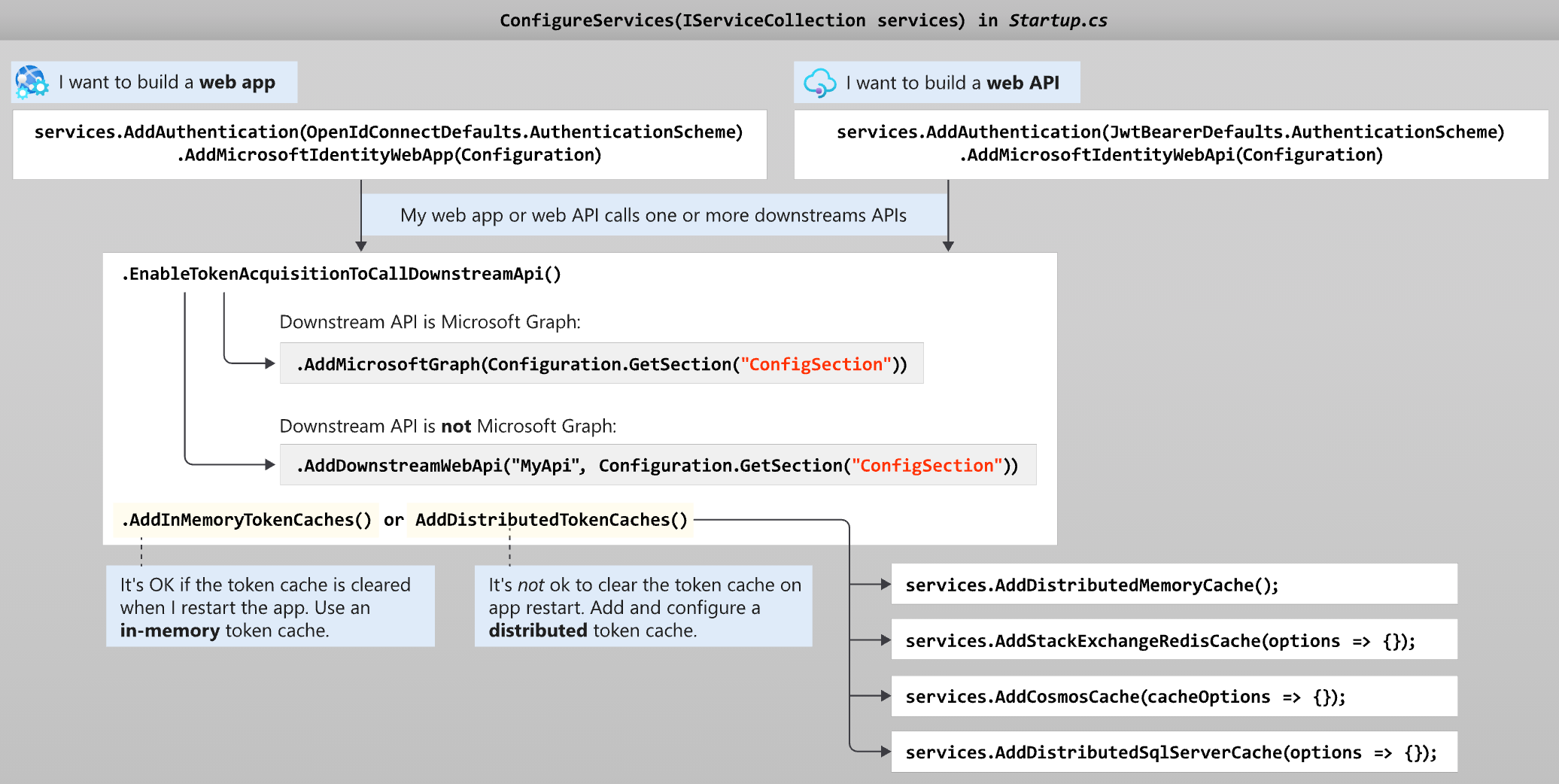
The only alternative to AddInMemoryTokenCaches is AddDistributedTokenCaches with ability to store tokens in memory, Redis, CosmosDB, SqlServer. Last three are nice options to distributed application but all of them are complicated for localhost development.
For our use case would be enough to serialise token cache to local file between restart. Luckily, it is not that complicated. We can implement IDistributedCache interface using TestDistributedCache as reference implementation.
public class LocalFileTokenCache :  IDistributedCache
{
    private class FileTransaction : IDisposable
    {
        public FileTransaction(string fileName = "cache.json")
        {
            var root = Path.GetDirectoryName(GetType().Assembly.Location);
            _fileName = Path.Combine(root, fileName);

            if (File.Exists(_fileName))
            {
                var str = File.ReadAllText(_fileName);
                Dict = JsonSerializer.Deserialize<Dictionary<string, byte[]>>(str);
            }

            Dict ??= new Dictionary<string, byte[]>();
        }

        private readonly string _fileName;
        public Dictionary<string, byte[]> Dict { get; }

        public void Dispose()
        {
            var str =JsonSerializer.Serialize(Dict);
            File.WriteAllText(_fileName, str);
        }
    }

    public byte[] Get(string key)
    {
        using var cache = new FileTransaction();
        return cache.Dict.TryGetValue(key, out var value) ? cache.Dict[key] : null;
    }

    public Task<byte[]> GetAsync(string key, CancellationToken token = default)
    {
        return Task.FromResult(Get(key));
    }

    public void Refresh(string key)
    {
        // Don't process anything
    }

    public Task RefreshAsync(string key, CancellationToken token = default)
    {
        Refresh(key);
        return Task.CompletedTask;
    }

    public void Remove(string key)
    {
        using var cache = new FileTransaction();
        cache.Dict.Remove(key, out _);
    }

    public Task RemoveAsync(string key, CancellationToken token = default)
    {
        Remove(key);
        return Task.CompletedTask;
    }

    public void Set(string key, byte[] value, DistributedCacheEntryOptions options)
    {
        using var cache = new FileTransaction();
        cache.Dict[key] = value;
    }

    public Task SetAsync(string key, byte[] value, DistributedCacheEntryOptions options, CancellationToken token = default)
    {
        Set(key, value, options);
        return Task.CompletedTask;
    }
}
LocalFileTokenCache implementation is not suitable for anything rather than local development.
The last step is to register LocalFileTokenCache in DI container as implementation of IDistributedCache instead of MemoryDistributedCache for development environment.
public class Startup
{
    public Startup(IConfiguration configuration, IWebHostEnvironment env)
    {
        Configuration = configuration;
        CurrentEnvironment = env;
    }

    public IConfiguration Configuration { get; }
    private IWebHostEnvironment CurrentEnvironment{ get; set; }

    public void ConfigureServices(IServiceCollection services)
    {
        services.AddMicrosoftIdentityWebAppAuthentication(Configuration)
            .EnableTokenAcquisitionToCallDownstreamApi(new[]
            {
                "User.Read", "Files.ReadWrite.AppFolder", "Files.ReadWrite"
            }).AddDistributedTokenCaches();

        if (CurrentEnvironment.IsDevelopment())
        {
            services.AddSingleton<IDistributedCache, LocalFileTokenCache>();
        }
        else
        {
            services.AddSingleton<IDistributedCache, MemoryDistributedCache>();
        }
        //...
    }
    //...
}
P.S. I hope that proper fix will land to official template.
Update 2021-04-06: There is an official guide how to setup a Redis cache in a Docker container for local testing, that also can be used to local development.