Selective crawling in SharePoint 2010 (with F# & Selenium)

SPcanopySharePoint Search Service Applications have two modes for crawling content:

  • Full Crawl that re-crawls all documents from Content Source.
  • Incremental Crawl that crawls documents modified since the previous one.

But it is really not enough if you are working on search driven apps. (More about SharePoint crawling you can read in Brian Pendergrass “SP2010 Search *Explained: Crawling” post).

Search applications are a special kind of applications that force you to be iterative. Generally, you work with large amount of data and you cannot afford to do full crawl often, because it is a slow process. There is another reason why it is slow: more intelligent search requires more time to indexing. We can not increase computations in query time, because it directly affects users’ satisfaction. Crawling time is the only place for intelligence.

Custom document processing pipeline stages are tricky a bit. Generally, you can find some documents in your hundreds of thousands or millions corpus, which failed on your custom stage or were processed in a wrong way. These may happen because of anything (wrong URL format, corrupted file, locked document, lost connection, unusual encoding, too large file size, memory issue, BSOD on the crawling node, power outage and even due to the bug in the source code 🙂 ) Assume you were lucky to find documents where your customizations work wrong and even fix them. There is a question how to test your latest changes? Do you want to wait some days to check whether it works on these files or not? I think no… You probably want to have an ability to re-crawl some items and verify your changes.

Incremental crawl does not solve the problem. It is really hard to find all files that you want to re-crawl and modify them somehow. Sometimes modification is not possible at all. What to do in such situation?

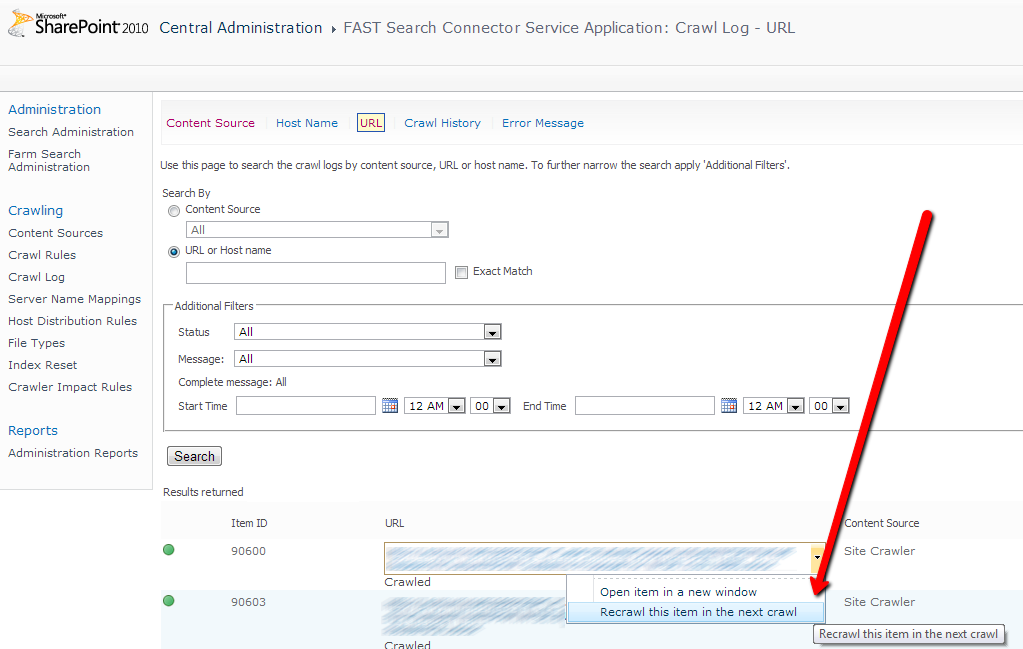
Search Service Applications have an UI for high level monitoring of index health (see the picture below). There you can check the crawl status of document by URL and even re-crawl on individual item.
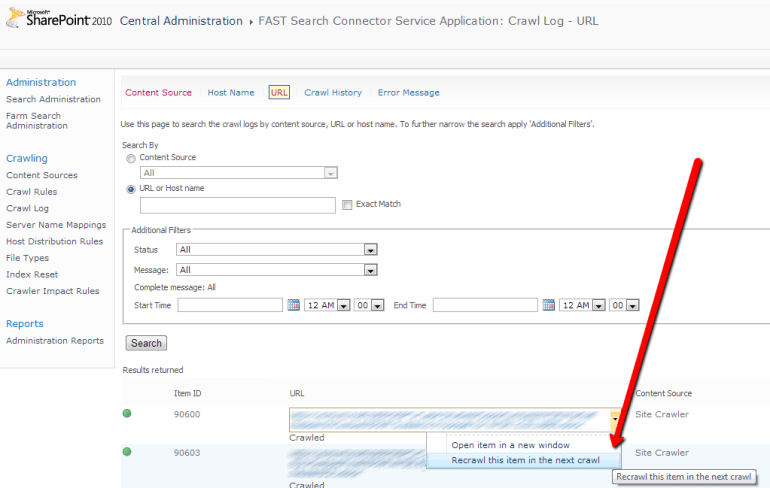
re-crawl-item

SharePoint does not provide an API to do it from code. All that we have is a single ASP.NET form in Central Administration. If you make a further research and catch call using Fiddler then you can find target code that process request. You can decompile SharePoint assemblies and find that some mysterious SQL Server stored procedure was called to  add you document into processing queue (read more about that stuff  in Mikael Svenson’s answer on FAST Search for SharePoint forum).

Ahh… It is already hard enough, just a pain and no fun. Even if we find where to get or how to calculate all parameters to stored procedure, it does not solve  all our problems. Also we need to find a way to collect all URLs of buggy documents that we want to re-crawl. It is possible to do so using SharePoint web services, I have already posted about that (see “F# and FAST Search for SharePoint 2010“). If you like this approach, please continue the research. I am tired here.

Canopy magic

Why should I go so far in SharePoint internals for such a ‘simple’ task. Actually, we can automate this task through UI. We have a Canopy – good UI automation Selenium wrapper for F#. All we need is to write some lines of code that start browser, open the page and click some buttons many times. For sure this solution have some disadvantages:

  1. You should be a bit familiar with Selenium, but this one is easy to fix.
  2. It will be slow. It works for hundreds document, maybe for thousands, but no more. ( I think that if you need to re-crawl millions of documents you can run a full crawl).

Also such approach has some benefits:

  1. It is easy to code and to use.
  2. It is flexible.
  3. It solves another problem – you can use Canopy for grabbing document URLs directly from the search result page or the other one.

All you need to start with Canopy is to download NuGet package and web driver for your favorite browser (Chrome WebDrover, IE WebDriver). The next steps are pretty straightforward: reference three assemblies, configure web driver location if it is different from default ‘c:\’ and start browser:

#r @"..\packages\Selenium.Support.2.33.0\lib\net40\WebDriver.Support.dll"
#r @"..\packages\Selenium.WebDriver.2.33.0\lib\net40\WebDriver.dll"
#r @"..\packages\canopy.0.7.7\lib\canopy.dll"

open canopy

configuration.chromeDir <- @"d:\"
start chrome

Be careful, Selenium, Canopy and web drivers are high intensively developed projects – newest versions maybe different from mentioned above. Now, we are ready to automate the behavior, but here is a little trick. To show up a menu we need to click on the area marked red on the screenshot below, but we should not touch the link inside this area. To click on the element in the specified position, we need to use Selenium advanced user interactions capabilities.
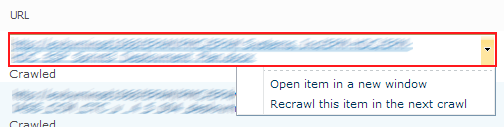
canopy_click

let sendToReCrawl url =
    let encode (s:string) = s.Replace(" ","%20")
    try
        let encodedUrl = encode url
        click "#ctl00_PlaceHolderMain_UseAsExactMatch" // Select "Exact Match"
        "#ctl00_PlaceHolderMain_UrlSearchTextBox" << encodedUrl
        click "#ctl00_PlaceHolderMain_ButtonFilter" // Click "Search" Button

        elements "#ctl00_PlaceHolderMain_UrlLogSummaryGridView tr .ms-unselectedtitle"
        |> Seq.iter (fun result ->
            OpenQA.Selenium.Interactions.Actions(browser)
                  .MoveToElement(result, result.Size.Width-7, 7)
                  .Click().Perform() |> ignore
            sleep 0.05
            match someElement "#mp1_0_2_Anchor" with
            | Some(el) -> click el
            | _ -> failwith "Menu item does not found."
        )
   with
   | ex -> printfn "%s" ex.Message

let recrawlDocuments logViewerUrl pageUrls =
    url logViewerUrl // Open LogViewer page
    click "#ctl00_PlaceHolderMain_RadioButton1" // Select "Url or Host name"
    pageUrls |> Seq.iteri (fun i x ->
        printfn "Processing item #%d" i;
        sendToReCrawl x)

That is all. I think that all other parts should be easy to understand. Here, CSS selectors used to specify elements to interact with.

Another one interesting part is grabbing URLs from search results page. It can be useful and it is easy to automate, let’s do it.

let grabSearchResults pageUrl =
    url pageUrl
    let rec collectUrls() =
        let urls =
            elements ".srch-Title3 a"
            |> List.map (fun el -> el.GetAttribute("href"))
        printfn "Loaded '%d' urls" (urls.Length)
        match someElement "#SRP_NextImg" with
        | None -> urls
        | Some(el) ->
            click el
            urls @ (collectUrls())
     collectUrls()

Finally, we are ready to execute all this stuff. We need to specify two URLs: first one is to the page with search results where we get all URLs, second one is to the logviewer page in you Search Service Application in Central Administration(do not forget to replace them in the sample above). Almost all SharePoint web applications require authentication, you can pass your login and password directly in URL as it done in the sample above.

grabSearchResults "http://LOGIN:PASSWORD@SEARVER_NAME/Pages/results.aspx?dupid=1025426827030739029&start1=1"
|> recrawlDocuments "http://LOGIN:PASSWORD@SEARVER_NAME:CA_POST/_admin/search/logviewer.aspx?appid={5095676a-12ec-4c68-a3aa-5b82677ca9e0}"

New Twitter API or “F# Weekly” v1.1

Good news for Twitter and no so good for developers:twitter_app

Today(2013-06-11), we(Twitter) are retiring API v1 and fully transitioning to API v1.1.

What does it all mean? This means that all old services are no longer available. Twitter switched to new ones with mandatory OAuth authentication. From now, to work with twitter services we must register new apps and use OAuth.

Also, it means that:

As I know, there are two alternatives available instead of Twitterizer:

  • Tweetsharp (TweetSharp is a fast, clean wrapper around the Twitter API.)
  • LINQ to Twitter (An open source 3rd party LINQ Provider for the Twitter micro-blogging service.)

I have chosen Tweetsharp because its API similar to Twitterizer. This is a new F# Weekly under the hood script:

#r "Newtonsoft.Json.dll"
#r "Hammock.ClientProfile.dll"
#r "TweetSharp.dll"

open TweetSharp
open System
open System.Net
open System.Text.RegularExpressions

let service = new TwitterService(_consumerKey, _consumerSecret)
service.AuthenticateWith(_accessToken, _accessTokenSecret)

let getTweets query =
    let rec collect maxId =
        let options = SearchOptions(Q = query, Count =Nullable(100), MaxId = Nullable(maxId),
                                    Resulttype = Nullable(TwitterSearchResultType.Recent))
        printfn "Loading %s under id %d" query maxId
        let results = service.Search(options).Statuses |> Seq.toList
        printfn "\t Loaded %d tweets" results.Length
        if (results.Length = 0)
            then List.empty
            else
                let lastTweet = results |> List.rev |> List.head
                if (lastTweet.Id < maxId)                     then results |> List.append (collect (lastTweet.Id))
                    else results
    collect (Int64.MaxValue) |> List.rev

let urlRegexp = Regex("http://([\\w+?\\.\\w+])+([a-zA-Z0-9\\~\\!\\@\\#\\$\\%\\^\\&\\*\\(\\)_\\-\\=\\+\\\\\\/\\?\\.\\:\\;\\'\\,]*)?", RegexOptions.IgnoreCase);

let filterUniqLinks (tweets: TwitterStatus list) =
    let hash = new System.Collections.Generic.HashSet();
    tweets |> List.fold
        (fun acc t ->
             let mathces = urlRegexp.Matches(t.Text)
             if (mathces.Count = 0) then acc
             else let urls =
                     [0 .. (mathces.Count-1)]
                     |> List.map (fun i -> mathces.[i].Value)
                     |> List.filter (fun url -> not(hash.Contains(url)))
                  if (List.isEmpty urls) then acc
                  else urls |> List.iter(fun url -> hash.Add(url) |> ignore)
                       t :: acc)
        [] |> List.rev

let tweets =
    ["#fsharp";"#fsharpx";"@dsyme";"#websharper";"@c4fsharp"]
    |> List.map getTweets
    |> List.concat
    |> List.sortBy (fun t -> t.CreatedDate)
    |> filterUniqLinks

let printTweetsInHtml filename (tweets: TwitterStatus list) =
    let formatTweet (text:string) =
        let matches = urlRegexp.Matches(text)
        seq {0 .. (matches.Count-1)}
            |> Seq.fold (
                fun (t:string) i ->
                    let url = matches.[i].Value
                    t.Replace(url, (sprintf "<a href="\&quot;%s\&quot;" target="\&quot;_blank\&quot;">%s</a>" url url)))
                text
    let rows =
      tweets
        |> List.mapi (fun i t ->
            let id = (tweets.Length - i)
            let text = formatTweet(t.Text)
            sprintf "</pre>
<table id="\&quot;%d\&quot;">
<tbody>
<tr>
<td rowspan="\&quot;2\&quot;" width="\&quot;30\&quot;">%d</td>
<td rowspan="\&quot;2\&quot;" width="\&quot;80\&quot;"><a href="\&quot;javascript:remove('%d')\&quot;">Remove</a></td>
<td rowspan="\&quot;2\&quot;"><a href="\&quot;https://twitter.com/%s\&quot;" target="\&quot;_blank\&quot;"><img alt="" src="\&quot;%s\&quot;/" /></a></td>
<td><b>%s</b></td>
</tr>
<tr>
<td>Created : %s</td>
</tr>
</tbody>
</table>
<pre>
"
id id id t.Author.ScreenName t.Author.ProfileImageUrl text (t.CreatedDate.ToString()))
        |> List.fold (fun s r -> s+" "+r) ""
    let html = sprintf "<script type="text/javascript">// <![CDATA[
function remove(id){return (elem=document.getElementById(id)).parentNode.removeChild(elem);}
// ]]></script>%s" rows
 System.IO.File.WriteAllText(filename, html)

printTweetsInHtml "d:\\tweets.html" tweets

15 Principles for Data Scientists

marksalen's avatarOpen Source Research

I have developed 15 principles for my daily work as a data scientist. These are the principles  that I personally follow :

1- Do not lie with data and do not bullshit: Be honest and frank about empirical evidences. And most importantly do not lie to yourself with data

2- Build everlasting tools and share them with others: Spend a portion of your daily work building tools that makes someone’s life easier. We are freaking humans, we are supposed to be tool builders!

3- Educate yourself continuously: you are a scientist for Bhudda’s sake. Read hardcore math and stats from graduate level textbooks. Never settle down for shitty explanations of a method that you receive from a coworker in the hallway. Learn fundamentals and you can do magic. Read recent papers, go to conferences, publish, and review papers. There is no shortcut for this.

4- Sharpen your skills: learn one language well…

View original post 413 more words

Three easy ways to create simple Web Server with F#

I have tried to find easiest ways to create a simple web server with F#. There are three most simple ways to do it.

The goal is to create a simple web service that maps web request urls to the files in the site folder. If file with such name exists then return its content as html. Assume that all html files located in ‘D:\mySite\‘.

HttpListener

First and probably the most promising option was created by Julian Kay and described in his post “Creating a simple HTTP Server with F#“. I slightly modified source code to satisfy my initial goal. You can find detailed description of how it works in Julian’s post. (Works from FSI)

open System
open System.Net
open System.Text
open System.IO

let siteRoot = @"D:\mySite\"
let host = "http://localhost:8080/"

let listener (handler:(HttpListenerRequest->HttpListenerResponse->Async<unit>)) =
    let hl = new HttpListener()
    hl.Prefixes.Add host
    hl.Start()
    let task = Async.FromBeginEnd(hl.BeginGetContext, hl.EndGetContext)
    async {
        while true do
            let! context = task
            Async.Start(handler context.Request context.Response)
    } |> Async.Start

let output (req:HttpListenerRequest) =
    let file = Path.Combine(siteRoot,
                            Uri(host).MakeRelativeUri(req.Url).OriginalString)
    printfn "Requested : '%s'" file
    if (File.Exists file)
        then File.ReadAllText(file)
        else "File does not exist!"

listener (fun req resp ->
    async {
        let txt = Encoding.ASCII.GetBytes(output req)
        resp.ContentType <- "text/html"
        resp.OutputStream.Write(txt, 0, txt.Length)
        resp.OutputStream.Close()
    })
// TODO: add your code here

Self-hosted WCF service

The second option is a tuned self-hosted WCF service. This approach was proposed by  Brian McNamara as an answer to the StackOverflow question “F# web server library“. (Works from FSI)

#r "System.ServiceModel.dll"
#r "System.ServiceModel.Web.dll"

open System
open System.IO

open System.ServiceModel
open System.ServiceModel.Web

let siteRoot = @"D:\mySite\"

[<ServiceContract>]
type MyContract() =
    [<OperationContract>]
    [<WebGet(UriTemplate="{file}")>]
    member this.Get(file:string) : Stream =
        printfn "Requested : '%s'" file
        WebOperationContext.Current.OutgoingResponse.ContentType <- "text/html"
        let bytes = File.ReadAllBytes(Path.Combine(siteRoot, file))
        upcast new MemoryStream(bytes)

let startAt address =
    let host = new WebServiceHost(typeof<MyContract>, new Uri(address))
    host.AddServiceEndpoint(typeof<MyContract>, new WebHttpBinding(), "")
      |> ignore
    host.Open()
    host

let server = startAt "http://localhost:8080/"
// TODO: add your code here
server.Close()

NancyFx

The third one is based on NancyFx. It is lightweight, low-ceremony, framework for building HTTP based services on .Net and Mono. Nancy is a popular framework in C# world, but does not have a natural support of F#. The F# code looks not so easy and simple as it could be. If you want to make it work, you need to create console application and install the Nancy and Nancy.Hosting.Self NuGet packages.

module WebServers

open System
open System.IO
open Nancy
open Nancy.Hosting.Self
open Nancy.Conventions

let (?) (this : obj) (prop : string) : obj =
    (this :?> DynamicDictionary).[prop]

let siteRoot = @"d:\mySite\"

type WebServerModule() as this =
    inherit NancyModule()
    do this.Get.["{file}"] <-
         fun parameters ->
              new Nancy.Responses.HtmlResponse(
                  HttpStatusCode.OK,
                  (fun (s:Stream) ->
                      let file = (parameters?file).ToString()
                      printfn "Requested : '%s'" file
                      let bytes = File.ReadAllBytes(Path.Combine(siteRoot, file))
                      s.Write(bytes,0,bytes.Length)
              )) |> box

let startAt host =
    let nancyHost = new NancyHost(new Uri(host))
    nancyHost.Start()
    nancyHost

let server = startAt "http://localhost:8080/"
printfn "Press [Enter] to exit."
Console.ReadKey() |> ignore
server.Stop()

Further reading

Mike Falanga speaks about Discriminated Unions at Cleveland F# SIG

gsvolt's avatardo the needful, write about it, simple

I was able to record the Cleveland F# SIG, where Mike Falanga spoke about F# language’s Discriminated Unions feature (http://msdn.microsoft.com/en-us/library/dd233226.aspx).

Here are the videos I took of the event for all attendees that weren’t able to make it:

View original post 283 more words

WPF MVVM with Xaml Type Provider

About a year ago XAML type provider (that now a part of fsharpx project) was born. First of all, happy birthday XAML type provider and thank you everyone who was involved.

Up to XAML type provider release the best option for F# WPF development was to split app into two parts: C# project with all XAML stuff for best tooling support and F# project with all source code. Daniel Mohl have created a project template “F# and C# Win App (WPF, MVVM)” that illustrates this approach end to end (read more about this in his blog).

XAML type provider is an amazing thing that makes available full-featured WPF development completely in F#. Steffen Forkmann has an excellent blog post about its usage “WPF Designer for F#“. It is probably one of my favorite posts about F# at all, it shows a real beauty and excellence of the technology.  This approach was already templated by Daniel Mohl – “F# Empty Windows App (WPF)“.

I think that a natural desire is to have an F# MVVM app using XAML type provider. It can be done by  combining these two templates. At the first step, create a new project from “F# Empty Windows App (WPF)” template, and leave App.fs file without any changes.

module MainApp

open System
open System.Windows
open System.Windows.Controls
open FSharpx

type MainWindow = XAML<"MainWindow.xaml">

let loadWindow() =
   let window = MainWindow()
   window.Root

[<STAThread>]
(new Application()).Run(loadWindow()) |> ignore

Now we need to define a ViewModel for MainWindow. I have reused BaseViewModel and RelayCommand from polyglot approach template.

namespace ViewModels

open System
open System.Windows
open System.Windows.Input
open System.ComponentModel

type ViewModelBase() =
    let propertyChangedEvent = new DelegateEvent<PropertyChangedEventHandler>()
    interface INotifyPropertyChanged with
        [<CLIEvent>]
        member x.PropertyChanged = propertyChangedEvent.Publish
    member x.OnPropertyChanged propertyName = 
        propertyChangedEvent.Trigger([| x; new PropertyChangedEventArgs(propertyName) |])

type RelayCommand (canExecute:(obj -> bool), action:(obj -> unit)) =
    let event = new DelegateEvent<EventHandler>()
    interface ICommand with
        [<CLIEvent>]
        member x.CanExecuteChanged = event.Publish
        member x.CanExecute arg = canExecute(arg)
        member x.Execute arg = action(arg)

type MainViewModel () = 
    inherit ViewModelBase()

    let mutable name = "Noname"
    member x.Name 
        with get () = name
        and set value = name <- value
                        x.OnPropertyChanged "Name"

    member x.OkCommand = 
        new RelayCommand ((fun canExecute -> true), 
            (fun action -> MessageBox.Show(sprintf "Hello, %s" x.Name) |> ignore)) 

The last and probably most tricky part is a XAML. Pay attention to the row number four (local namespace definition). You need to specify assembly part even if your view model located in the same assembly as XAML. It happens because type provider works in another one.

<Window
        xmlns="http://schemas.microsoft.com/winfx/2006/xaml/presentation"
        xmlns:x="http://schemas.microsoft.com/winfx/2006/xaml"
        xmlns:local="clr-namespace:ViewModels;assembly=FsharpMVVMWindowsApp" 
        Title="MVVM and XAML Type provider" Height="120" Width="300">
    <Window.DataContext>
        <local:MainViewModel></local:MainViewModel>
    </Window.DataContext>
    <Grid >
        <Grid.RowDefinitions>
            <RowDefinition/>
            <RowDefinition/>
            <RowDefinition/>
        </Grid.RowDefinitions>
        <Label FontSize="16">What is your name?</Label>
        <TextBox Grid.Row="1" FontSize="16" Text="{Binding Name, Mode=TwoWay}"/>
        <Button Grid.Row="2" FontSize="16" Command="{Binding OkCommand}">Ok</Button>
    </Grid>
</Window>

Voila, it works now.

HelloSergey